


Scopri folk il CRM per le aziende basate sulle persone
La scelta tra Pipedrive Close dipende in ultima analisi da una domanda fondamentale: quale CRM consente realmente di risparmiare tempo grazie all'automazione, anziché creare ulteriori oneri amministrativi?
Per i team che apprezzano la semplicità, folk offre una delle funzionalità di automazione più efficienti e potenti disponibili in qualsiasi CRM, consentendo agli utenti di automatizzare le e-mail in base alle condizioni definite ed eseguire azioni tramite l'API.
Perché l'automazione è essenziale per il CRM nel 2026
L'automazione è diventata la pietra angolare dei moderni team di vendita. Le vendite e il marketing devono gestire un volume crescente di lead, interagire attraverso più canali e orientarsi in percorsi di acquisto complessi, il tutto senza aumentare il personale o compromettere la personalizzazione. Un CRM che dipende ancora dall'inserimento manuale dei dati, dai follow-up ad hoc e dai report su fogli di calcolo obsoleti sottrae tempo, energia e concentrazione alle interazioni significative con i clienti.
Ecco i motivi principali per cui l'automazione è ormai indispensabile:
- Gli acquirenti richiedono risposte rapide e pertinenti tramite e-mail, LinkedIn, WhatsApp e telefonate.
- Le pipeline si muovono rapidamente e qualsiasi follow-up trascurato può comportare una perdita di entrate.
- L'esplosione dei dati rende gli aggiornamenti manuali irrealistici e inaffidabili.
- La leadership richiede una visibilità delle prestazioni in tempo reale, non solo stime di fine mese.
Il vero valore di un CRM risiede nella quantità di lavoro che alleggerisce al team, non nel numero di campi che può ospitare. La piattaforma ideale acquisisce automaticamente le attività, mantiene registrazioni pulite in background e suggerisce i passi successivi appropriati al momento giusto, consentendo ai rappresentanti di concentrarsi sulla costruzione di relazioni e sulla conclusione di accordi invece che sulla gestione dello strumento.
Cos'è Pipedrive?
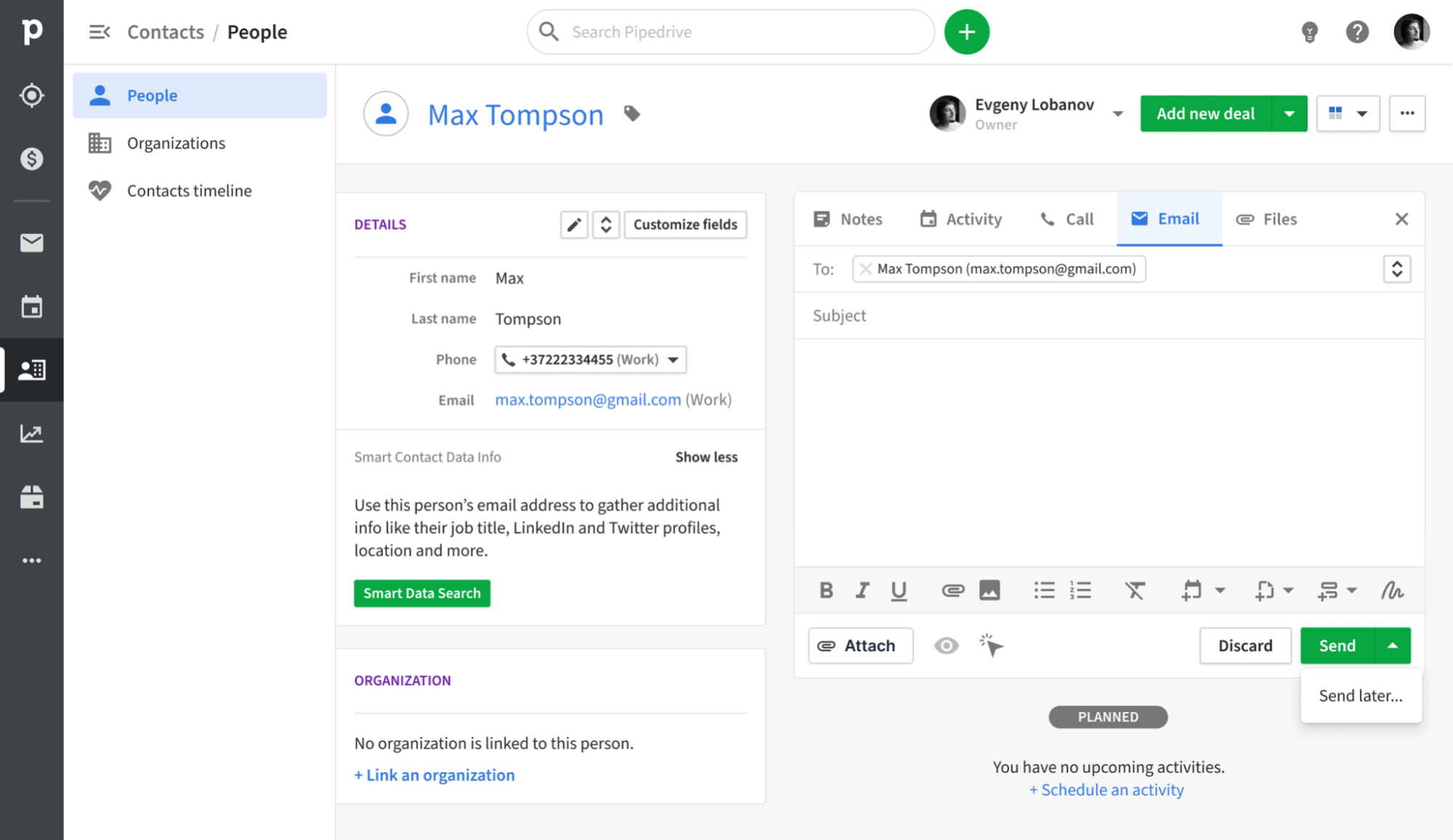
Pipedrive è un CRM incentrato sulle vendite progettato attorno a una pipeline visiva, che consente ai rappresentanti di monitorare le trattative dal contatto iniziale alla chiusura. La sua sincronizzazione e-mail si collega perfettamente a Gmail, Outlook e altri provider IMAP, garantendo che ogni messaggio venga automaticamente registrato nel contatto e nella trattativa corrispondenti. Grazie a una casella di posta in arrivo integrata con funzionalità di monitoraggio e campagne di base, i team possono gestire gli aggiornamenti relativi alla pipeline e alle attività di outreach in un'unica posizione centralizzata, eliminando la necessità di destreggiarsi tra più strumenti.
Che cos'è Close ?

Close è una piattaforma di vendita su misura per team di vendita interni ad alta velocità, che offre chiamate, SMS ed e-mail integrati. Grazie alla sincronizzazione bidirezionale delle e-mail integrata, i rappresentanti possono inviare, ricevere e tracciare i messaggi direttamente all'interno Close, assicurando che ogni conversazione sia automaticamente associata al contatto e all'opportunità appropriati. Inoltre, le e-mail di massa, le sequenze e i report sulle prestazioni trasformano la posta elettronica da una casella di posta indipendente a un canale di comunicazione ben strutturato.
Confronto delle funzionalità di Pipedrive Close
Capacità di integrazione
Pipedrive si integra Pipedrive con Gmail e Outlook (con fallback IMAP per altri provider), acquisendo tutti i messaggi in entrata e in uscita collegati al contatto o alla trattativa appropriati. La funzione Smart Email BCC ti consente di registrare i messaggi senza uscire dal tuo client di posta elettronica; basta aggiungere il BCC dinamico e Pipedrive del resto. Grazie all'integrazione nativa con i calendari di Google e Microsoft, tutti i tuoi appuntamenti vengono automaticamente inseriti nella timeline dei contatti, fornendo una visione completa di ogni interazione con i clienti.
Close un'integrazione e-mail molto semplice: basta collegare il proprio account Gmail o Outlook, autenticarsi tramite OAuth e ogni messaggio associato a un contatto corrispondente apparirà automaticamente nella timeline Close. Sebbene Close in modo nativo gli eventi del calendario, è possibile collegare facilmente le riunioni al CRM utilizzando l'integrazione Zapier o Google Calendar, assicurando che il proprio programma sia sincronizzato con la pipeline di vendita.
Frequenza di sincronizzazione e affidabilità
La sincronizzazione delle e-mail Pipedrivecon Gmail e Outlook avviene ogni pochi minuti, garantendo un equilibrio tra immediatezza e prestazioni del sistema. Sia i messaggi in uscita che quelli in entrata vengono acquisiti e abbinati ai contatti o alle trattative in meno di cinque minuti, riducendo al minimo i casi di registrazioni mancanti o ritardate. Il fallback IMAP aderisce ai protocolli IMAP IDLE standard per le notifiche push, garantendo aggiornamenti quasi istantanei per i provider compatibili.
L'integrazione e-mail Closeoffre una sincronizzazione bidirezionale immediata utilizzando connessioni basate su OAuth con Gmail e Outlook. Quando un contatto ti invia un'e-mail, Close la Close instantly, eliminando la necessità di intervalli di polling o BCC manuali. Le e-mail in uscita inviate da Close riportate in tempo reale dal tuo provider di posta elettronica, e lo stesso vale per i messaggi in arrivo. Per gli eventi del calendario, puoi collegare Google Calendar tramite Zapier per gli aggiornamenti automatici; tuttavia, questi trigger funzionano ogni pochi minuti in base al tuo piano Zapier.
Sincronizzazione bidirezionale di e-mail e calendario
Con i piani Advanced e superiori, la funzione di invio di email di gruppo Pipedriveconsente di scegliere fino a 100 contatti da qualsiasi elenco per inviare messaggi in blocco che includono tag di unione e tracciamento delle risposte. Inoltre, Pipedrive , un componente aggiuntivo, offre un modulo specializzato per la creazione di percorsi email, la segmentazione del pubblico e l'analisi dei tassi di apertura e di clic. Tutte le risposte vengono automaticamente collegate all'affare o al contatto appropriato. Tuttavia, è importante notare che l'add-on Campagne comporta costi aggiuntivi e che le sue funzionalità di reporting sono meno complete rispetto alle piattaforme di email marketing dedicate.
Close, invece, offre una perfetta integrazione bidirezionale della posta elettronica tramite IMAP/SMTP. Una volta autenticato il tuo account Gmail, Google Apps o Microsoft, Close registra Close ogni email inviata e ricevuta in tempo reale, collegando i thread al contatto corretto senza la necessità di BCC manuali. Sebbene Close offra la sincronizzazione nativa degli eventi del calendario, la sua configurazione "Emailing" indica che è possibile sincronizzare sia la posta elettronica di lavoro che il calendario.
Stampa unione e campagne
Per gli utenti con piani Advanced e superiori, la funzione di invio di e-mail di gruppo Pipedriveconsente di selezionare fino a 100 contatti da qualsiasi elenco e inviare messaggi in blocco completi di tag di unione e tracciamento delle risposte. L'add-on Pipedrive offre un modulo specializzato per la creazione di percorsi e-mail, la segmentazione del pubblico e l'analisi dei tassi di apertura e di clic, con tutte le risposte automaticamente collegate all'affare o al contatto appropriato. Tuttavia, vale la pena notare che l'add-on Campagne ha un costo aggiuntivo e che le sue funzionalità di reporting sono più limitate rispetto alle piattaforme di email marketing autonome.
Al contrario, Close offre un'interfaccia tradizionale per la stampa unione, ma consente la creazione di campagne di gocciolamento in più fasi attraverso il suo motore Workflows, integrando e-mail, chiamate e SMS in una sequenza coerente. È possibile registrare i lead, personalizzare i messaggi utilizzando modelli e consentire Close inviare automaticamente le fasi al ritmo preferito, il tutto registrando le interazioni nella sua casella di posta unificata. Detto questo, Close un generatore di campagne visivo e offre analisi limitate delle campagne e-mail, il che significa che non si avrà accesso alle tendenze dei tassi di apertura o alle informazioni sui test A/B all'interno dell'interfaccia utente.
Monitoraggio delle aperture e dei clic
Pipedrive il monitoraggio grazie alle funzioni "Traccia apertura email" e "Traccia apertura link", che consentono di registrare tutte le aperture e i clic dei messaggi inviati, completi di conteggi e timestamp nella scheda Posta. È possibile abilitare o disabilitare facilmente il monitoraggio per ogni email e visualizzare chi ha cliccato su quale link direttamente nella vista dell'affare. Tuttavia, la reportistica Pipedrive è piuttosto limitata, poiché offre solo i tassi di apertura e di clic di base: non sono disponibili visualizzazioni del funnel integrate o approfondimenti con mappe di calore, a meno che non si esportino i dati in uno strumento di BI.
Al contrario, Close traccia Close le aperture di tutte le e-mail inviate dalla sua casella di posta unificata, visualizzando il numero di aperture e i timestamp sotto ogni messaggio.
Esperienza CRM nella posta in arrivo
L'add-on Gmail Pipedriveintegra perfettamente un pannello laterale nella tua casella di posta, consentendoti di visualizzare le informazioni sui contatti e sulle trattative, aggiornare le fasi e aggiungere nuove attività direttamente all'interno di Gmail. Puoi accedere instantly a Smart Email BCC, modelli e pulsanti di tracciamento instantly uscire dalla tua casella di posta, e creare nuovi lead o trattative con un semplice clic. Trasforma efficacemente la tua casella di posta in una Pipedrive . Tuttavia, questa funzionalità nella posta in arrivo è disponibile solo su Chrome o Edge, poiché non esiste un componente aggiuntivo equivalente per Outlook desktop.
D'altra parte, Close offre una barra laterale nativa per Gmail o Outlook, ma è possibile utilizzare l'integrazione Missive per gestire contatti, lead e opportunità direttamente dalla propria casella di posta. Le e-mail inviate o ricevute tramite il client di posta vengono visualizzate nel flusso di attività unificato Closesenza la necessità di BCC manuali, mantenendo così il contesto. Tieni presente, tuttavia, che dovrai cambiare scheda per accedere alle panoramiche della pipeline o dashboards, il che significa che non si tratta di un CRM completamente integrato nella posta in arrivo, ma piuttosto di un complemento ben sincronizzato.
folk : il miglior CRM per le automazioni
folk è un CRM innovativo basato sull'intelligenza artificiale, pensato su misura per i team che desiderano automatizzare le loro trattative senza complicazioni. Consolida tutte le relazioni (lead, clienti, partner, candidati e investitori) in viste adattabili che si adattano a qualsiasi flusso di lavoro.
folk è stato creato per i team che danno priorità all'automazione. Grazie alla sincronizzazione integrata di e-mail e calendario, i team possono facilmente ampliare i propri follow-up e la propria portata. Le nuove automazioni condizionali delle e-mail consentono di inviare e-mail attivate dai dati in tempo reale in folk; ad esempio, le e-mail di onboarding o di passaggio possono essere inviate automaticamente quando un contatto diventa un cliente o quando viene concluso un accordo.
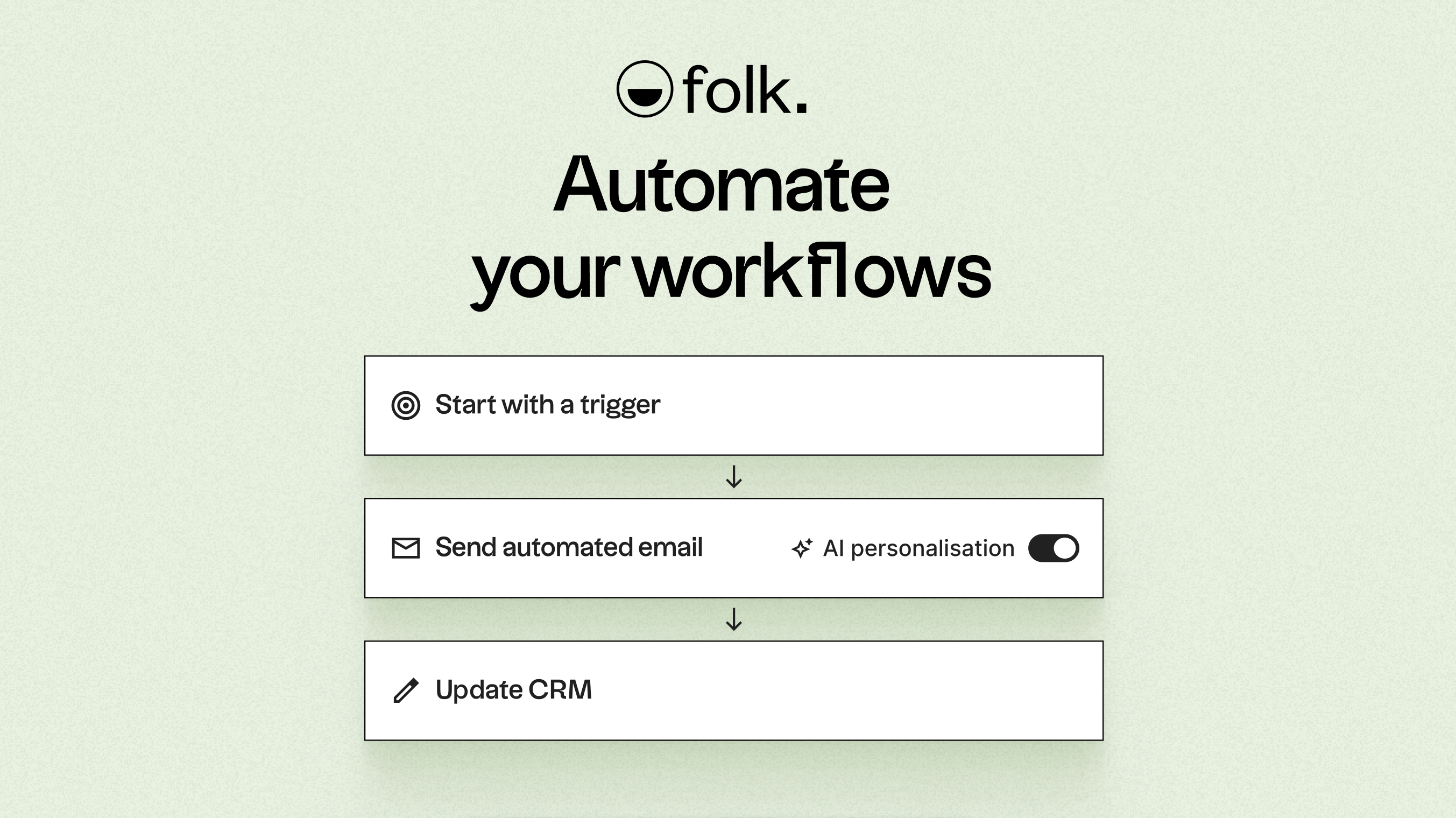
Grazie all'intelligenza artificiale, folk i dati, crea icebreaker, redige email personalizzate e consiglia le azioni migliori da intraprendere. La sua API aperta e i webhook si integrano perfettamente con strumenti come Zapier e Make, facilitando flussi di lavoro avanzati tra email, WhatsApp, Slack, fatturazione e sistemi interni.
Grazie alla possibilità di acquisire i contatti con un solo clic tramite l'estensione Chrome folkX e alle pipeline collaborative, folk ai team un CRM leggero ma robusto che consente di scalare efficacemente l'automazione mantenendo il controllo completo.
Conclusione
In sintesi, mentre Pipedrive integra Pipedrive la posta elettronica e offre una pipeline di vendita visiva per il monitoraggio delle trattative, e Close eccelle con la sua sincronizzazione bidirezionale istantanea della posta elettronica su misura per i team ad alta velocità, folk si distingue come la scelta migliore per i team focalizzati sull'automazione. La sua avanzata automazione delle e-mail, le capacità di integrazione senza soluzione di continuità e i miglioramenti basati sull'intelligenza artificiale consentono agli utenti di scalare la portata senza sforzo. Per coloro che danno priorità all'integrazione delle e-mail, all'automazione e alla sequenzializzazione, folk è la migliore alternativa, fornendo una soluzione all-in-one per i moderni team di vendita. Prova folk gratuitamente
Inizia oggi stesso la tua prova gratuita di 14 giorni o prenota una demo.
Domande frequenti
Qual è il CRM migliore per l'automazione?
L'articolo presenta folk la soluzione migliore per l'automazione grazie alle automazioni condizionali delle e-mail, ai suggerimenti basati sull'intelligenza artificiale e a un'API aperta per flussi di lavoro avanzati; Pipedrive Close anch'essi funzionalità di automazione, ma con maggiori limitazioni e costi aggiuntivi.
In che modo Pipedrive Close per quanto riguarda la sincronizzazione delle e-mail e del calendario?
Pipedrive Gmail e Outlook con il fallback IMAP ogni pochi minuti e offre un'integrazione nativa con i calendari di Google e Microsoft, mentre Close una sincronizzazione bidirezionale istantanea tramite OAuth per le e-mail, ma non dispone di una sincronizzazione nativa dei calendari e in genere richiede l'uso di Zapier per collegare i calendari.
È possibile folk strumenti con altri e supportare flussi di lavoro avanzati?
Sì; folk un'API aperta, webhook e integrazioni native con Zapier e Make per collegare e-mail, WhatsApp, Slack, sistemi di fatturazione e sistemi interni, oltre a un'estensione per Chrome che consente di acquisire i contatti con un solo clic.
Scopri folk
Come l'assistente alle vendite che il tuo team non ha mai avuto