


Scopri folk il CRM per le aziende basate sulle persone
Una volta individuati i tuoi contatti e potenziali clienti, il passo successivo è parlare loro del tuo prodotto, e uno dei modi migliori per farlo è una presentazione chiara del tuo servizio, strumento o idea. La maggior parte delle persone preferisce utilizzare un programma professionale per la creazione di presentazioni piuttosto che fare tutto a mano. Chi, dopotutto, vorrebbe passare il tempo a trascinare forme su una tela nel 2026?
Il problema dei generatori di slide basati sull’intelligenza artificiale è che tendono a fornire dati errati, e in una presentazione di vendita ricca di dati non ci si può permettere un errore del genere, perché i numeri devono essere precisi. Anche lo stile è importante: le slide devono comunque avere un aspetto curato e rispecchiare la tua visione. Abbiamo quindi sottoposto diversi strumenti allo stesso test e li abbiamo valutati in base a tre criteri: struttura, coerenza dei dati e impatto visivo. Di seguito trovi i risultati delle valutazioni, i punti di forza e le carenze di ciascuno, in modo da poter scegliere lo strumento più adatto alla presentazione che devi realizzare.
I tre criteri in base ai quali abbiamo valutato
Una buona presentazione di vendita raramente fallisce a causa della copertina. È nelle diapositive che contengono i dati che si rivela il punto debole. Abbiamo quindi valutato ogni strumento in base agli stessi tre criteri.
- Struttura: un’architettura delle diapositive corretta e modificabile che puoi adattare, non un’immagine piatta che devi rifare a mano.
- Coerenza dei dati: cifre, date e luoghi indicati con precisione, in modo che una diapositiva che sembra attendibile non contenga in realtà un errore nascosto.
- Impatto visivo: un look pulito e in linea con l’immagine del marchio, che rispecchi la tua visione, non un semplice segnaposto.
I 9 migliori strumenti di presentazione basati sull'intelligenza artificiale per presentazioni di dati nel 2026
Nel corso del test, il vincitore indiscusso è stato Perceptis AI. È stato l’unico strumento in grado di garantire l’accuratezza dei dati e la possibilità di modificare le diapositive in tutte e tre le diapositive fisse.
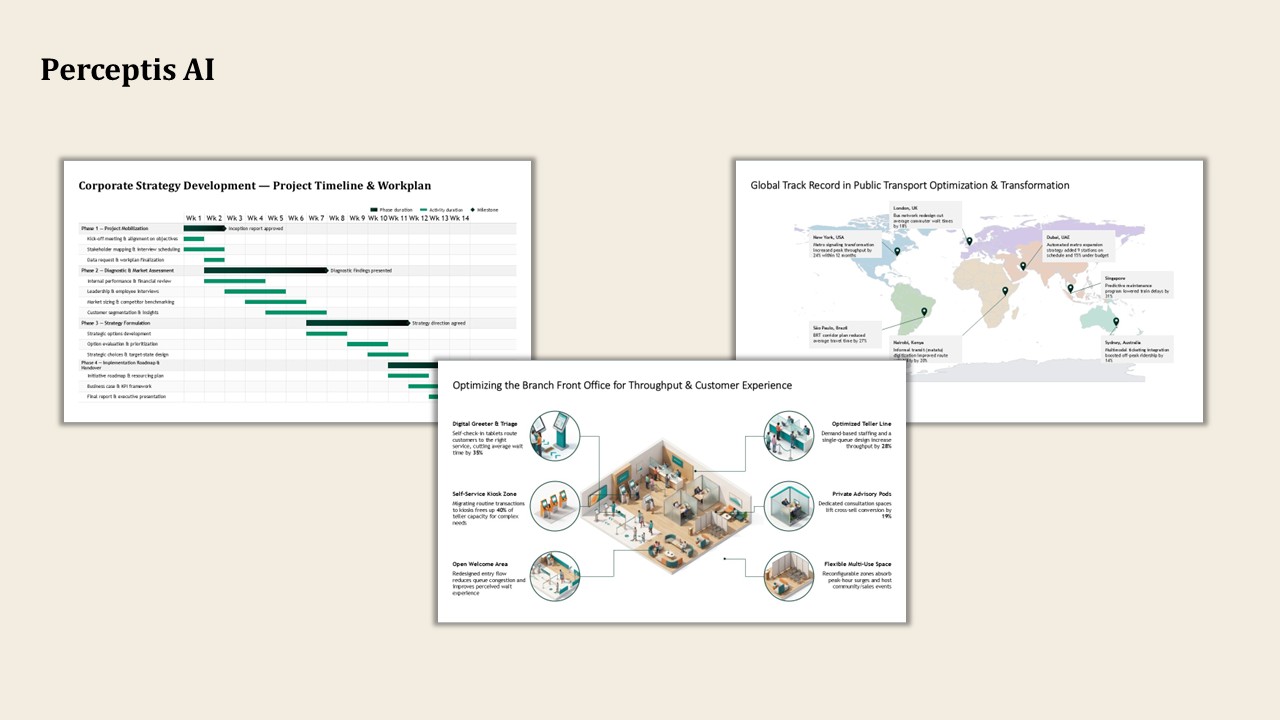
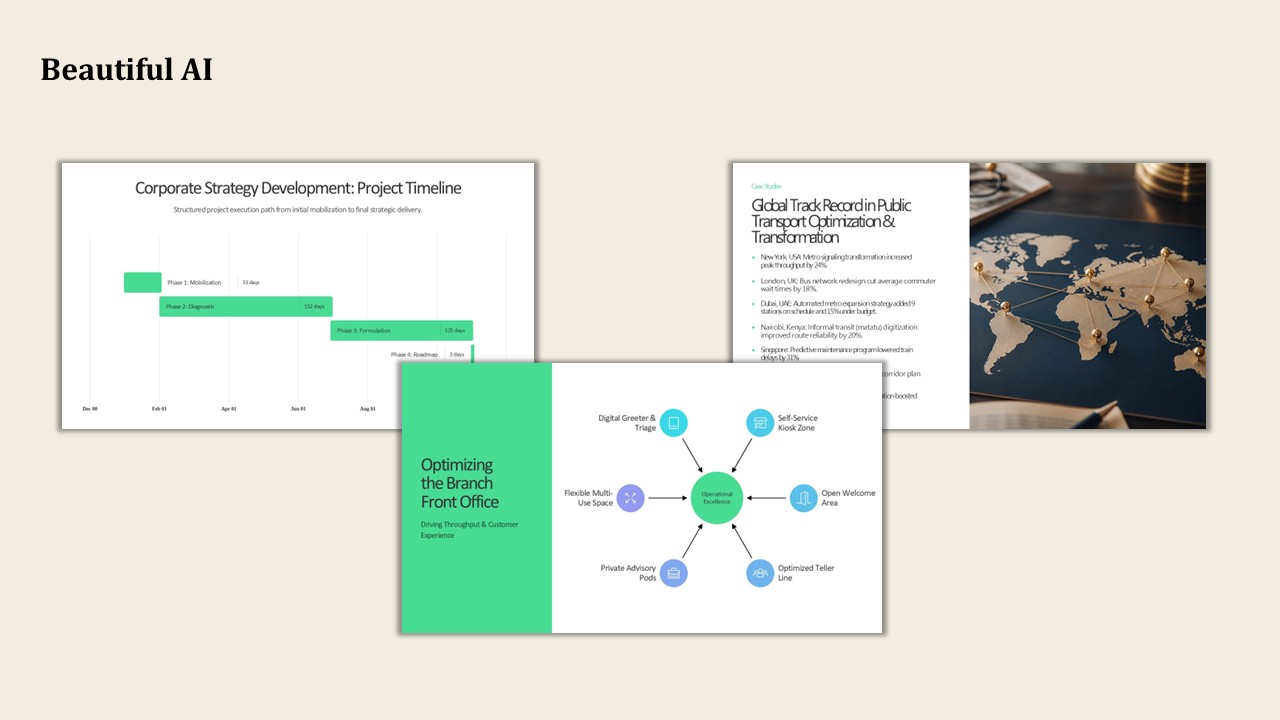
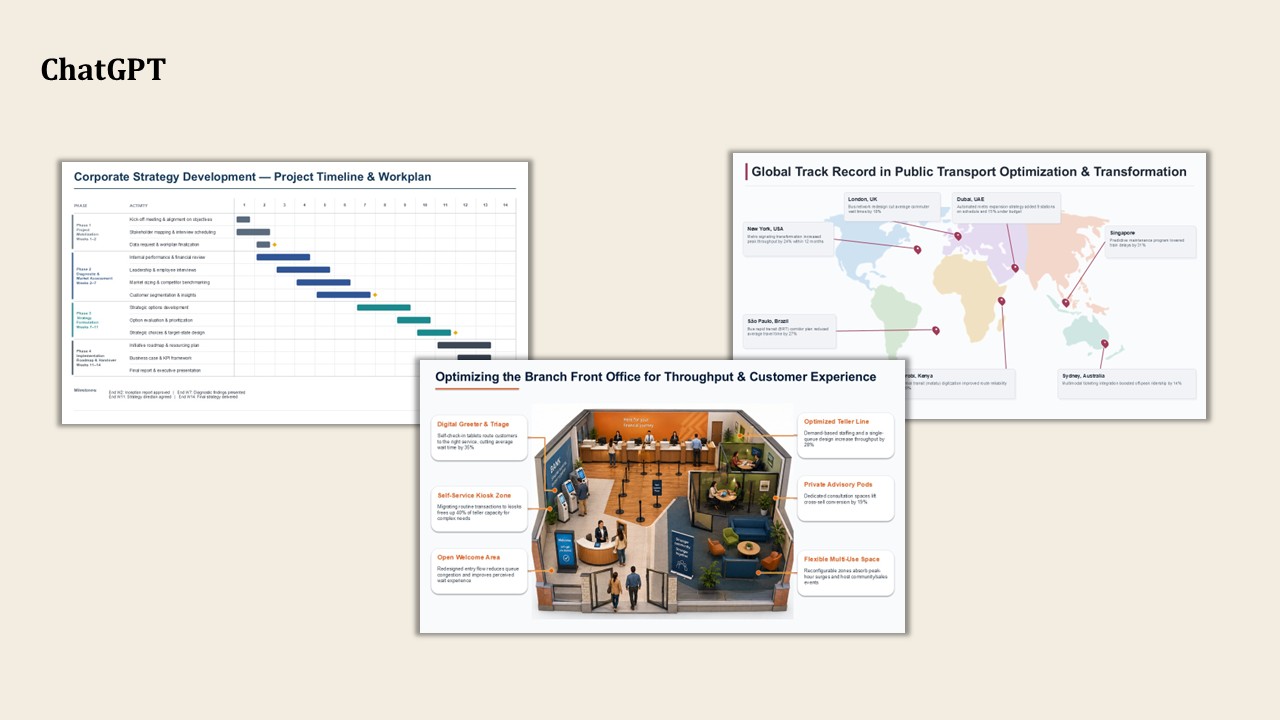
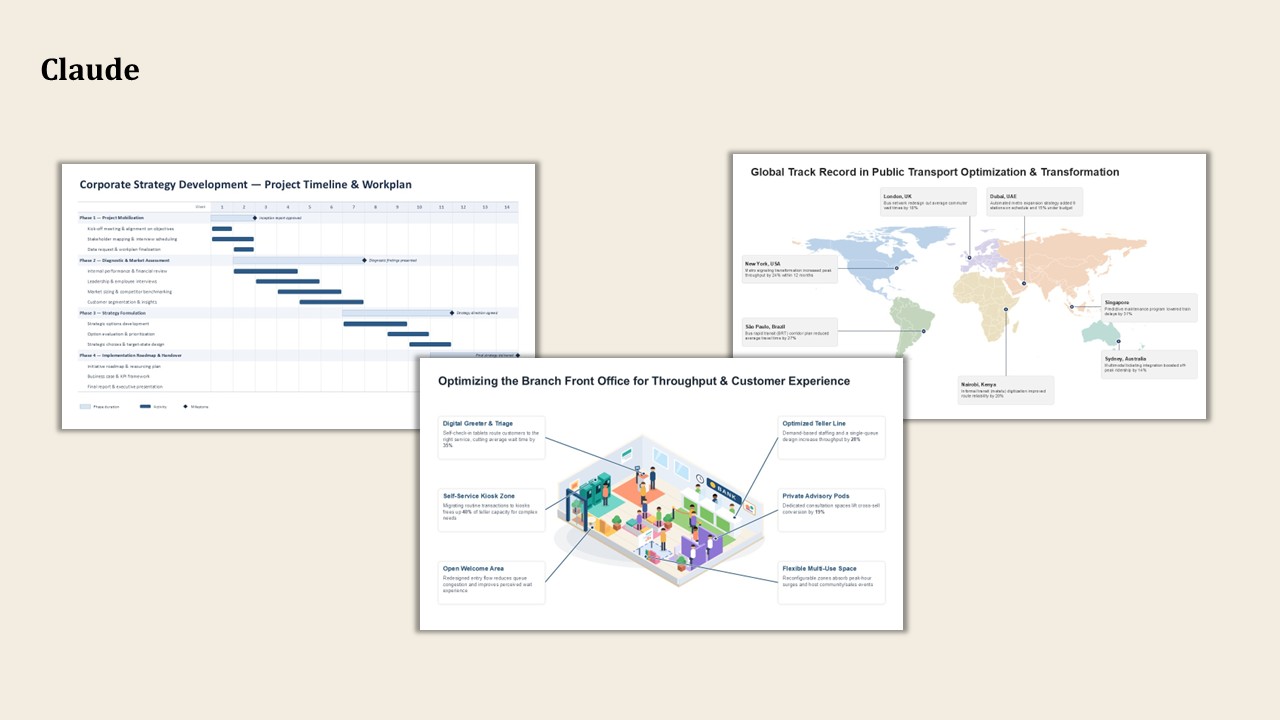
La tabella sottostante illustra a colpo d'occhio i punti di forza principali e i casi d'uso più indicati per ciascuno strumento. Più avanti troverete i risultati dettagliati dei test relativi a ciascuno di essi. A ogni strumento è stato fornito lo stesso brief, composto da tre diapositive ricche di dati: un diagramma di Gantt relativo a una strategia di 14 settimane con quattro tappe fondamentali, una mappa globale dei risultati ottenuti in sette città e un'infografica sui processi di una filiale bancaria con sei didascalie collegate.
1. Perceptis AI
Perceptis AI genera presentazioni di livello professionale per le società di servizi professionali.
Pro:
- Precisione in ogni dettaglio: i dati vengono posizionati esattamente dove devono essere, dalle date sulla linea temporale ai segnaposto sulla mappa, fino alle etichette associate.
- Risultato modificabile: ogni elemento è una forma nativa della diapositiva che puoi modificare, non un'immagine.
- Layout coerente: una struttura chiara e professionale che non richiede alcuna correzione.
Contro:
- Tempo di generazione: la generazione del mazzo richiedeva occasionalmente fino a 6 minuti.
- Eccesso di parole: alcune diapositive generate contenevano troppe parole, rendendo meno chiaro il messaggio chiave.
2. La bellezza dell’IA
Beautiful AI è un generatore di presentazioni basato su modelli, veloce e perfettamente in linea con l’immagine del marchio, ideale per presentazioni narrative.
Pro:
- Modelli curati: ideali per presentazioni narrative accattivanti e in linea con l’immagine del marchio.
- Output modificabile: le diapositive rimangono modificabili anche dopo la generazione.
Contro:
- Difficoltà nel fornire dati precisi: omissioni e dettagli inventati, tra cui una data di inizio che non è mai stata indicata.
- Il brief visivo non è stato rispettato: le forme generiche sostituiscono l'illustrazione che avevate richiesto.
3. ChatGPT
ChatGPT è un assistente in grado di redigere diapositive e ha prodotto una serie di diapositive utilizzabili, con un unico punto debole.
Pro:
- Affidabile sulla maggior parte delle diapositive: ha gestito in modo chiaro i contenuti strutturati e illustrati.
- Veloce e ampiamente disponibile: iterazioni rapide.
Contro:
- È necessario verificare l'accuratezza dei dati: alcune posizioni erano errate, ad esempio i segnaposti sulla mappa erano collocati in modo errato.
- Piccole correzioni prima dell'invio: modifiche minori alle etichette e pulizia dei connettori.
- File PPTX danneggiato: il file generato era danneggiato e ha dovuto essere riparato prima di poter proseguire il lavoro.
4. Claude
Claude è un assistente che punta molto sulla struttura, con un costo in termini di velocità davvero elevato su questo tipo di scivolo.
Pro:
- Strutturalmente corretto: output audio generato senza dati inventati.
Contro:
- Non sempre modificabile: alcuni risultati sono stati visualizzati come immagini statiche anziché come forme modificabili.
- Punti deboli nelle illustrazioni: le immagini dettagliate sono risultate troppo semplici.
- Lento: a volte una singola diapositiva richiedeva dai 10 ai 30 minuti.
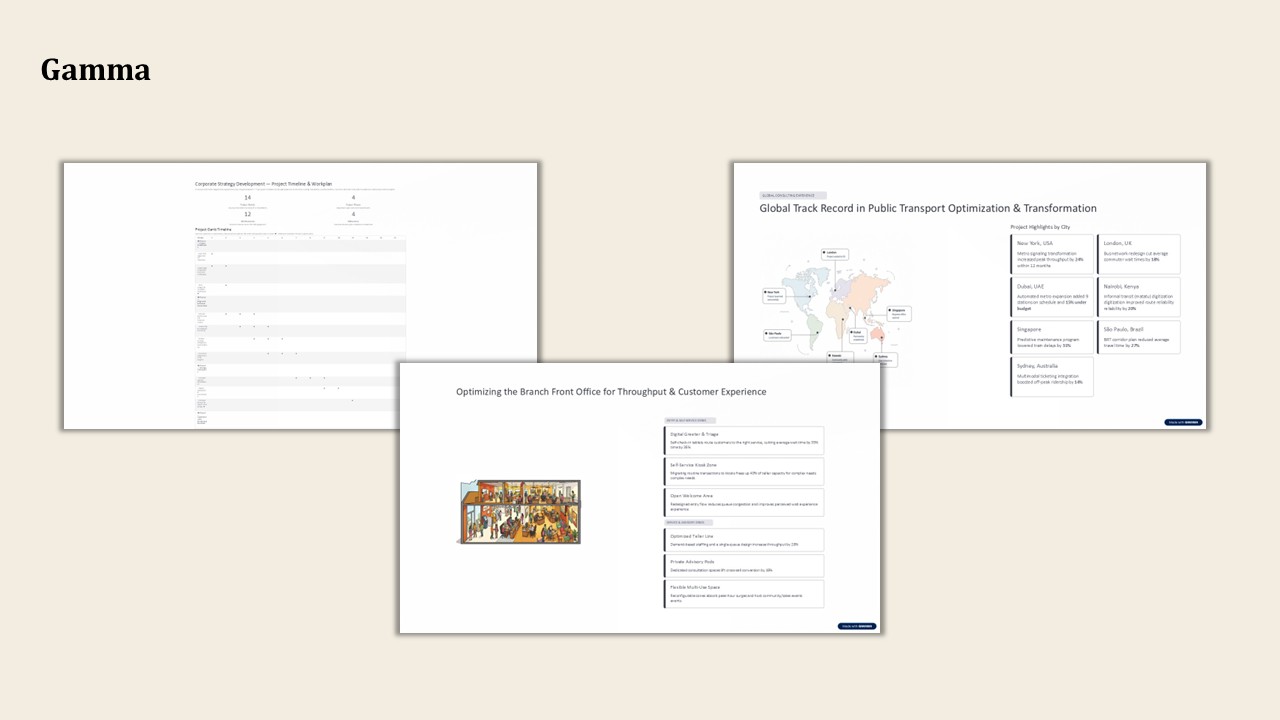
5. Gamma
Gamma è uno strumento efficace per la creazione rapida di presentazioni, documenti e siti web incentrati sulla narrazione.
Pro:
- Veloce e raffinato: ideale per i mazzi narrativi che fanno poco uso di dati.
- Output modificabile: le diapositive rimangono modificabili.
Contro:
- Problemi con le diapositive ricche di dati: formati errati e visualizzazione incompleta.
- Aggiunge contenuti non richiesti: elementi duplicati e superflui.
6. KIMI
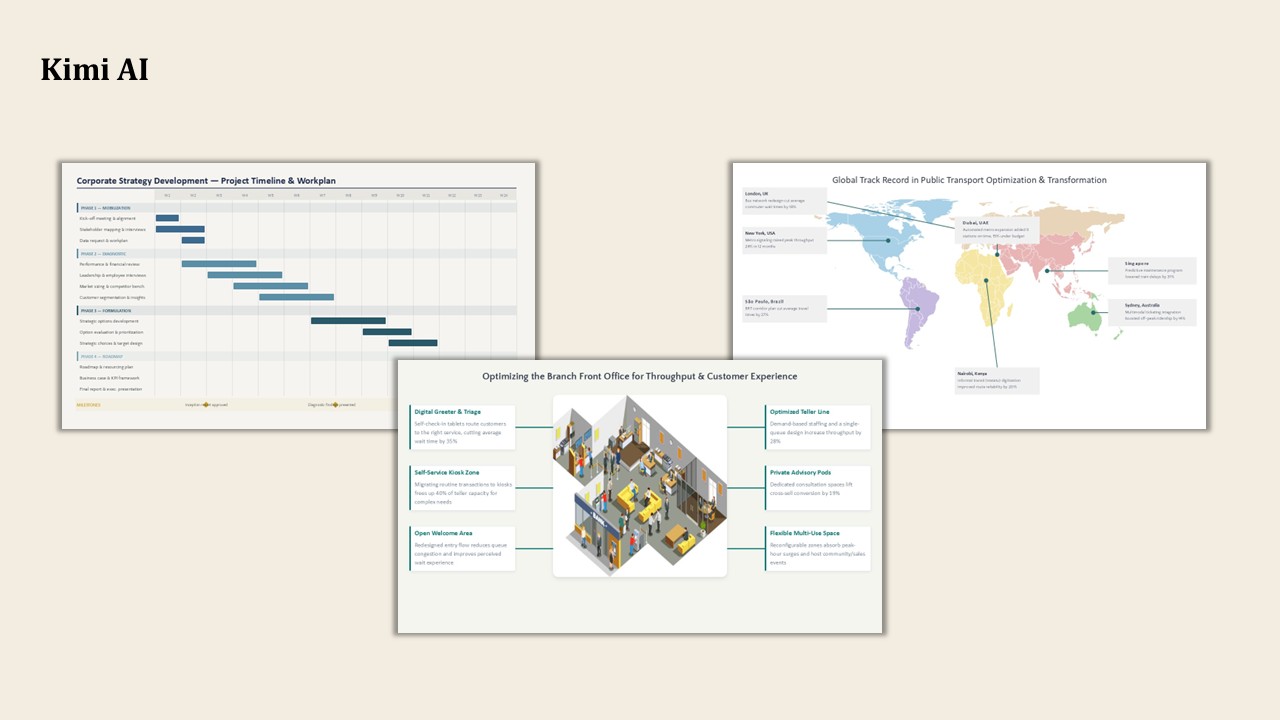
KIMI è un assistente con intelligenza artificiale generica che ha dato risultati contrastanti.
Pro:
- Strutture modificabili: output che è possibile aprire e rielaborare, come ad esempio una timeline modificabile.
Contro:
- Accuratezza inaffidabile: errori di tempistica e posizionamento nelle varie diapositive.
- Difetti di qualità: alcuni file erano non modificabili o a bassa risoluzione.
7. Manus
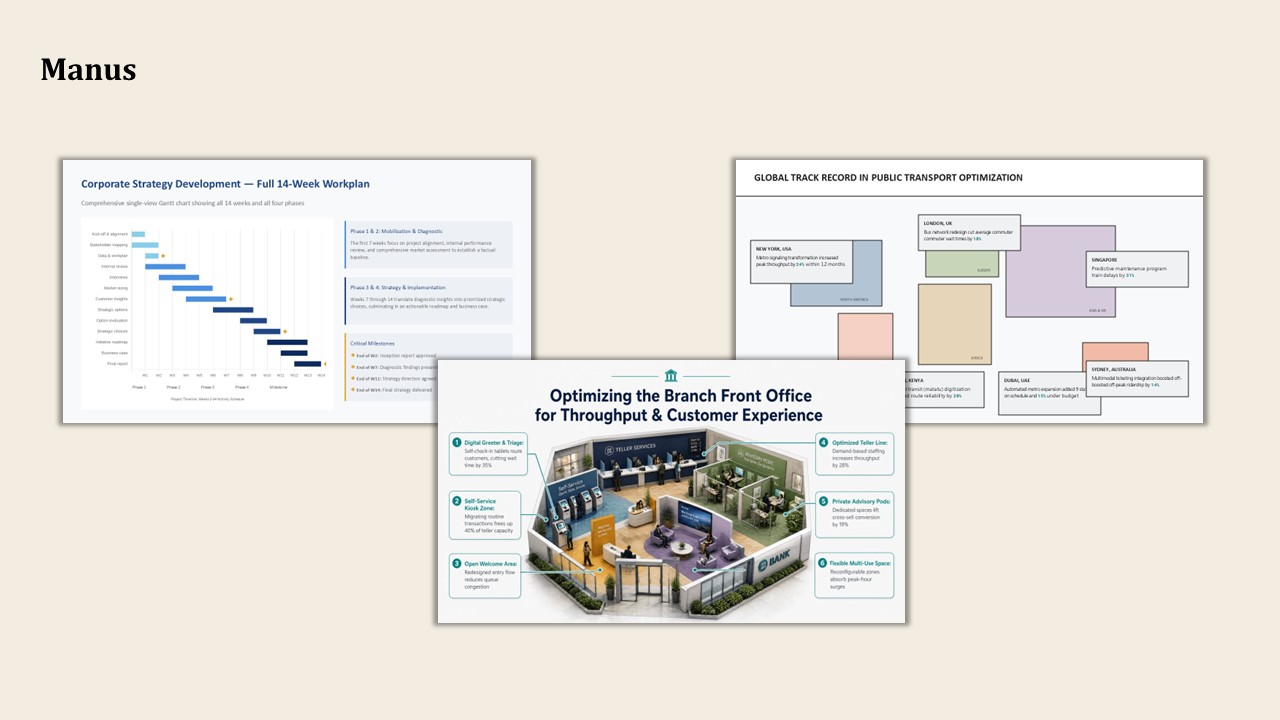
Manus è un agente autonomo che, pur avendo commesso alcuni gravi errori, ha prodotto l'immagine migliore in assoluto nel confronto.
Pro:
- Migliore immagine singola: eccezionale per un’illustrazione unica.
Contro:
- Non è possibile ottenere una singola diapositiva: per ottenere una diapositiva è necessario generare un'intera presentazione.
- Inaffidabile: una diapositiva non è stata visualizzata, senza alcun preavviso.
8. NotebookLM
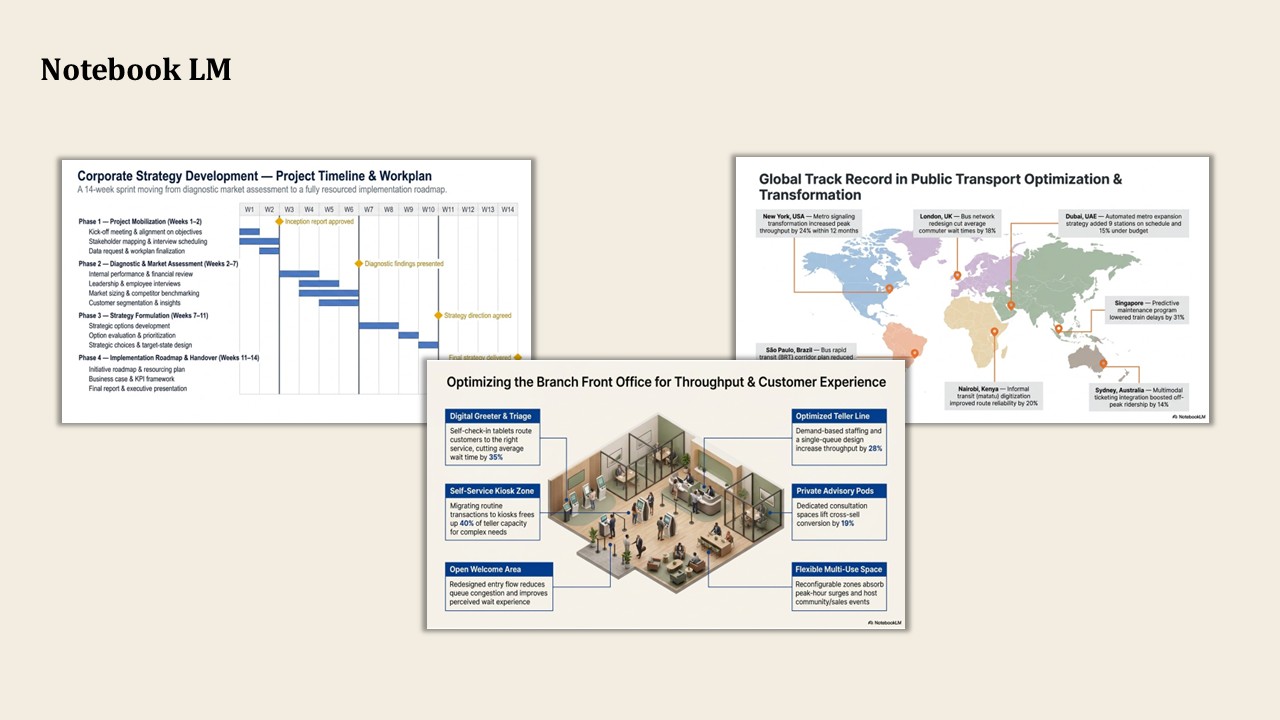
NotebookLM è un assistente di ricerca che genera diapositive collegate al materiale di riferimento e ha ottenuto buoni risultati nella maggior parte dei test.
Pro:
- Immagini di grande impatto: mappe e illustrazioni chiare e di facile lettura.
- Collegato alle fonti: mantiene il risultato fedele al materiale di partenza.
Contro:
- L'accuratezza può variare: è necessario verificare dettagli come le date.
- Diapositive aggiuntive: potrebbero essercene più di quelle richieste.
- Non modificabile in PowerPoint: genera immagini anziché diapositive modificabili, pertanto non è possibile apportare modifiche in PowerPoint.
9. Plus AI
Inoltre, l’IA funziona come componente aggiuntivo all’interno dei consueti strumenti per la creazione di diapositive, il che la rende più adatta a layout semplici piuttosto che a quelli ricchi di dati.
Pro:
- Si adatta al tuo flusso di lavoro: funziona all’interno degli strumenti per le diapositive che già utilizzi.
- Adatto a layout semplici: utilizzabile quando la diapositiva non contiene molti dati.
Contro:
- Difficoltà con le diapositive ricche di dati: risultati inutilizzabili in quelle più complesse.
- Finitura approssimativa: errori di formattazione e ortografici, ad esempio asterischi lasciati nel testo al posto del grassetto.
Come scegliere
Scegli lo strumento in base alla diapositiva, non alla demo. Per le presentazioni in cui il valore risiede in dati accurati e modificabili, la scelta si restringe rapidamente. Perceptis AI è stato l’unico strumento in grado di posizionare correttamente le figure e di restituire forme modificabili durante l’intero test, il che lo rende la scelta più sicura per una presentazione di vendita ricca di dati. Per le presentazioni narrative con pochi dati, la maggior parte di questi strumenti va bene, e i generatori dedicati, insieme a NotebookLM, sono veloci e ben rifiniti. Se si desidera un’opzione generica, ChatGPT è il più efficace tra gli assistenti, affidabile sulla maggior parte delle diapositive purché si controllino i dettagli prima dell’invio.
Due controlli consentono di evitare gran parte del lavoro di correzione. Innanzitutto, assicurati che il risultato sia un contenuto della diapositiva modificabile anziché un’immagine statica, in modo che un dato errato possa essere corretto. In secondo luogo, verifica i dati prima che la presentazione venga diffusa, perché una diapositiva ben progettata e che ispira fiducia, ma contenente un dato errato, è più pericolosa di una che appare palesemente approssimativa.
Domande frequenti
Quale strumento di presentazione basato sull'intelligenza artificiale dovrei utilizzare per le presentazioni commerciali ricche di dati?
Dipende dalla quantità di dati concreti contenuti nella presentazione. Per le presentazioni di tipo narrativo, la maggior parte degli strumenti funziona bene. Per le diapositive ricche di dati, è consigliabile cercare uno strumento che posizioni i dati con precisione e generi forme modificabili anziché un’immagine piatta. In questo confronto, gli strumenti che hanno soddisfatto entrambe le condizioni in tutte e tre le diapositive di prova sono stati l’eccezione piuttosto che la regola.
Perché gli strumenti di presentazione basati sull'intelligenza artificiale riportano grafici e dati errati?
Il problema di solito dipende da come è costruita la diapositiva. Molti strumenti forniscono un’immagine statica invece di oggetti reali e strutturati. A prima vista sembra tutto a posto, ma le cifre, le date e le etichette sono posizionate solo in modo approssimativo, quindi i numeri finiscono nel posto sbagliato e, trattandosi semplicemente di un’immagine, non è possibile correggere nulla una volta inserita nella presentazione. Perceptis AI è diverso sotto questo aspetto: genera grafici e tabelle completamente nativi e modificabili. Tra gli altri strumenti che abbiamo provato, Claude è quello che più si avvicina a questo standard di generazione nativa dei grafici.
Gli strumenti dedicati all'IA per le presentazioni sono migliori degli assistenti generici?
Non sempre. Nei semplici deck narrativi, gli strumenti dedicati sono veloci e ben rifiniti. Nelle diapositive ricche di dati di questo confronto, diversi assistenti generici hanno prodotto risultati più accurati rispetto ad alcuni strumenti dedicati, quindi la scelta giusta dipende dalla quantità di dati concreti contenuti nel deck.
Come posso assicurarmi che una diapositiva generata dall'IA sia modificabile?
Dopo la generazione, prova a selezionare e spostare un singolo elemento. Se l’intera diapositiva viene selezionata come un’unica immagine, significa che si tratta di un’immagine piatta e non può essere modificata. Gli strumenti che generano forme native delle diapositive consentono di modificare ogni singolo elemento, il che è importante quando i dati subiscono modifiche in un secondo momento.
Ti presentiamo folk, il CRM basato sull'intelligenza artificiale per l'intero processo di vendita.