


Scopri folk il CRM per le aziende basate sulle persone
Nel frenetico mondo delle startup, la differenza tra successo e fallimento dipende spesso da un follow-up efficace e da una comunicazione semplificata. Gli accordi possono sfuggire quando le interazioni sono sparse su più piattaforme, come caselle di posta elettronica, fogli di calcolo e app di messaggistica. Un CRM per startup consolida queste interazioni, garantendo che ogni conversazione, ogni passo successivo e ogni responsabile siano chiaramente visibili e facilmente accessibili.
In questo articolo esploreremo due CRM leader nel settore, HubSpot e Salesforce, che affrontano queste sfide con approcci distinti. HubSpot pone l'accento su una strategia incentrata sulla suite, offrendo potenti funzionalità di automazione, un solido allineamento di marketing e reportistica completa. Salesforce , invece, Salesforce un'ampia personalizzazione e Salesforce operazioni di fatturato complesse, rivolgendosi alle startup pronte a scalare i propri processi di vendita.
Questo confronto metterà in evidenza gli aspetti chiave che influiscono sulle operazioni quotidiane: dall'acquisizione dei contatti e dalla pulizia dei dati alle capacità di automazione e ai costi totali man mano che il tuo team si espande.
Cos'è HubSpot?
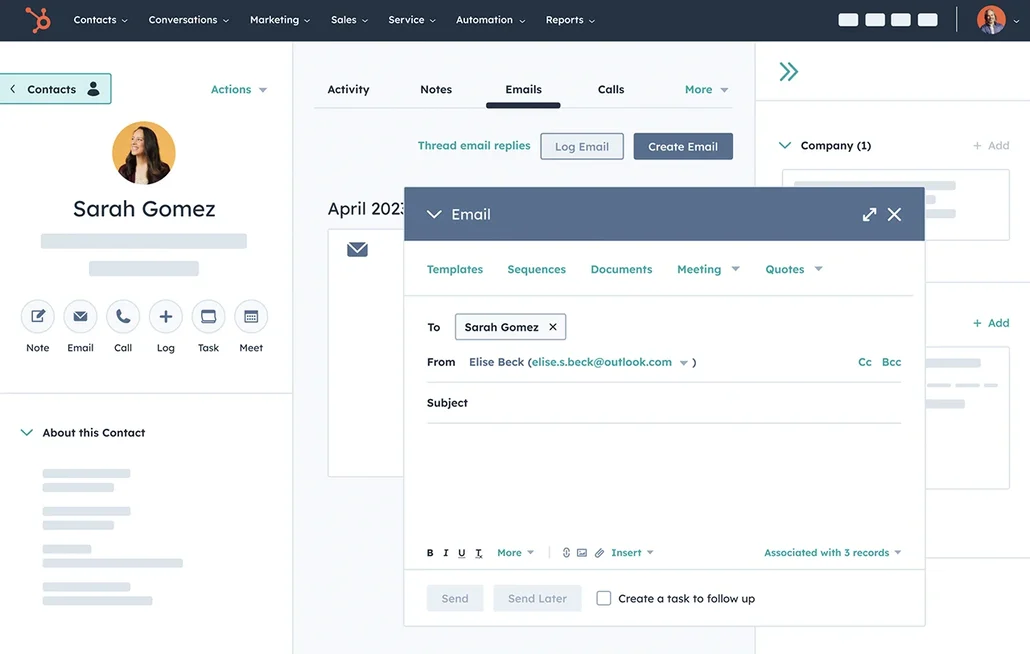
HubSpot è una piattaforma completa per il go-to-market che integra CRM, automazione del marketing, strumenti di vendita e assistenza clienti. È ideale per le startup che cercano un unico sistema per gestire il loro funnel dall'acquisizione alla fidelizzazione, offrendo solide funzionalità di segmentazione e reporting. Partendo da un CRM facile da usare, gli utenti possono successivamente espandersi verso flussi di lavoro avanzati e attribuzione man mano che le loro esigenze evolvono. Ampiamente adottato negli Stati Uniti, HubSpot si integra perfettamente anche con la maggior parte dei moderni strumenti SaaS, anche se i costi possono aumentare rapidamente quando si passa a più hub e livelli superiori.
Che cos'è Salesforce?
Salesforce un CRM di livello aziendale progettato per un'ampia personalizzazione, governance e operazioni di fatturato complesse. È adatto alle startup che hanno superato gli strumenti di base e richiedono autorizzazioni rigorose, reportistica avanzata e flussi di lavoro personalizzati tra i vari team. La piattaforma si adatta praticamente a qualsiasi struttura di dati grazie a oggetti personalizzati e funzionalità di automazione. Inoltre, vanta un vasto ecosistema di applicazioni e partner nel mercato statunitense. Tuttavia, l'implementazione e gli sforzi amministrativi continui sono in genere superiori a quelli della maggior parte dei CRM e i costi complessivi possono aumentare rapidamente.

Confronto delle funzionalità di HubSpot e Salesforce
Sincronizzazione di e-mail e calendario
HubSpot si integra perfettamente con le caselle di posta Gmail e Office 365 tramite l'integrazione HubSpot Sales, consentendo di registrare facilmente le e-mail direttamente dalla casella di posta e di tracciare le aperture e i clic. Si sincronizza anche con Google Calendar e Outlook Calendar, assicurando che gli incontri creati in questi calendari appaiano nella timeline corrispondente se il contatto invitato è presente nel CRM. Inoltre, gli utenti possono pianificare riunioni dall'interno di HubSpot, che verranno poi sincronizzate con il calendario collegato. Ciò si traduce in una cronologia consolidata delle attività sia per le e-mail che per le riunioni, mantenuta aggiornata con un intervento manuale minimo.
Salesforce connettività alla posta in arrivo e al calendario tramite le integrazioni con Outlook e Gmail, potenziate da Einstein Activity Capture, che registra automaticamente le e-mail e gli eventi sulla timeline delle attività. Queste attività registrate possono essere collegate a record pertinenti, inclusi contatti, lead e opportunità, mantenendo il contesto senza la necessità di un inserimento manuale costante. Questa configurazione è ideale per i team di vendita che si concentrano su e-mail e riunioni e richiedono una visibilità CRM legata alle interazioni reali. In genere, un amministratore gestisce la configurazione e le autorizzazioni per allinearsi ai requisiti di governance.
Pulizia dei dati di contatto con arricchimento e deduplicazione
HubSpot offre un sistema integrato di arricchimento dei dati che popola automaticamente le informazioni relative all'azienda e ai contatti, riducendo al minimo i record incompleti e la necessità di ricerche manuali. Le sue funzionalità di arricchimento e di analisi delle intenzioni degli acquirenti funzionano secondo un modello a crediti, utilizzando i crediti HubSpot per specifiche funzionalità premium . Il sistema di gestione dei duplicati identifica i potenziali duplicati e facilita la revisione e l'unione dei record, garantendo un database pulito. Questo processo mitiga le cronologie delle attività frammentate che derivano da più voci di contatto. Di conseguenza, dati più puliti migliorano la segmentazione, l'instradamento, la reportistica e l'affidabilità dell'automazione.
Salesforce una solida gestione dei duplicati attraverso regole di corrispondenza e duplicazione che identificano e impediscono la creazione di record duplicati. A seconda della configurazione, queste regole possono avvisare gli utenti, bloccare i salvataggi o inviare potenziali duplicati a flussi di lavoro di revisione. Per l'arricchimento dei dati, Salesforce migliorare i record tramite gli arricchimenti Data Cloud e tramite i fornitori di dati AppExchange che aggiungono attributi aziendali e di contatto all'interno della piattaforma. Questa integrazione garantisce che i record rimangano completi e riduce la frammentazione tra i team.
Pipeline e viste flessibili
HubSpot favorisce la collaborazione all'interno di ogni record integrando attività quali note, compiti, chiamate, e-mail e riunioni. È possibile creare attività direttamente da un record come parte di un flusso di lavoro, assicurando che i passaggi successivi rimangano visibili e assegnati. Le menzioni nelle attività o nei commenti avvisano i colleghi, facilitando i passaggi rapidi e preservando il contesto. Le impostazioni di associazione delle attività determinano quali record collegati condividono la stessa cronologia delle attività, contribuendo a mantenere una visibilità coerente tra contatti, aziende, trattative e ticket. Questa configurazione favorisce l'allineamento tra i team, anche con l'aumentare del volume.
Salesforce le pipeline attraverso opportunità e processi di vendita basati su fasi, adattandosi a varie metodologie con tipi di record e processi di vendita distinti. È possibile personalizzare le fasi, i campi e i layout delle pagine per segmento, regione o linea di prodotti, garantendo al contempo una reportistica coerente. Questo framework supporta sia pipeline semplici che flussi di lavoro aziendali complessi che prevedono approvazioni e previsioni. Sebbene la standardizzazione sia solida, la configurazione iniziale è più complessa rispetto ai CRM leggeri.
Collaborazione di gruppo
HubSpot favorisce la collaborazione all'interno di ogni record incorporando attività quali note, compiti, chiamate, e-mail e riunioni. I compiti possono essere creati direttamente da un record come parte di un flusso di lavoro delle attività, garantendo che i passaggi successivi rimangano visibili e assegnati. Le menzioni nelle attività o nei commenti avvisano i colleghi, facilitando rapidi passaggi di consegne e preservando il contesto. Le impostazioni di associazione delle attività determinano quali record collegati ereditano la stessa cronologia delle attività, mantenendo così una visibilità coerente tra contatti, aziende, trattative e ticket. Questa configurazione favorisce l'allineamento tra i team all'aumentare del carico di lavoro.
Salesforce la collaborazione direttamente sui record tramite Chatter, dove aggiornamenti, discussioni e informazioni contestuali coesistono in un unico luogo. I record possono essere condivisi nei gruppi Chatter, consentendo discussioni e coordinamento del team su account o opportunità specifici. Attività, note e cronologia delle attività offrono un livello operativo unificato per i passaggi di consegne e la visibilità interfunzionale. Le autorizzazioni e i controlli di condivisione garantiscono che la collaborazione sia in linea con i requisiti di sicurezza.
Automazione leggera e integrazioni
HubSpot consente l'automazione attraverso flussi di lavoro che integrano perfettamente i processi di marketing, vendita e assistenza, con un builder visivo intuitivo per l'impostazione di trigger e azioni. Inoltre, si collega a strumenti esterni tramite trigger e azioni Zapier per la gestione di contatti, aziende, transazioni e oggetti personalizzati. Per chi desidera un controllo più solido, HubSpot offre API per sviluppatori che facilitano le integrazioni personalizzate e la sincronizzazione dei dati. Questa combinazione supporta un'automazione leggera sin dall'inizio, evolvendosi in un'orchestrazione più complessa man mano che il sistema cresce. La governance centralizzata viene mantenuta tramite le impostazioni CRM e i controlli di automazione.
Salesforce sull'automazione attraverso Salesforce , che consente flussi di lavoro dichiarativi che coinvolgono record, approvazioni, instradamento e aggiornamenti dei dati. Le integrazioni possono essere create utilizzando API e i modelli basati sugli eventi sono supportati attraverso eventi della piattaforma per la connettività esterna in tempo reale. L'ecosistema AppExchange migliora ulteriormente l'automazione e le integrazioni, consentendo agli utenti di espandere le funzionalità senza partire da zero. Questa soluzione è ideale per le startup che richiedono scalabilità, ampia personalizzazione e governance sostenuta, sebbene con il compromesso di un aumento degli sforzi amministrativi e di implementazione.
folk : il CRM definitivo per le startup nel 2026
folk un CRM contemporaneo progettato specificamente per le startup che gestiscono le relazioni tramite Gmail, Google Calendar, LinkedIn e fogli di calcolo. Consolida contatti, aziende, accordi, note, file e tutte le interazioni in un unico spazio di lavoro leggero, garantendo che il contesto della pipeline sia radicato in conversazioni autentiche piuttosto che disperso in varie schede.
Caratteristiche principali più apprezzate dalle startup nel settore folk
- Sincronizzazione perfetta tra Gmail e Google Calendar per una cronologia automatica delle attività
- Acquisizione dei contatti pronta per LinkedIn tramite una comoda estensione Chrome
- Arricchimento dei contatti per inserire rapidamente i dati mancanti
- Deduplicazione per mantenere pulito il database nonostante l'aumento del volume
- Pipeline e campi personalizzati su misura per adattarsi a qualsiasi strategia di commercializzazione
- appfolk per gestire contatti e attività ovunque ti trovi
Per le startup, folk in termini di rapidità di valorizzazione e adozione quotidiana da parte degli utenti. La configurazione è rapida, i flussi di lavoro rimangono adattabili e il contesto multicanale è facilmente accessibile senza appesantire il CRM con inutili complessità. Ciò porta a follow-up più coerenti, dati più puliti e informazioni più chiare sui ricavi con attriti minimi.
Conclusione
In sintesi, HubSpot eccelle grazie alla sua solida automazione e all'allineamento con il marketing, mentre Salesforce un'ampia personalizzazione per operazioni di fatturato complesse. Tuttavia, per le startup che danno priorità a un'integrazione e un'automazione delle e-mail senza complicazioni, folk è la scelta migliore. Combina una configurazione leggera con un'efficace gestione del contesto multicanale, consentendo ai team di dare seguito in modo coerente e mantenere i dati puliti senza sforzo. Fai la scelta intelligente per la tua startup: scegli folk CRM oggi stesso.
Inizia oggi stesso la tua prova gratuita di 14 giorni o prenota una demo.
Scopri folk
Come l'assistente alle vendite che il tuo team non ha mai avuto