


Entdecken Sie folk das CRM für personenorientierte Unternehmen
A prospect’s job title tells you who they are. It rarely tells you why they would answer your email.
That takes research: what the company is working on, what falls under the contact’s responsibilities, and whether anything has changed that makes your offer relevant. AI prospect research helps you collect and organize that context before you reach out.
The challenge is deciding what deserves a place in your message. A recent hire is a fact. Assuming that hire means the company needs your product is a guess. Useful research keeps the two separate.
This guide walks through the process, from defining your research questions to checking sources and choosing tools. You’ll also learn how to turn verified findings into personalized outreach: pick a relevant fact, connect it to your offer, and write an opening that gives the prospect a reason to respond!
AI Prospect Research: Quick Recap
- Start with a decision. Research should help you decide whether to contact an account, whom to approach, or what to ask.
- Collect information that changes your approach. Focus on account fit, the contact’s responsibilities, relevant company changes, and previous conversations.
- Ask AI for evidence. Request sources, dates, and clear distinctions between confirmed facts, possible implications, and missing information.
- Turn one strong finding into personalization. Use it to explain why you’re reaching out, connect your offer to the prospect’s context, and ask a relevant question.
- Check the facts before sending. Confirm the person, company, event, and date behind any claim used in your message.
- Keep research close to the next action. Save findings alongside contact details and conversation history so your team can use them in outreach and follow-ups.
What Is AI Prospect Research?
💡 AI prospect research is the use of AI tools to collect, analyze, and summarize information about potential customers before a sales conversation. It helps reps understand what a company does, whether it matches their target market, and which information could make an outreach message relevant.
The inputs can include company websites, professional profiles, job postings, recent announcements, and previous conversations stored in a CRM. AI organizes those inputs into a brief that a rep can review and act on.
For example, a research brief might identify an open role that mentions responsibility for consolidating sales tools. That gives a rep a specific topic to explore. It does not confirm that the company has approved a budget or wants to replace its CRM.
How Does It Differ From Enrichment and Qualification?
These activities work together, but each answers a different question:
👉 Data enrichment: “What information is missing?” Add details such as a business email, company domain, or job title.
👉 Prospect research: “What should we understand before reaching out?” Examine the company’s activities, the contact’s responsibilities, and relevant changes.
👉 Lead qualification: “Should we pursue this opportunity?” Assess the prospect against your commercial criteria, using research and direct conversations.
A company can match your ideal customer profile while its purchasing timeline remains unknown. Research helps establish the fit and prepare useful questions; a conversation often supplies the missing answers.
What Should an AI Research Brief Include?
Keep the brief short enough for a teammate to use without reopening every source:
✔️ Account fit: Which targeting criteria the company meets, misses, or leaves unanswered.
✔️ Contact relevance: The person’s current role and documented responsibilities.
✔️ Relevant finding: A company initiative, professional statement, or recent event connected to your offer.
✔️ Evidence: The source URL, publication date when available, and research date.
✔️ Open question: What you still need to confirm.
✔️ Next action: Contact, investigate further, nurture, or disqualify—with a short reason.
The brief is complete when it supports a clear next step. If it only describes the company, it still needs work.
What Should You Research Before Contacting a Prospect?
Research should change a decision or improve a conversation. Before collecting a detail, ask: would knowing this change whom I contact, what I say, or whether I reach out at all?
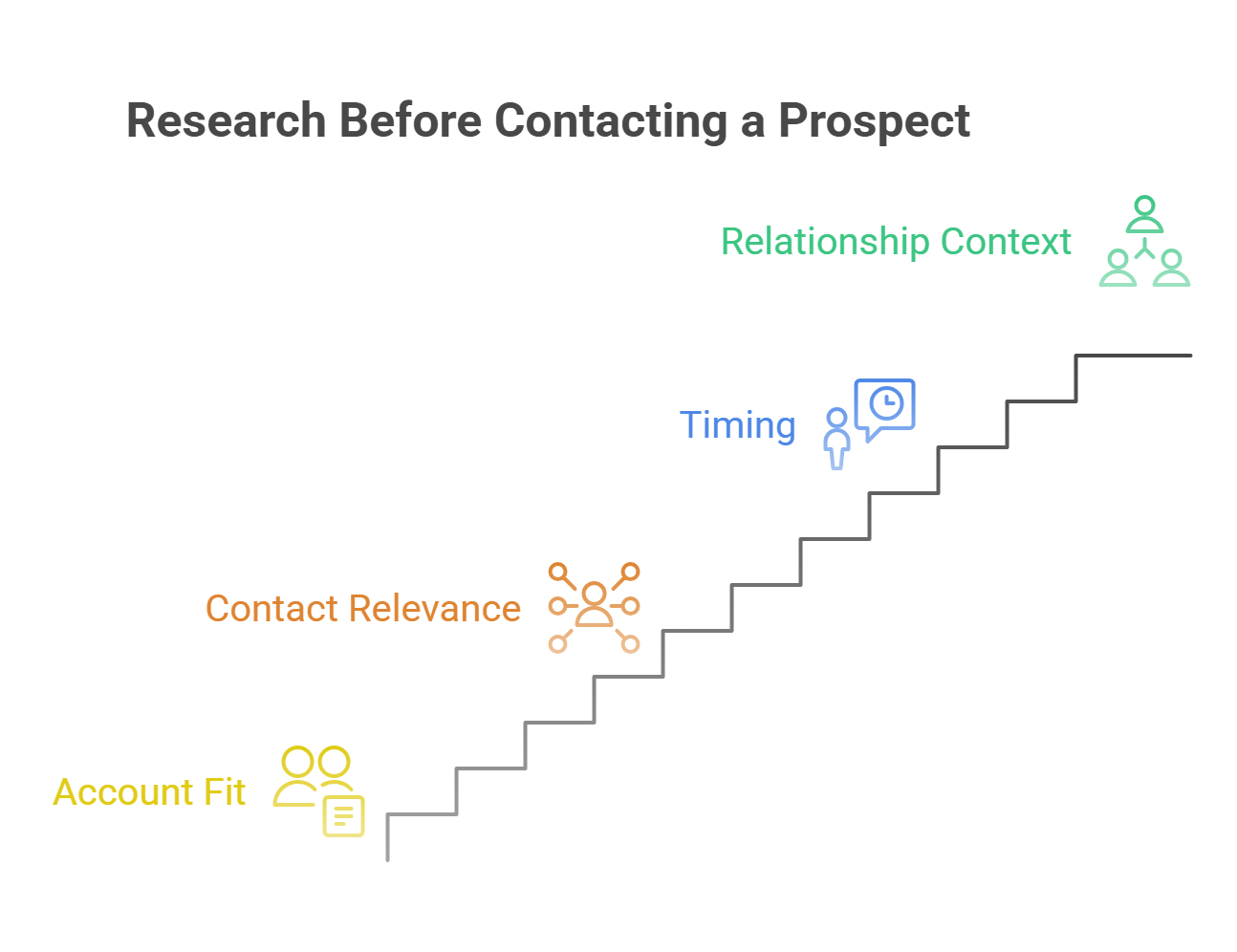
Focus on four areas.
1. Account Fit: Is This Company Worth Pursuing?
Check the company against your targeting criteria before digging into individual contacts.
Useful information includes:
→ Business model: What does the company sell, and who buys it?
→ Industry and location: Does it operate in a market you serve?
→ Company or team size: Is it within the range your product supports?
→ Relevant operating context: Does its business involve the workflow your product helps improve?
→ Disqualifiers: Are there requirements or characteristics that make it unsuitable?
Start with the company’s website and use additional sources to fill specific gaps. If headcount estimates conflict, keep the range and flag the uncertainty.
Give AI your actual criteria. “Is this a good prospect?” invites a vague answer. “Check these five requirements and return match, mismatch, or unknown for each” produces something you can review.
2. Contact Relevance: Is This the Right Person?
A senior title does not automatically make someone the right contact. Find evidence that their responsibilities connect to the problem you solve.
Achten Sie auf:
- Their current employer and role.
- The team or function they manage.
- Responsibilities mentioned in their profile, professional posts, or company biography.
- Whether their remit is local, regional, or company-wide.
When you find leads on LinkedIn, confirm that the profile matches the company you are researching. A search result may still reference an old position.
Do not ask AI to label someone “the budget owner” based on seniority alone. Record them as a potentially relevant stakeholder and leave purchasing authority as a question to confirm.
3. Timing: Has Something Changed That Makes Your Offer Relevant?
A recent event can give you a reason to start a conversation. Its value depends on the connection to your offer.
Potentially useful changes include:
- A job posting that describes a relevant project or responsibility.
- An expansion into a market your solution supports.
- A product launch that changes how the company sells or serves customers.
- A new leader with a publicly stated mandate.
- A professional post discussing a problem your product addresses.
Read beyond the headline. A hiring announcement says little by itself; the job description may explain which process the team wants to build.
Keep the event separate from its possible implications. An expansion is observable. A need for new software remains a hypothesis unless the company says so. Use the finding to frame a question, rather than presenting an assumed problem as fact.
4. Relationship Context: What Does Your Team Already Know?
Before researching a prospect from scratch, check whether someone on your team has already spoken with them.
Review the available CRM history for:
- Previous outreach and replies.
- Problems or priorities the prospect explicitly mentioned.
- Objections, timing requests, or reasons a deal stalled.
- Introductions and existing relationships.
- Commitments your team made.
- A colleague who already owns the conversation.
An earlier reply asking you to reconnect this month may be more useful than a new company announcement. It gives you a clear reason to follow up and tells you how to approach the conversation.
Use AI to summarize that history, then check the original exchange before acting on a commitment or deadline. Save the relevant context with the contact so the next rep can continue the conversation without repeating it.
How to Use AI for Prospect Research in 6 Steps
1. Decide What You Need to Know Before You Start
Research becomes easier when you know what would make an account worth contacting. Start with your ideal customer profile, then identify the questions that could change your approach.
Does the company run a sales process your product supports? Does the contact own the relevant workflow? Has the business described an initiative you could help with?
Give AI those questions alongside your targeting criteria. “Find information about this company” invites a broad summary. “Check whether this company sells to multiple customer segments and explain how its sales team is organized” sets a useful direction.
Adjust the depth to the opportunity. A priority account may justify researching several stakeholders and their stated initiatives. For a lower-priority account, confirming fit and finding one credible outreach angle may be enough.
Stop when you have enough evidence to choose your next action. More information only helps if it changes that decision.
2. Build a Reliable Account and Contact Profile
Before asking AI to interpret a prospect’s situation, establish who you are researching.
Use the company’s official domain and the contact’s current professional profile. Confirm their employer and role, especially when search results reference older positions. Then fill essential gaps such as industry, location, company size, and business contact details.
Enrichment and research serve different purposes here. Enrichment helps complete the record; research explains which parts of that record matter for your approach. The different categories of research tools can support either task, so check what your chosen tool actually provides.
Once the basic profile is reliable, add source material with commercial relevance: product pages, job descriptions, company announcements, professional posts, and previous CRM conversations.
Keep the source attached to each useful finding. If an AI tool cannot access a page, supply the relevant excerpt rather than assuming it has read the URL.
3. Look for a Relevant Change That Affects Timing
Account fit tells you whether a company belongs on your list. A relevant change can help explain why you are contacting it now.
Look for developments connected to the workflow your product supports. A new market launch may raise questions about coordination across teams. A job description may reveal plans to build a process. A contact’s post may describe an operational challenge in their own words.
The connection needs scrutiny:
Read the original source and check the event date. An announcement can remain searchable long after its relevance has faded.
Treat a signal as a reason to investigate, not proof of buying intent. If the event has no clear connection to your offer, leave it out of the message.
4. Write Prompts That Produce Usable Findings
A good research prompt defines the task, the evidence available, and the output you need. It also tells the model what to do when the evidence falls short.
Use this structure:
Review the supplied sources for this account and contact.
Our offer: [brief description]
Our targeting criteria: [criteria]
Research question: [specific question]
Sources: [URLs or excerpts, with dates where available]
Return a brief containing:
- A direct answer to the research question.
- The supporting fact, source URL, and date.
- A possible connection to our offer, clearly labeled as a hypothesis.
- One question we should ask the prospect.
Use “unknown” where the sources do not provide an answer. Do not infer budget, purchasing authority, or buying intent. Keep the brief under 150 words.
Separate research from message writing. Review the findings first, then ask AI to draft outreach from the facts you approve. This makes it easier to catch an unsupported interpretation before it becomes a confident statement in an email.
5. Turn Research Into Personalization
Personalization should explain why the conversation could be useful. Mentioning a recent announcement adds little unless you connect it to something the recipient handles.
Build the message around three elements: a verified observation, a relevant connection, and a question the prospect can answer.
Suppose a company’s careers page confirms that it is hiring account executives in two additional regions. A weak opening would be:
❌ “Congrats on your impressive growth! Scaling companies like yours need a powerful CRM.”
The compliment adds no substance, and the second sentence assumes a need.
A more useful approach would be:
✔️ “Your careers page lists AE openings in two new regions. Will those teams share accounts with your existing reps, or manage separate territories?”
That question follows from the research without claiming to know the company’s internal setup. If your offer helps teams coordinate account ownership, you can explain that connection in the next sentence.
The same finding should shape the rest of the message. Choose proof relevant to distributed teams, then make an ask that fits the question. Do not open with regional expansion and switch immediately to an unrelated feature pitch.
For LinkedIn outreach, keep the same logic while shortening the message. These LinkedIn InMail examples provide additional guidance on concise openings and clear asks.
One well-chosen fact is usually enough. Listing several discoveries can make the message feel assembled from a research report.
6. Review the Output Before You Use It
Read the draft as someone who knows their own company better than your AI tool does. Which sentence would they challenge?
Start there. Open the supporting source and check whether it justifies the exact wording. “Hiring sales reps” and “doubling the sales team” are different claims. So are “discussed a challenge” and “is looking for a solution.”
Then check the identity, date, and distinction between evidence and interpretation. Any sentence that asserts an internal priority, budget, or project should have direct support—or become a question.
Review every prospect-specific claim used in outreach. For larger research batches, inspect a sample of the remaining briefs for recurring errors before expanding the workflow. Repeated mistakes usually call for better inputs or clearer instructions.
Finally, save the approved finding and its source in your CRM. Record the next action and update the brief when the prospect responds. Their answer can confirm, correct, or replace the hypothesis that started the conversation.
5 AI Prospect Research Prompts You Can Reuse!
The best prompt depends on the question you need answered. Use these templates for specific research tasks, replacing the bracketed inputs with your own criteria and source material.
1. Check Whether an Account Fits Your ICP
Use this before spending time researching individual contacts. Provide concrete requirements, including any characteristics that would rule an account out.
Evaluate this company against our ideal customer profile using the supplied sources.
Company: [name and official domain]
Targeting criteria: [industry, location, size, business model, relevant requirements]
Disqualifying criteria: [exclusions]
Sources: [source material or accessible URLs]
Assess each criterion as “match,” “mismatch,” or “unknown.” Include the supporting evidence and source for each assessment.
Finish with one recommendation: pursue, investigate further, or disqualify. Explain which criteria support that recommendation. Do not treat missing information as a mismatch.
Review the unknowns before acting. If company size is essential to your targeting, an unknown headcount needs investigation. If it is only a preference, it may not justify holding up outreach.
2. Identify a Relevant Reason to Reach Out
Use this when an account fits your target market but you need a timely, credible conversation starter.
Review the supplied sources for company developments relevant to our offer.
Company: [name and domain]
Our offer: [what you help customers do]
Research period: [date range]
Sources: [announcements, careers pages, professional posts, or other material]
Return up to three relevant developments. For each, provide:
What happened.The event date and source URL.Why it may relate to our offer, labeled as a hypothesis.One question we could ask the prospect.
Rank findings by relevance to our offer, then recency. Return fewer than three if the evidence is insufficient. Do not infer purchasing intent from hiring, funding, or expansion alone.
Check the event date separately from the publication date. A recent article about an old funding round does not create a fresh reason to reach out.
3. Understand a Contact’s Responsibilities
When you research leads on LinkedIn, use the person’s documented responsibilities to assess relevance. Their title is a starting point.
Assess whether this contact is relevant to a conversation about our offer.
Contact: [name, current role, company, profile URL]
Our offer: [brief description]
Sources: [profile text, company biography, professional posts, or other evidence]
Summarize their documented responsibilities and explain which, if any, connect to our offer. Cite the supporting sources.
Separate explicitly stated responsibilities from role-based assumptions. Do not assign budget ownership or purchasing authority unless directly supported.
Finish with one question that would help confirm whether this person owns the relevant workflow. Keep the answer under 150 words.
If the output relies entirely on assumptions about the title, treat the contact as a possible stakeholder. You still need to confirm their involvement.
4. Prepare a Brief Before a Sales Call
A meeting brief should help you continue the conversation. Include previous exchanges so the AI can distinguish questions already answered from genuine gaps.
Prepare a sales call brief using the supplied account research and conversation history.
Meeting purpose: [discovery, demo, follow-up, or re-engagement]
Account and contact: [details]
Public research: [verified findings and sources]
Previous interactions: [relevant emails, notes, or transcripts]
Enthalten:
A short account overview.Priorities or problems explicitly mentioned by the prospect.Previous commitments and unresolved next steps, with dates where available.Three questions that address important gaps.
Distinguish prospect statements from our team’s assumptions. Flag conflicting information. Do not repeat questions already answered unless clarification is needed. Keep the brief under 250 words.
Read the original exchange before relying on a deadline or commitment. A summary can miss the difference between “we will review this next month” and “we might review this next month.”
5. Check an Outreach Draft Against the Evidence
Use this after drafting the message and before sending it. Provide the underlying sources alongside the research brief.
Review this outreach draft for factual accuracy and unsupported personalization.
Draft: [message]
Approved research: [brief]
Supporting sources: [source material and URLs]
Identify any statement that:
Is unsupported by the supplied evidence.Overstates what a source says.Presents a hypothesis as a confirmed fact.Uses outdated information as though it were current.
For each issue, quote the wording, explain the problem, and suggest a correction or removal.
Preserve supported facts. Do not add new prospect details. If a claim cannot be checked from the supplied material, label it “requires verification.”
This review is a second pass, not independent verification. If both the brief and draft rely on the same incorrect input, another AI check may repeat the error. Open the source behind any prospect-specific claim you intend to send.
5 Tools for AI Prospect Research in 2027
1. folk
folk keeps company research close to the contacts and conversations your team already manages. It suits teams that want to investigate accounts, review relationship context, and decide what to do next within their CRM.
- G2 rating: ⭐⭐⭐⭐½ 4.5/5.
- Best for: Sales teams that want research connected to contact management and follow-up activity.
- AI prospect research features:
- Research Assistant generates company research notes for individual accounts or groups.
- Custom research questions help focus notes on information relevant to your offer.
- Company enrichment adds details such as industry, size, location, and funding information.
- Recap Assistant summarizes available relationship history to help prepare conversations.
- Main limitation: Research output still needs verification before prospect-specific claims appear in outreach.
- Starting price: $24/member/month, billed annually, for Standard. Usage allowances vary by plan.
2. ChatGPT
ChatGPT works well for turning source material into a concise account brief. Give it your targeting criteria, relevant excerpts, and a specific question, then review the findings before asking it to draft a message.
- G2 rating: ⭐⭐⭐⭐⭐ — 4.6/5.
- Best for: Flexible research and analysis of individual accounts.
- AI prospect research features:
- Analyzes supplied company information against your research criteria.
- Organizes findings into briefs, open questions, and potential outreach angles.
- Web search retrieves current public information with source links that can be inspected.
- Follow-up prompts let reps investigate gaps or challenge an interpretation.
- Main limitation: Access to sources and the quality of your instructions affect the output. Unsupported conclusions can still appear in a well-written brief.
- Starting price: Free plan available. Paid individual plans start with ChatGPT Go at $8/month in the US; research capabilities and limits differ by plan.
3. Perplexity
Perplexity is useful when your research starts with a question about public information. Ask about a specific initiative or company development, then inspect the sources behind the answer before using it in outreach.
- G2 rating: ⭐⭐⭐⭐ — 4.4/5.
- Best for: Finding public evidence and investigating company developments.
- AI prospect research features:
- Searches public sources to answer company and market questions.
- Provides source references for reviewing supporting information.
- Pro Search supports more involved questions that require deeper investigation.
- Follow-up questions help narrow the research to a particular event or initiative.
- Main limitation: Source references make checking easier, but they do not establish that every interpretation is correct.
- Starting price: Free plan available; Pro costs $20/month on monthly billing.
4. Clay
Clay suits teams that need to repeat defined research tasks across account lists. It is most useful once you know which questions produce actionable answers and want to build a workflow around them.
- G2 rating: ⭐⭐⭐⭐⭐ — 4.6/5.
- Best for: Research and enrichment workflows across prospect lists.
- AI prospect research features:
- Claygent researches target companies and people.
- Research tasks can investigate relevant contacts, company news, and job postings.
- Enrichment data can support account assessment and segmentation.
- Research findings can feed personalized message generation.
- Main limitation: Workflows require setup and testing. Ambiguous research instructions can produce inconsistent results across a list.
- Starting price: Launch starts at $185/month on monthly billing. Costs depend on the plan and usage requirements.
5. LinkedIn Sales Navigator
Sales Navigator helps reps identify relevant people and investigate their professional context. It combines search and alerts with AI capabilities, although access to specific features depends on the subscription.
- G2 rating: ⭐⭐⭐⭐ — 4.3/5.
- Best for: Finding stakeholders and tracking professional changes.
- AI prospect research features:
- Account IQ and Lead IQ provide AI-generated account and contact insights on eligible plans.
- Advanced search filters help narrow the people and companies worth researching.
- Lead and account alerts surface changes such as new roles.
- Relationship features help investigate connections and potential stakeholders.
- Main limitation: A relevant title or professional signal does not confirm purchasing authority. AI features may require a higher plan than Core.
- Starting price: Core starts at $119.99/license/month, or $1,079.88/license/year, equivalent to $89.99/month with annual billing.
What Are the Limitations of AI Prospect Research?
AI can help you gather and organize information, but the evidence available sets the limits of what you can conclude.
❌ Some sources remain inaccessible. An AI tool may be unable to read a professional profile, a restricted page, or dynamically loaded content. Ask it to flag inaccessible sources. If you have legitimate access, supply the relevant excerpt rather than letting the model fill the gap.
❌ Public information can be outdated or contradictory. A contact may have changed roles, an open position may have closed, or a company directory may show an old headcount estimate. Check dates and compare conflicting sources before using a detail to qualify an account or personalize a message.
❌ A citation may support only part of a claim. A source confirming an expansion does not necessarily support an AI summary claiming that the company is struggling to coordinate its teams. Open the source and check the exact statement you intend to use.
❌ Business signals do not establish buying intent. Funding, hiring, and leadership changes can justify a relevant question. They do not confirm budget, urgency, or vendor evaluation. Keep those conclusions as hypotheses until the prospect provides evidence.
❌ Job titles reveal only part of the buying process. AI can suggest likely stakeholders, but purchasing responsibilities vary between companies. Use the research to identify whom to approach, then ask who owns the workflow and who else participates in the decision.
❌ Missing information can distort account prioritization. Companies with detailed websites and frequent announcements are easier to research. That does not automatically make them better prospects. Keep “unknown” separate from “does not meet our criteria” so accounts with less public information are not rejected by default.
❌ Internal context requires careful handling. Emails, call notes, and CRM records may contain confidential information. Use tools approved for that data and provide only what the research task requires. A public company question rarely needs an entire customer conversation history.
❌ Automation can repeat a flawed assumption across a list. Test research instructions on varied accounts before expanding the workflow. Review the results for recurring errors, particularly when moving toward broader automation such as AI SDR workflows. Fix the underlying prompt or source problem before processing more records.
Schlussfolgerung
AI prospect research works best when it answers a specific sales question. Establish account fit, verify the contact’s relevance, and find evidence that helps you prepare a useful conversation.
Then turn one supported finding into a reason to reach out. Keep assumptions visible, ask about what remains unknown, and update the research when the prospect responds. The goal is a better next step—not a longer company summary.
Häufig gestellte Fragen
What Is AI Prospect Research?
AI prospect research uses artificial intelligence to collect, analyze, and summarize information about potential customers. Sales teams use it to assess account fit, understand contacts’ responsibilities, investigate relevant developments, and prepare outreach or meetings.
How Do You Use AI to Research Sales Prospects?
Define the questions you need answered, confirm the company and contact, and provide relevant sources. Ask AI for a brief that separates facts, hypotheses, and missing information. Verify the findings that affect your decision or message, then save the research and assign a next action.
Can ChatGPT Research a Prospect?
Yes. ChatGPT can analyze supplied material and use web search to investigate public information. Give it the company domain, contact details, research criteria, and a clear output format. Check that it accessed the relevant sources and verify any prospect-specific claims before using them.
What Is the Difference Between Prospect Research and Data Enrichment?
Data enrichment fills gaps in a record, such as an email address, job title, or company domain. Prospect research examines information to understand an account and prepare a relevant approach. Enrichment supplies useful inputs; research helps determine what those inputs mean for your next conversation.
How Do You Turn AI Prospect Research Into Personalized Outreach?
Choose one verified finding connected to your offer. Use it to explain why you are reaching out, then ask a question the prospect can answer. Avoid presenting a possible implication as a confirmed problem or adding unrelated facts simply to demonstrate that you researched them.
What Is the Best AI Tool for Prospect Research?
The best choice depends on the task. folk suits teams that want research connected to CRM records and conversations. ChatGPT supports flexible analysis, Perplexity helps investigate public sources, Clay supports repeatable research workflows, and Sales Navigator helps identify relevant people and professional changes.
How Does folk CRM Help With Prospect Research?
folk’s Research Assistant generates company research notes and enriches company information. Teams can customize research questions and investigate individual companies or groups. Its Recap Assistant also summarizes available relationship history, helping reps prepare outreach and calls with both company information and previous conversation context.
Can AI Prospect Research Confirm Buying Intent?
Public research alone usually cannot confirm buying intent. Hiring, funding, or expansion may suggest a useful topic to explore, but they do not establish budget, purchasing authority, or an active evaluation. Use those findings to prepare questions and confirm the situation directly with the prospect.
Lernen Sie „ folk “ kennen – das KI-gestützte CRM für Ihren gesamten Vertriebsprozess.