


Discoverfolk 人材主導型ビジネス向けCRM
ターゲットアカウント内の適切な担当者を見つける作業は、当てずっぽうであってはならない。リード調査は明確な地図から始めることで効果を発揮する——誰が何をし、誰が決定権を持ち、誰が取引に影響を与えるのか。これを怠れば、アプローチは無駄なノイズに変わる。正確に把握できれば、すべてのメッセージは文脈に沿って確実に届く。
4つの高速ソースがこれを単純化する:
- LinkedIn(タイトルとネットワーク向け)
- 組織のヒントとチームのための企業ウェブサイト
- 新卒採用向け求人プラットフォームとその範囲
- 厳格なコンプライアンスを伴う拡張性のためのサードパーティ製データベース
状況に合った情報源を選び、詳細を確認し、時間を無駄にせず、正確で連絡可能なリストを作成しましょう。
| 主なポイント |
|---|
|
ある企業の従業員を見つける5つの簡単な方法
1. LinkedInで従業員を探す
LinkedInは、企業内で誰が何を担当しているかを即座に可視化します:役職、職位、最近の異動、そして報告ラインのヒントまで。推測せずに購買担当者、影響力者、妨害要因を特定する最も迅速な方法です。
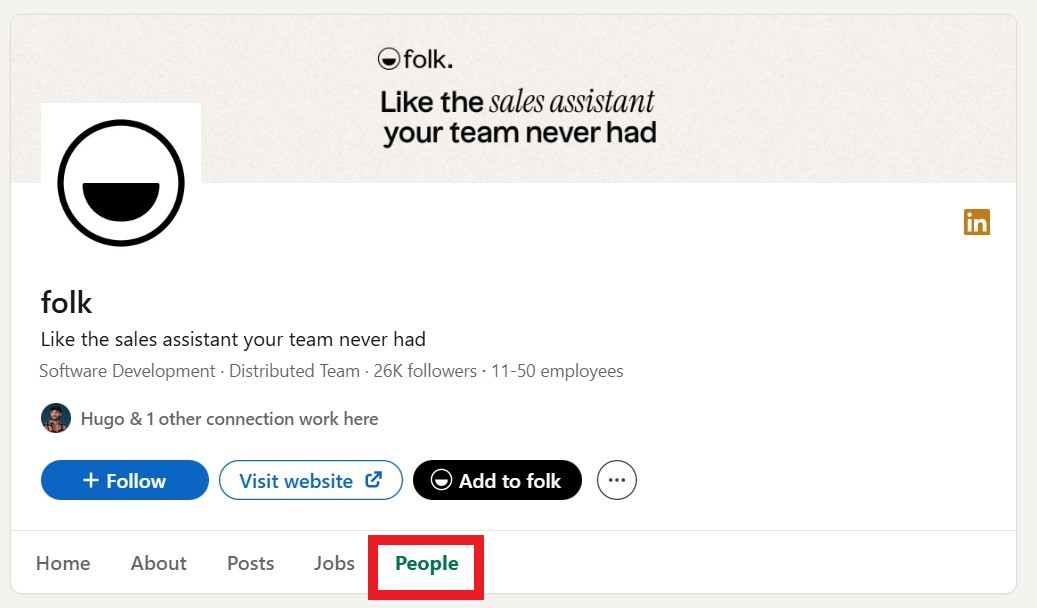
企業ページと「People」タブを活用して、適切な役職やレベルを絞り込み、いくつかのプロフィールや最近の活動履歴を確認して対象範囲を確定しましょう。20~50名規模の営業チームの場合、folkXのようなワンクリック拡張機能を使って適切なプロフィールをCRMに直接取り込むことで、リストを整理された状態で共有可能に保ち、スプレッドシートに縛られることを防げます。Folk 、エンタープライズレベルの複雑さを伴わずに連絡先管理を効率化したい中規模の営業チームにとって、このワークフローに最適です。
手順:
- 会社ページを開く → 人物 → 役職キーワードと所在地で絞り込む。
- 役職フィルター(部長、部長、副社長)を追加し、同じ役職を意味する職位バリエーションを含める。
- 3~5件のプロファイルを開き、範囲、言及されたツール、チーム規模の手がかりを確認する。
- ワンクリックキャプチャ(例:folkX)を使用して、適格なプロフィールを専用リストに保存する。
- 各連絡先の活動内容から短いメモを追加し、最初のメッセージ作成の指針としてください。
- 重複を削除し、機能と経験年数でタグ付けした後、アウトリーチに手渡す。
folkX Chrome拡張機能で従業員をエクスポート!
folkXを使用して、LinkedInやSales Navigator 従業員プロフィールをSales Navigator folk共有リストに保存できます。各キャプチャでは名前、役職、会社名、プロフィールURLを取得し、重複排除により記録をクリーンに保ちます。そこからエンリッチメントを実行し、リストを直接アウトリーチに移行できます。
👉🏼folk を試して、LinkedInのキャプチャを共有・重複排除済みのリストに保存し、より迅速なアウトリーチを実現しましょう
2. B2Bデータベースを探索する
B2Bデータベースは数分でチーム全体を抽出可能:氏名、役職、業務用メールアドレス、場合によっては電話番号も。営業活動には有用だが、誤用はリスクを伴う。EUではGDPRに基づき法的根拠とオプトアウト管理が必須。米国ではメール送信にCAN-SPAM法、通話・テキスト送信にTCPA法を遵守。業務目的のみに限定し、最小限の情報を保管。オプトアウト手順を文書化すること。
✔️ 信頼できるプロバイダーを利用し、アウトリーチ前に結果を検証する。LinkedInや企業サイトで役職名を照合し、非ICP(インバウンド営業)職を排除し、真に必要な情報のみを充実させる。20~50名の営業担当者を擁する組織では、オプトfolk 一元管理し、アカウント担当者が最新の同意ステータスを確認できるようにする。複数のチームメンバーが同一アカウントを担当する場合、これが極めて重要となる。
主要なB2Bデータベース:
3. 企業のウェブサイトを確認する
企業サイトは運営体制を明らかにすることが多い:「チーム」や「会社概要」ページ、経営陣の経歴、部門紹介ページ、プレスリリース、イベント登壇者リストなど。推測せずに役職名・肩書・業務範囲を確認でき、場合によっては報告系統や地域責任者も把握できる。
サイト内を検索し、人物紹介ページ、ブログ執筆者プロフィール、マネージャーが言及されている採用情報、ステークホルダー名が記載された事例研究を探します。役職名はLinkedInで照合し、職位とスペルを確認した後、正確な役職名と職務内容と共に該当する名前をリストに追加します。
ベストプラクティス:
- 「About」を開く → 「チーム/リーダーシップ」; 正確な役職名と部署を記載する。
- 役職に関連する引用文や講演者については、プレス/ニュースおよびイベントをご確認ください。
- 採用担当者向けキャリア情報とチーム構成に関する投稿をご覧ください。
- LinkedIn上の名前と役職を検証する。
- 検証が完了したら、従業員情報を取得し、CRMに送信してください。
- 確認済みの従業員を、部署と地域のタグ付きでリストに追加してください。
4. 求人プラットフォーム
求人プラットフォームは、現在誰が採用されているか、そしてそれらのチームを誰が率いているかを明らかにする。公開されている求人情報は、業務範囲、職位、報告ラインを明らかにし、推測せずにマネージャー、同僚、関連するステークホルダーを特定するのに役立つ。
「報告先」や「チームについて」などのセクションから、投稿を用いて役職名や肩書を抽出します。その後、公開プロフィールでスペルと役職レベルを確認してください。新たな役職は、アウトリーチ対象マップに追加すべき新規チームや地域を示すサインでもあります。
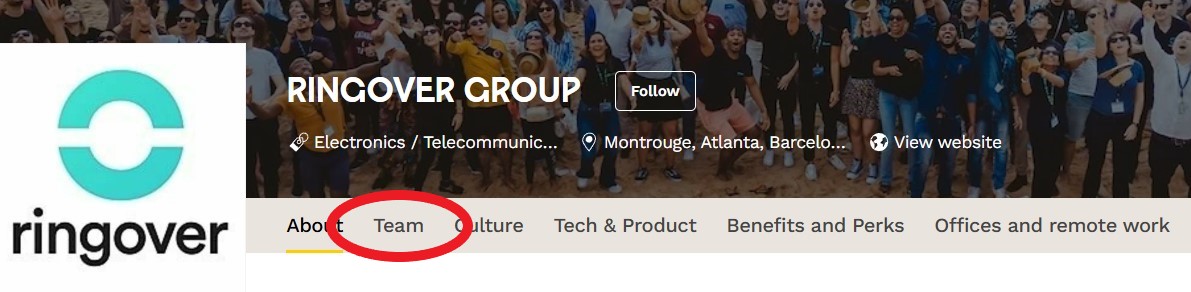
通常、従業員リストの全部または一部を確認できる場所:
- ジャングルへようこそ:企業プロフィールでは、チームメンバーと役割が紹介されることが多い
- Wellfound(AngelList Talent):企業プロファイルの創業者とチームセクション
- 組み込み機能:チームと選抜された従業員を強調する企業プロフィール
5. Google検索演算子を使って従業員数を推定する
Googleの検索演算子を使えば、ウェブ上にインデックス登録されたプロフィールや名簿、言及情報を抽出することで、企業の従業員数を概算することができます。正確な数字は得られませんが、特に公式データが存在しない場合や情報が古くなっている場合に、従業員数を確認したり概算したりするための手っ取り早い方法となります。
この方法は、LinkedInやB2Bツールと組み合わせて使用すると最も効果的です。これにより、公開されている従業員数が把握でき、その企業が従業員数20名、50名、あるいは200名に近い規模なのかを見極めるのに役立ちます。
手順:
• 検索: site:linkedin.com/in "会社名"
• 検索結果をスクロールして、インデックスに登録されたプロフィールの数を把握する
• 役職名(例:「会社名」「エンジニア」)を追加し、職務別チーム規模を見積もる
• Googleの検索結果の数(上位の検索結果やページネーションなど)を大まかな目安とする
• 正確性を確認するため、LinkedInの企業ページに記載されている従業員数と照合する
• より正確な見積もりを出すために、他の手法(データベース、ウェブサイト)と組み合わせて活用する
👉🏼プロのアドバイス:アウトリーチリストを作成する前に、この方法で対象となる従業員の数を把握しておきましょう。その後、folkXを使用して、最も関連性の高いプロフィールを収集・整理し、重複を除去したクリーンなリストとしてチームに提供します。
結論:企業の従業員を見つける最善の方法とは?
LinkedInはこの職種に関する最も包括的な情報源です。現在の従業員を役職・勤続年数・勤務地別に掲載し、比較的最新情報を維持しています。また、コネクションリクエスト・コメント・InMailによる直接連絡が可能です。役職・経験年数・地域によるフィルタリング機能により、実際の意思決定者や影響力のある人物を迅速に特定できます。
実行手順:会社を検索し、[People]タブを開きます。役職と経験年数のフィルターを適用し、folkX Chrome拡張機能で適切なプロフィールをキャプチャします。キャプチャしたfolk充実させ、管理できるクリーンな状態にします。
👉🏼folk をお試しください。従業員リストを一元管理し、配信停止設定を管理することで、チームが誤った連絡先にメールを送ることを防ぎます
よくある質問
LinkedInで企業の従業員を探す最良の方法は何ですか?
会社のページを開き、「People」に移動し、役職、経験年数、勤務地で絞り込みます。数件のプロファイルを確認して対象範囲を確定します。folkXで適格なプロファイルをエクスポートし folkにエクスポートし、タグ付けと重複排除を行った後、アウトリーチ担当に引き継ぐ。
なぜアウトリーチ前に従業員リストを作成するのか?
意思決定者と影響力者をマッピングし、マルチスレッディングを可能にし、担当者を割り当て、役割に応じたメッセージングをカスタマイズし、重複を減らし、ターゲットを絞ったABMをサポートすることで、よりクリーンなデータと迅速なカバレッジを実現します。
オンラインで見つけた従業員にメールを送るのは合法ですか?
はい、コンプライアンスを遵守します。EUではGDPRに基づく法的根拠を確保し、オプトアウトを尊重します。米国では、メール送信にはCAN-SPAM法、通話/テキスト送信にはTCPAを順守します。ビジネス連絡先のみを使用し、最小限のデータのみを保存し、オプトアウトはCRMで一元管理します。
LinkedInで企業の元従業員を見つける方法は?
会社ページを開き、「People」を選択後、過去の会社名・役職キーワード・勤務地で絞り込みます。各プロフィールを確認し、在籍期間と関連性を確認した上で、該当する役職のみリストに追加してください。
folk を発見
あなたのチームがこれまで持っていなかったような販売アシスタントのように