


Откройте для себя Folk — CRM для компаний, ориентированных на людей
Imagine cutting your admin time in half and doubling your closed deals.
That's what the right CRM can do for your business—if you choose the right one.
| Основные моменты |
|---|
|
What this guide covers
In this guide, we'll compare the top 10 CRM software for 2025, covering their best use cases, standout features, pros, cons, and pricing. Whether you're managing a team of 20-50 people, leading a mid-size sales team, or running a growing agency, you'll find the best CRM to streamline your workflow and grow faster.
Top 10 CRM Software: 2025 Comparison
| CRM | Лучше всего подходит для | LinkedIn Integration | Email Sequences | Pipeline Management | Chrome Extension | Unique Feature | Pricing (per user/month) |
|---|---|---|---|---|---|---|---|
| народная CRM | Mid-size teams (20-50 people), agencies, growing sales teams | ✅ Native via Chrome | ✅ | ✅ | ✅ | Smart contact enrichment from LinkedIn | $20–$50 |
| HubSpot CRM | All-in-one marketing & sales | ✅ (Sales Navigator) | ✅ | ✅ | ✅ | Автоматизация маркетинга | $0–$90 |
| Pipedrive | Sales-focused teams | ❌ (only via tools) | ✅ | ✅ | ✅ | Deal rotting alerts | $14–$99 |
| Серия | Gmail users | ❌ | ✅ | ✅ | ✅ | CRM fully inside Gmail | $15–$129 |
| Медь | Пользователи Google Workspace | ❌ | ✅ | ✅ | ✅ | Deep G-Suite integration | $29–$99 |
| Zoho CRM | SMBs on a budget | ✅ | ✅ | ✅ | ✅ | AI assistant (Zia) | 14–52 долларов |
| Salesforce | Предприятия | ✅ (Sales Navigator) | ✅ | ✅ | ✅ | Complex customization | $25–$300+ |
| Freshsales | Growing sales teams | ❌ | ✅ | ✅ | ✅ | Built-in phone & email | $15–$69 |
| Insightly | Project-focused sales teams | ❌ | ✅ | ✅ | ✅ | Project management features | $29–$99 |
| Закрыть CRM | Sales calling teams | ❌ | ✅ | ✅ | ✅ | Built-in calling & SMS | $49–$129 |
👉🏼 Try folk now to capture LinkedIn leads and automate outreach for mid‑size teams in the Top 10 CRM Software (2026 Edition)
1. folk CRM
Лучше всего подходит для
Teams of 20-50 people, agencies, growing sales organizations
Unique strength
Native LinkedIn extension (and other social media), ultra-personalized relationship view, easy outreach, data enrichment.
Обзор
folk CRM is a lightweight, intuitive, and modern CRM designed for mid-size teams that live in their inbox and on LinkedIn. Built specifically for teams of 20-50 people, it brings a contact-first interface, enabling you to manage all your relationships—clients, partners, prospects—in one place, with zero clutter. Unlike legacy tools that become overwhelming as your team grows, folk CRM scales perfectly with growing organizations.
It integrates natively with LinkedIn through its Chrome extension, allowing users to import leads directly and trigger automated sequences. The tool is extremely flexible, with shared contact folders, personalized email campaigns, and tags that make segmentation easy. It's the top choice for B2B teams of 20-50 people looking to scale without complexity.
Плюсы
- Native LinkedIn contact management
- Simple UI with powerful segmentation
- Perfect pricing for mid-size teams
- Shared workspaces for team collaboration
Минусы
- Fewer enterprise-grade integrations than Salesforce
- Limited if you need complex sales forecasting
Ценообразование
$20–$50/user/month
👉🏼 Try folk now to manage contact-based reminders with your team and never miss a follow-up in your CRM evaluation
2. Streak
Лучше всего подходит для
Gmail power users
Обзор
Streak integrates directly into your Gmail inbox, turning your email into a full CRM without needing another tab. You can manage pipelines, send email campaigns, and track interactions from inside Gmail. It's popular with solopreneurs and small teams who work exclusively within Google Workspace.

Плюсы
- Seamless Gmail experience
- Easy to use for non-technical users
- Great for basic pipelines
Минусы
- No native LinkedIn integration
- Not ideal for complex sales workflows
- Can get cluttered with multiple pipelines
Ценообразование
$15–$129/user/month
3. Copper
Лучше всего подходит для
Пользователи Google Workspace
Обзор
Copper CRM is built for Google users. It integrates with Gmail, Google Calendar, and Drive like no other CRM. You can add leads, log emails, and automate tasks right from your inbox. Copper is best for teams who want deep G Suite integration without the bulk of Salesforce.

Плюсы
- Tight Google Workspace integration
- Beautiful, modern UI
- Easy onboarding
Минусы
- Limited custom automation
- No direct LinkedIn integration
- Can become pricey at higher tiers
Ценообразование
$23–$99/user/month
4. Pipedrive
Лучше всего подходит для
SMB sales teams
Обзор
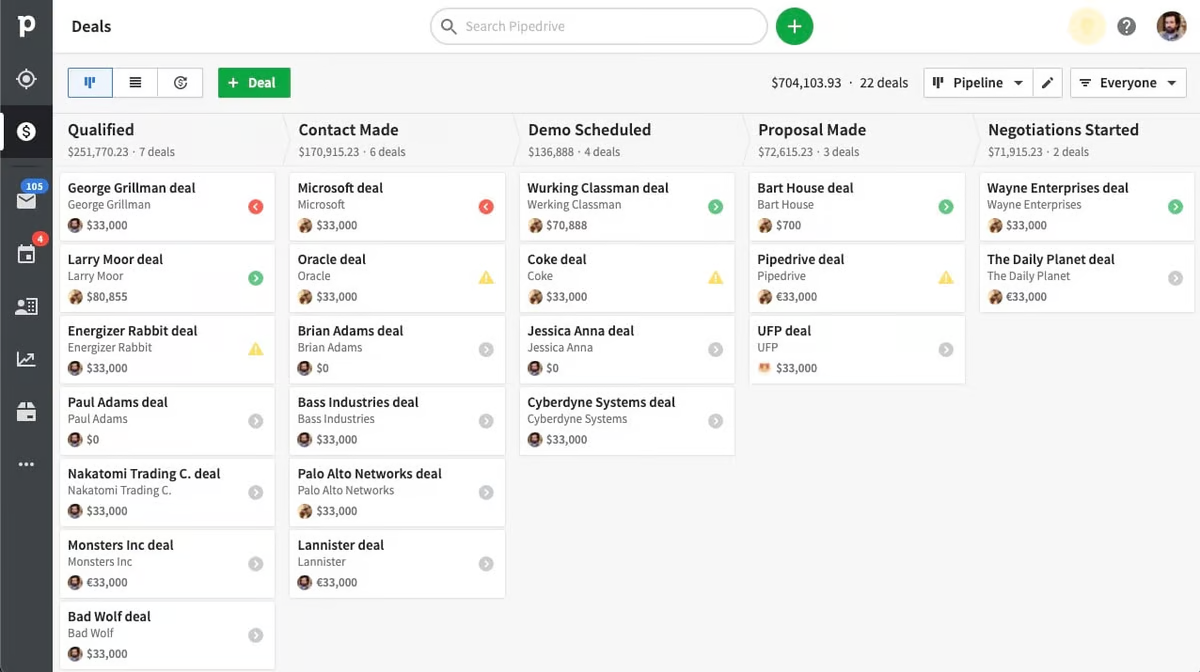
Pipedrive is known for its visual sales pipelines and ease of use. Sales reps love it for its clarity and automation capabilities. While it doesn't natively support LinkedIn, you can integrate it with Surfe or Zapier to sync data from LinkedIn profiles.
Плюсы
- Visual pipeline tracking
- Easy drag-and-drop UI
- Excellent email and workflow automation
Минусы
- LinkedIn data import via third-party tools only
- Basic reporting unless on higher tiers
Ценообразование
$14.90–$99/user/month
5. HubSpot CRM
Лучше всего подходит для
Businesses wanting an all-in-one marketing & sales suite
Обзор
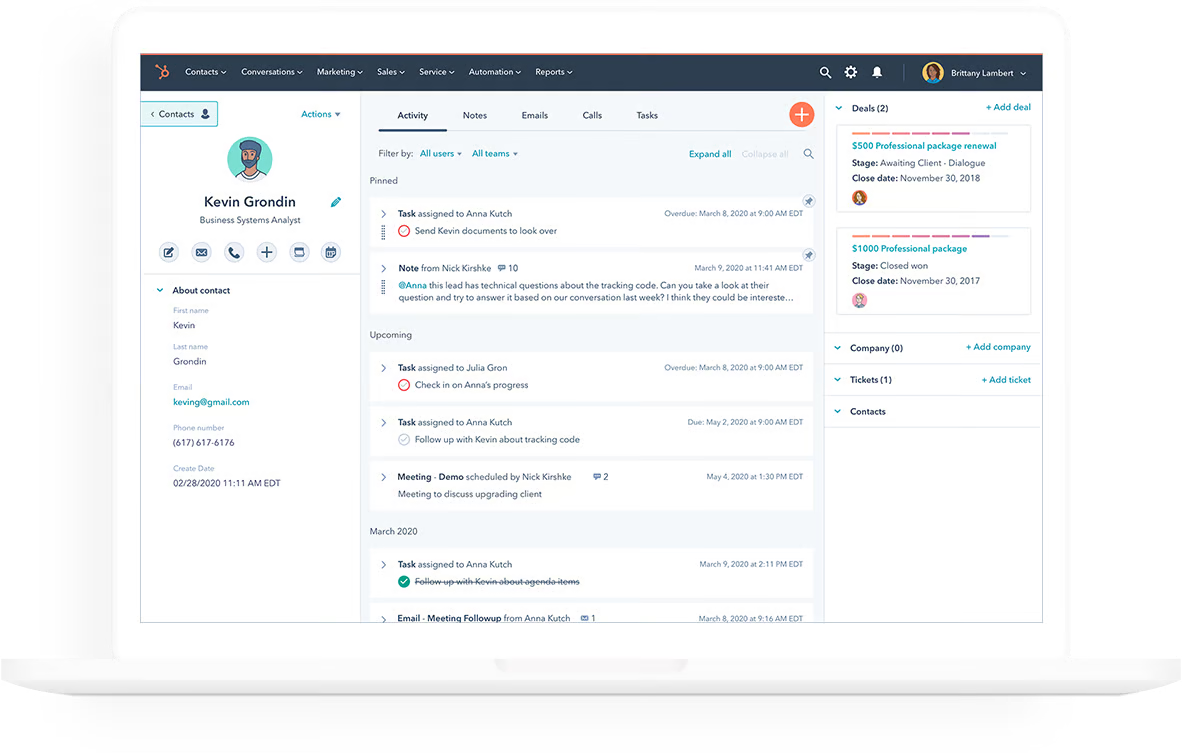
HubSpot CRM is powerful and feature-rich. It covers marketing automation, sales, customer service, and content—all under one roof. The free tier is generous, but advanced features get expensive fast. LinkedIn integration is available via Sales Navigator.
Плюсы
- Powerful free plan
- Marketing & sales under one platform
- Great learning resources
Минусы
- Cost scales quickly with advanced features
- Some features require steep learning curve
Ценообразование
$0–$1,200+/month depending on features
6. Salesforce
Лучше всего подходит для
Large enterprises and complex sales orgs
Обзор
Salesforce is the granddaddy of CRM systems. It's extremely customizable and scalable, making it ideal for large teams with complex needs. However, it's also one of the hardest tools to set up and maintain.

Плюсы
- Scalable and highly customizable
- Huge ecosystem of integrations
- Rich reporting and forecasting
Минусы
- Requires strong onboarding support
- Very high learning curve
- No native Chrome or LinkedIn extension
Ценообразование
$25–$300+/user/month
7. Zoho CRM
Лучше всего подходит для
Бизнес, ориентированный на экономию бюджета
Обзор
Zoho CRM is a cost-effective solution with a strong feature set. It offers everything from automation to omnichannel communication. It's a good entry-level CRM that grows with your business.

Плюсы
- Great value for price
- Omnichannel support (chat, email, phone, etc.)
- Easy custom workflows
Минусы
- UI feels a bit dated
- Reporting less intuitive than competitors
Ценообразование
$14–$52/user/month
8. Monday CRM
Лучше всего подходит для
Teams combining CRM with project management
Обзор
Monday.com recently added CRM functionality to its platform. It's ideal for businesses that want project tracking and client management in one place. However, it lacks advanced CRM-specific features.

Плюсы
- All-in-one work management
- Customizable pipelines
- Clean and visual interface
Минусы
- CRM features still evolving
- Not ideal for large B2B sales teams
Ценообразование
$10–$36/user/month
9. Close CRM
Лучше всего подходит для
Sales outreach with built-in calling features
Обзор
Close is a sales-focused CRM with a built-in power dialer, SMS, email automation, and pipeline tools. It's designed to help teams close deals faster through multichannel outreach.

Плюсы
- Built-in calling & SMS tools
- High outbound sales performance
- Fast and responsive interface
Минусы
- Limited marketing automation
- Interface can be overwhelming for beginners
Ценообразование
$49–$129/user/month
10. Freshsales
Лучше всего подходит для
Fast-growing SMBs
Обзор
Freshsales by Freshworks is a good mid-market CRM that balances usability with intelligent features. It includes lead scoring, email automation, and Freddy AI—a tool that suggests next best actions.

Плюсы
- Встроенный помощник с искусственным интеллектом
- Omnichannel communication
- Clean UI
Минусы
- AI is not very customizable
- Ограниченные интеграции с третьими сторонами
Ценообразование
$15–$69/user/month
How to Choose the Right CRM for Your Business
Here's what to consider when picking your CRM:
Team Size & Structure
Mid-size teams of 20-50 people need different capabilities than small startups or large enterprises.
➤ For teams of 20-50 people: folk CRM, HubSpot
➤ For enterprise: Salesforce, HubSpot
Основные характеристики
Look for CRM tools with:
- Email tracking
- Pipeline automation
- LinkedIn integration
- Mobile access
- Shared team access
Budget
Start with a free trial or a freemium model. Avoid committing to expensive tools unless you need advanced features.
Ease of Use
A beautiful interface is great—but clarity and usability are better. Prioritize intuitive tools that reduce onboarding time.
Scalability
Choose a CRM that can grow with your team. Some tools are great to start but become limiting over time.
Заключение
Choosing the right CRM software for your business is crucial for scaling efficiently and managing your relationships effectively. Whether you're managing a team of 20-50 people, running a growing agency, or leading a mid-size sales organization, there's a CRM tailored to your needs.
From the relationship-centric approach of folk CRM to the powerful integrations of Salesforce, each CRM offers distinct features that can make or break your sales and marketing efforts.
Ultimately, your CRM choice should align with your team's workflow, size, and specific goals. Take your time to explore the tools that match your business model, and don't forget to leverage free trials to get hands-on experience before committing. The right CRM will be a long-term asset that drives both productivity and growth for your business.
Дополнительные ресурсы
Часто задаваемые вопросы
Что такое CRM в сфере частного капитала?
A private equity CRM centralizes deal flow, LP relations, and portfolio contacts. It tracks interactions, manages pipelines from sourcing to exit, supports fundraising workflows, and keeps compliance-ready records so deal teams collaborate and move faster.
Which CRM is best for LinkedIn outreach?
The folk Chrome extension captures LinkedIn contacts and enriches data, then triggers email sequences. Alternatives like Pipedrive or Close need third‑party add‑ons for LinkedIn, adding cost and complexity.
How to choose a CRM for a 20–50 person team?
Prioritize easy onboarding, shared workspaces, email sequences, and LinkedIn capture. Ensure clear pipelines, role permissions, and fair per‑seat pricing. Tools like folk balance simplicity with automation for mid‑size teams.
What is the most budget-friendly CRM?
Zoho CRM is among the lowest cost with solid automation. HubSpot's free tier works for basics, but advanced features can raise costs. Compare per‑user pricing, add‑ons, and required integrations before committing.
Откройте для себя народную CRM-систему
Как помощник по продажам, которого у вашей команды никогда не было
