


Откройте для себя Folk — CRM для компаний, ориентированных на людей
Для кого предназначено это руководство
As a service industry professional managing teams of 20-50 people, managing client relationships, tracking appointments, and ensuring timely follow-ups are critical to delivering top-notch service. A powerful Customer Relationship Management (CRM) system can help you stay organized by streamlining client data, automating follow-ups, and tracking your service delivery process—all from one platform. With the right CRM, you can enhance client communication, improve efficiency, and grow your business.
In this blog post, we'll explore the best CRM options for the service industry, focusing on tools that will help you manage clients, optimize operations, and deliver exceptional service.
| Основные моменты |
|---|
|
Почему вам нужна CRM
Managing a service-based business without a CRM can lead to inefficiencies and missed opportunities.
Проблемы без CRM
Without the right CRM in place, you might experience a few common challenges, such as...
- Disorganization: Struggling to keep track of client information and service history.
- Missed opportunities: Failing to follow up on leads and losing potential clients.
- Inefficient processes: Wasting time on manual tasks and redundant data entry.
- Lack of insight: Inability to analyze business performance and client behavior.
- Inconsistent communication: Difficulty maintaining regular and personalized contact with clients.
Преимущества CRM
Fortnately, the right CRM can address these challenges, and provide some extra benefits along the way that will allow your team to work more collaboratively.
- Centralized information: All client data in one place, accessible by your entire team.
- Enhanced efficiency: Automates repetitive tasks, freeing up time for more critical activities.
- Improved customer relationships: Personalized communication and better service delivery.
- Более эффективное принятие решений: аналитические данные для разработки бизнес-стратегий.
- Increased sales: Streamlined sales processes and better lead management.
- Consistent communication: Regular and targeted outreach to maintain client engagement.
Как оценить и выбрать CRM
With a lot of CRM systems to explore, it can be hard to figure out which platform will match your needs best. To help you with your decision making process, we've put together some tips that you can adapt accordingly.
1. Определите свои требования
When choosing the best CRM for the service industry, it's important to identify the key features needed for your business. For service-based businesses managing teams of 20-50 people, look for functionalities like appointment scheduling, customer interaction tracking, and service request management. Additionally, ensure the CRM offers robust customer support tools and integrates seamlessly with other software you use. We suggest starting with the following key features.
8 features service industry teams need in their CRM
A CRM tailored for service-oriented businesses can streamline operations, enhance customer satisfaction, and ultimately drive growth. Service industry teams should look for the following features to get the most out of their CRM software.
- Contact management: Efficiently manage and categorize customer information.
- Appointment scheduling: Simplify the booking process with automated scheduling tools.
- Task management: Keep track of tasks and follow-ups to ensure nothing falls through the cracks.
- User-friendly interface: If you're looking for a plug and play CRM platform, you'll need to ensure that their interface is user-friendly to avoid having to block a lot of time out in your team's diaries for implementation training.
- Mobile access: Access the CRM from anywhere to stay productive on the go.
- Automation: Automate repetitive tasks to save time and reduce human error.
- Analytics: Gain insights into business performance and customer behavior.
- Integrations: Seamlessly integrate with other tools and software used by the business.
2. Соображения бюджета
Balancing cost and return on investment is crucial when selecting a CRM for your service business. Evaluate the pricing plans and consider whether the features offered justify the expense. Affordable CRM solutions can still provide significant value, especially if they streamline operations and improve customer satisfaction. Look for scalable options that can grow with your business.
3. Процесс отбора
Researching and choosing the right CRM vendor involves several steps. Start by compiling a list of potential vendors specializing in service industry solutions. Read reviews on G2, request demos, and compare features. Pay attention to the vendor's reputation for customer service and support, as this will be crucial for long-term success.
4. Получите демо-версию
Before committing to a CRM, it's crucial to see it in action. A demo can provide a hands-on experience, allowing you to understand how the CRM can cater to your specific needs in the service industry. It also gives you the opportunity to ask questions and see how the CRM handles scenarios relevant to your business. Get started with a demo of folk to see if it's the right fit for your service-based operations.
👉🏼 Try folk now to organize appointments and follow-ups for 20–50 person teams.
5 Best CRM for service industry
Now that you know what to look for, let's unpack the best CRMs in the market for the service industry – and, what makes their CRM system so useful.

1. folk
Best for: All-in-one, user-friendly simple CRM that can support multiple business functions for teams of 20-50 people.
folk is designed with simplicity and efficiency in mind, making it the perfect solution for service businesses with teams of 20-50 people. It offers a streamlined interface that makes it easy for businesses to manage customer relationships without a steep learning curve. folk CRM is one of the best flexible CRM systems on the market thanks to its ability to accommodate several business functions including sales team, customer service team, marketing and more.
Основные характеристики
- Contact Management and contact sync great for multiple customer data hub
- Social media integration for lead generation and to import client information
- Task Management including reminders and collaborative notes
- Mail merge and email Integration for Gmail and Outlook
- Customizable dashboards
- Multiple pipelines for sales, recruitment, project management and more.
- Mobile Access

Плюсы
- User-friendly interface: The intuitive design ensures that even non-tech-savvy users can navigate the CRM effortlessly, reducing the need for extensive training.
- Customization: Tailor the CRM to fit your specific business processes and workflows, making it highly adaptable to various service industry needs.
- Affordable: Offers competitive pricing plans that are budget-friendly for small businesses.


Минусы
- folk offers advanced reporting and analytics, including pipeline and deal stage analytics, weighted revenue forecasting, performance breakdowns by any custom field, and revenue insights.
Цены и тарифные планы
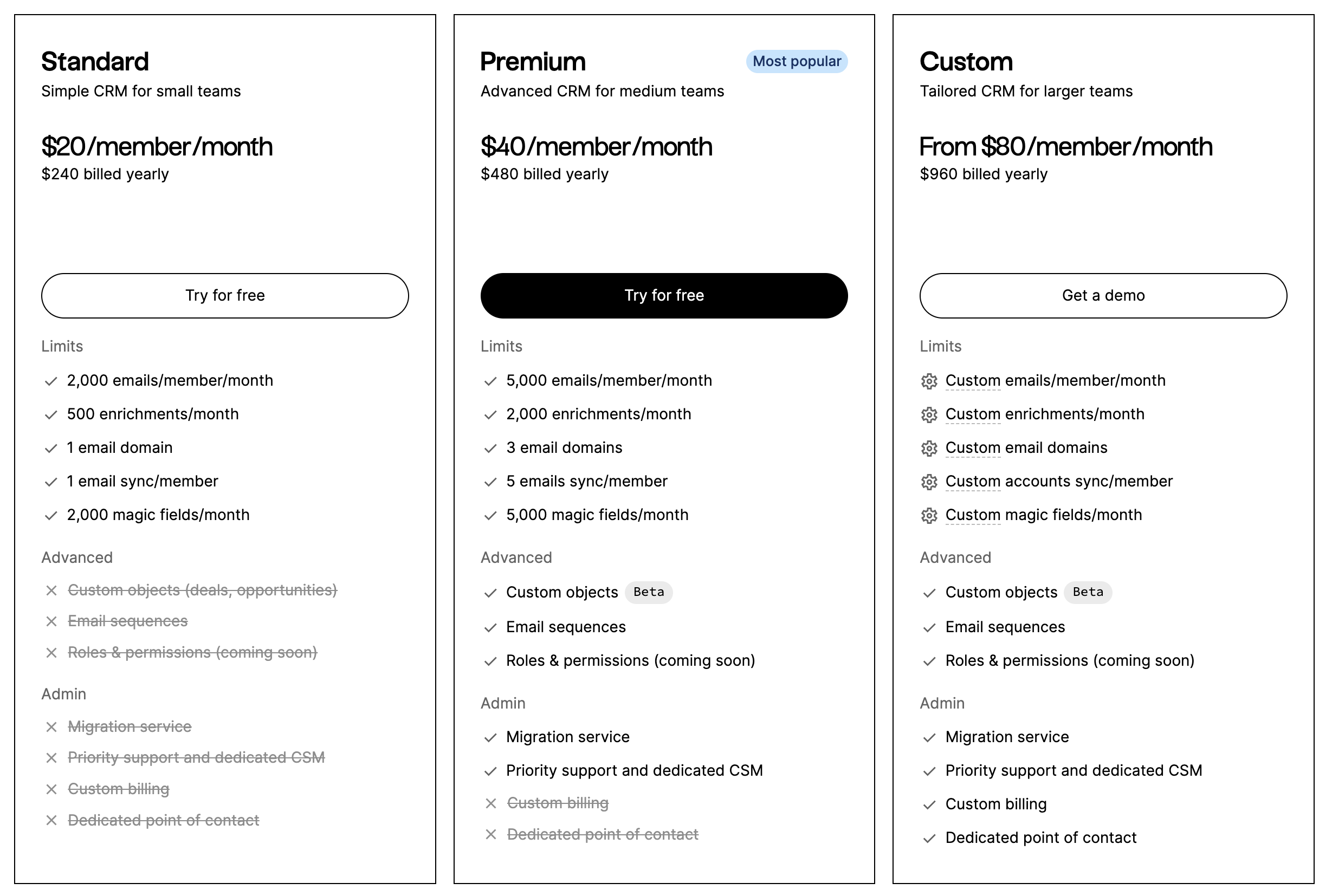
You can try folk for free with a 14 day free trial. After that, a monthly or annual subscription plan is as follows.
- Стандартный: 20 долларов США за пользователя в месяц
- Премиум: 40 долларов США за пользователя в месяц
- Custom: Starts from $60 per user, per month
2. Sugar CRM
Best for: CRM with deployment options
Sugar CRM is known for its flexibility and extensive customization options, making it suitable for businesses with specific and unique CRM needs.
Основные характеристики
- Advanced reporting and analytics
- Workflow automation
- Customer support tools
- Integration with major applications
- Mobile access
Плюсы
- Customization: Highly customizable to fit the unique requirements of various service businesses, allowing for tailored workflows and processes.
- Comprehensive features: Offers a wide range of features that support sales, marketing, and customer service efforts comprehensively.
Минусы
- Complexity: The extensive features and customization options can make it overwhelming and complex for new users, requiring more training and onboarding.
- Higher cost: More expensive compared to some other CRMs, which might be a barrier for very small businesses or startups.
Цены и тарифные планы
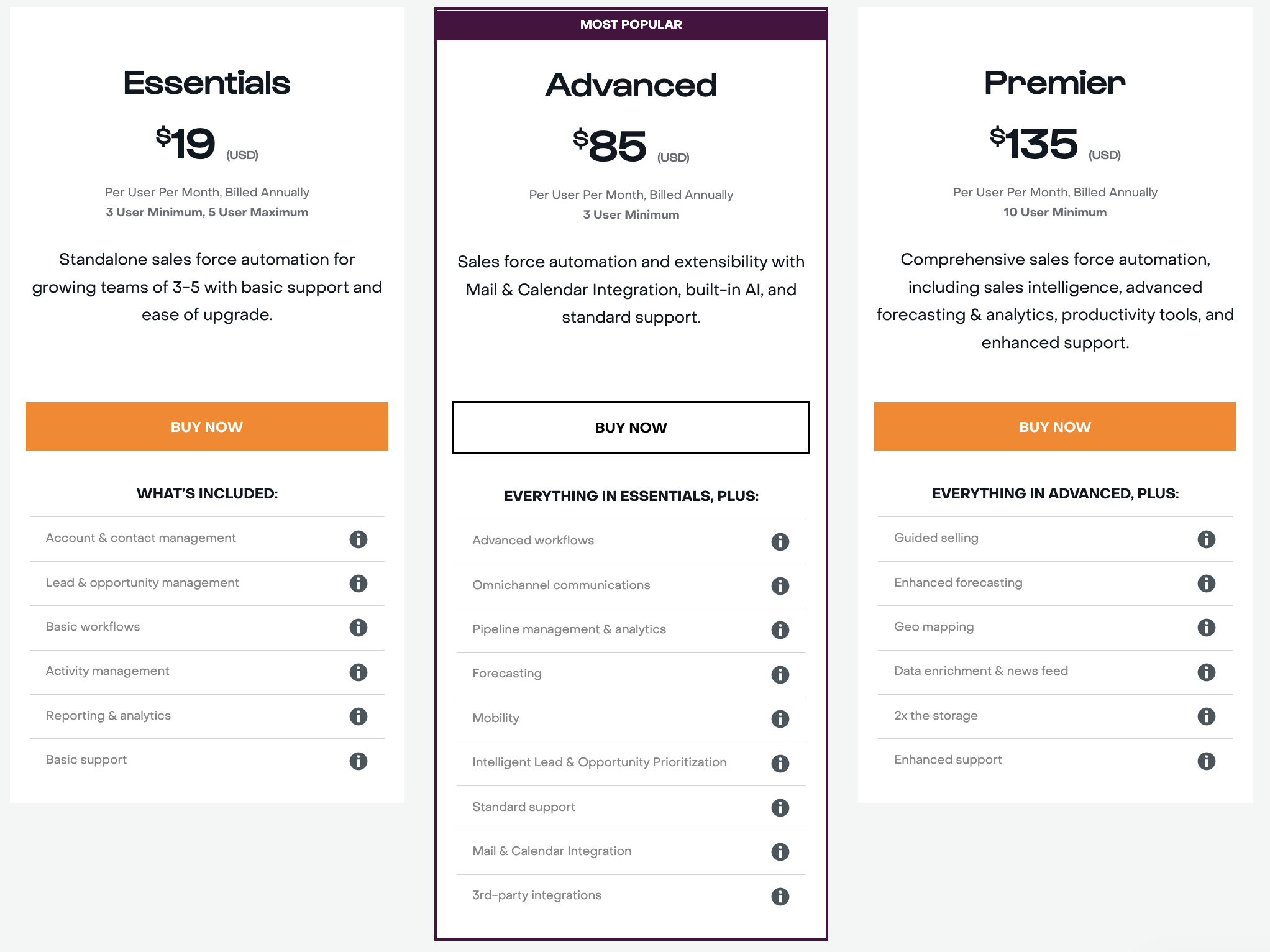
An annual subscription plan is as follows.
- Essentials: $19 per user, per month (minimum of 3 users, maximum of 5)
- Advanced: $85 per user, per month (minimum of 3 users)
- Premier: $135 per user, per month (minimum of 10 users)
3. HubSpot CRM
Best for: New businesses looking for a free-forever CRM plan despite limited features
HubSpot CRM is a popular choice due to its robust free tier and extensive features that support business growth. It integrates seamlessly with HubSpot's suite of marketing, sales, and service tools.
Основные характеристики
- Управление контактами
- Email tracking and templates
- Управление каналом продаж
- Reporting dashboards
- Автоматизация маркетинга

Плюсы
- Free tier: Offers a comprehensive free plan that includes many essential features, making it accessible for small businesses and startups.
- Integration: Seamlessly integrates with HubSpot's ecosystem and other third-party applications, enhancing functionality.
Минусы
- Limited advanced features in free tier: Some advanced features and capabilities are only available in higher-tier paid plans.
- Customization constraints: While versatile, it may not offer the same level of deep customization as other CRMs.
Цены и тарифные планы
HubSpot CRM has a free version with basic CRM features. For more features and integrations, there are a few plans available. Such as the CRM suite below.
- Starter: $15 per user, per month.
- Professional: $450 per user, per month.
- Enterprise: 1500 долларов США за пользователя в месяц.
4. Agile CRM
Best for: Service businesses looking for an all-in-one CRM solution with marketing automation.
Agile CRM combines CRM functionalities with marketing automation, making it a comprehensive tool for managing customer relationships and marketing efforts in one place.
Основные характеристики
- Управление контактами
- Автоматизация маркетинга
- Sales tracking
- Customer service tools
- Social media integration

Плюсы
- Marketing capabilities: Strong marketing automation features that help businesses streamline their marketing campaigns.
Минусы
- Learning curve: The multitude of features can create a steep learning curve for new users.
- Performance issues: Some users report occasional performance issues, particularly with the more advanced features.
Цены и тарифные планы
There is a free plan with limited features for up to 10 users. After that, an annual subscription plan is as follows.
- Starter: $9.99 per user, per month.
- Regular: $39.99 per user, per month.
- Enterprise: $64.99 per user, per month.

5. Zoho CRM
Best for: Small business solution
Zoho CRM is part of the Zoho Suite. Offering a wide range of features and integration capabilities.
Основные характеристики
- Workflow management
- Advanced analytics
- AI-powered insights
- Multi-channel communication
- Sales automation

Плюсы
- Versatility: Offers a broad range of features that cater to various aspects of customer relationship management.
- Integration: Seamlessly integrates with other Zoho apps and many third-party applications, providing extensive functionality.
Минусы
- Complexity: The wide range of features can be overwhelming for new users, requiring time to learn and adapt.
- Cost for advanced features: Advanced features and higher-tier plans can be costly, which might not be ideal for very small businesses.
Цены и тарифные планы
There is a free plan limited to three users suitable for small businesses. After that, an annual subscription plan is as follows:
- Standard: $14 per user, per month
- Professional: $23 per user, per month
- Enterprise: $40 per user, per month
Заключение
While Sugar CRM, HubSpot, Agile CRM, and Zoho offer powerful solutions for the service industry, folk CRM stands out as the best choice for service businesses with teams of 20-50 people. Unlike more complex platforms, folk CRM is tailored for service-oriented businesses looking to streamline workflows, automate tasks, and build strong customer relationships without the burden of unnecessary features. For service providers managing medium-sized teams seeking a flexible and user-friendly CRM, folk offers the perfect balance between simplicity and functionality, helping businesses stay organized and focused on delivering exceptional service. Try folk today, free.
👉🏼 Try folk now to never miss a follow-up by automating reminders and tasks.
Нужна помощь? Воспользуйтесь нашим бесплатным инструментом, чтобы найти идеальный CRM-решение.
Дополнительные ресурсы
Часто задаваемые вопросы
What is a CRM for the service industry?
A CRM for the service industry centralizes client data, appointments, work orders, and communications, automates follow-ups, and adds pipelines and analytics to manage service delivery, sales, and support across teams.
What features should a service business look for in a CRM?
Key essentials: contact and job management, appointment scheduling, task reminders, email integration, automation, mobile access, customizable pipelines, dashboards, reporting, and integrations with calendars and billing tools.
How much does a CRM for a service business cost?
Pricing ranges from free tiers to about $135+ per user/month, depending on features and seats. folk offers a 14‑day trial, then Standard $20/user/month, Premium $40, Custom from $60.
Which CRM fits service teams of 20–50 people?
Look for an easy, flexible platform that supports multiple workflows, automation, email, and mobile access. folk suits 20–50 person teams with simple setup, customizable pipelines, and collaborative contact management.
Откройте для себя народную CRM-систему
Как помощник по продажам, которого у вашей команды никогда не было
