


Entdecken Sie folk das CRM für personenorientierte Unternehmen
Wenn es darum geht, ein CRM zu wählen, das zu Ihren geschäftlichen Anforderungen passt, sind Pipedrive Capsule CRM zwei beliebte Optionen, die oft genannt werden. Beide Plattformen richten sich an kleine und mittlere Unternehmen und bieten Tools für das Vertriebs-Pipeline-Management, die Kontaktorganisation und die Aufgabenautomatisierung. Allerdings unterscheiden sich ihre Ansätze zum CRM, weshalb es wichtig ist, die wichtigsten Funktionen, Stärken und Einschränkungen der einzelnen Plattformen zu verstehen.
In diesem Blogbeitrag vergleichen wir Pipedrive Capsule CRM, um Ihnen dabei zu helfen, herauszufinden, welches der beiden besser zu den Arbeitsabläufen und Wachstumszielen Ihres Unternehmens passt. Außerdem stellen wir Ihnen folk als beliebte Alternative vorstellen, die eine Überlegung wert ist.

| Wichtigste Punkte |
|---|
|
Was ist Pipedrive?
Pipedrive ist ein webbasiertes CRM für kleine Unternehmen, das Lead-Management, Automatisierung, E-Mail-Integration und anpassbare Pipelines zur Optimierung des Vertriebs bietet.
Die wichtigsten Funktionen von Pipedrive:
- Lead- und Deal-Management: Zentralisierte Tools zur Verwaltung von Kundendaten, Interaktionen und Vertriebspipelines, die Teams dabei unterstützen, Chancen schnell zu nutzen.
- Vertriebsautomatisierung: Automatisierung von Arbeitsabläufen zur Bewältigung sich wiederholender Aufgaben wie Lead-Weiterleitung, Nachverfolgung und E-Mail-Sequenzen, damit sich Vertriebsteams auf den Abschluss von Geschäften konzentrieren können.
- E-Mail-Integration: Vollständige E-Mail-Synchronisierung, Vorlagen und Tracking-Funktionen, mit denen Benutzer die gesamte Kommunikation direkt über das CRM verwalten können.
- Erweiterte Berichterstellung und Analysen: Echtzeit-Datenanalysen und benutzerdefinierte Berichterstellungstools zur Verfolgung der Vertriebsleistung, zur Umsatzprognose und zum Gewinn umsetzbarer Erkenntnisse.
- Anpassung und Sicherheit: Optionen zur Anpassung von Pipelines, Feldern und Benutzerberechtigungen mit robusten Sicherheitsmaßnahmen zum Schutz der Daten.
Was ist Capsule CRM?
Capsule CRM ist eine benutzerfreundliche Plattform für das Kundenbeziehungsmanagement, die speziell für kleine und mittlere Unternehmen entwickelt wurde. Sie bietet eine übersichtliche, intuitive Benutzeroberfläche, mit der Nutzer Kundenbeziehungen verwalten, Vertriebspipelines verfolgen und Aufgaben und Kommunikation effizient organisieren können.
Wichtigste Funktionen von Capsule CRM
- Kontaktverwaltung: Ermöglicht es Benutzern, Kundeninformationen zu organisieren, den Kommunikationsverlauf zu verfolgen und Beziehungen an einem Ort zu verwalten.
- Vertriebspipeline-Management: Hilft bei der Verfolgung von Verkaufschancen und Geschäften und bietet einen visuellen Überblick über die Vertriebsphasen, um den Fortschritt zu überwachen.
- Aufgabenverwaltung: Ermöglicht Benutzern das Einrichten von Erinnerungen, das Erstellen von To-do-Listen und das Verfolgen von Fristen für eine optimierte Produktivität.
- Anpassungsoptionen: Bietet anpassbare Felder und Workflows, um das CRM an spezifische Geschäftsanforderungen anzupassen.
- Integrationen von Drittanbietern: Integriert sich in beliebte Tools wie Google Workspace, Xero und Mailchimp die Funktionalität zu erweitern.
Pipedrive . Capsule CRM: Funktionsvergleich
Die wichtigsten Unterschiede auf einen Blick
- Pipedrive: stärkere Automatisierung, integrierte E-Mail-Tools und KI-Vertriebsassistent.
- Capsule: einfachere Benutzeroberfläche, aufgabenorientierte Arbeitsabläufe, Kontaktaufnahme über Transpond.
- Beides: SMB-orientierte Pipelines, Berichterstellung und Integrationen.
Lassen Sie uns die wichtigsten Funktionen zweier CRM-Softwarelösungen genauer betrachten und einen genaueren Blick auf ihre Vertriebsautomatisierung, E-Mail-Marketing-Tools und Kontaktverwaltung werfen.
1. Vertriebs-Pipeline-Management
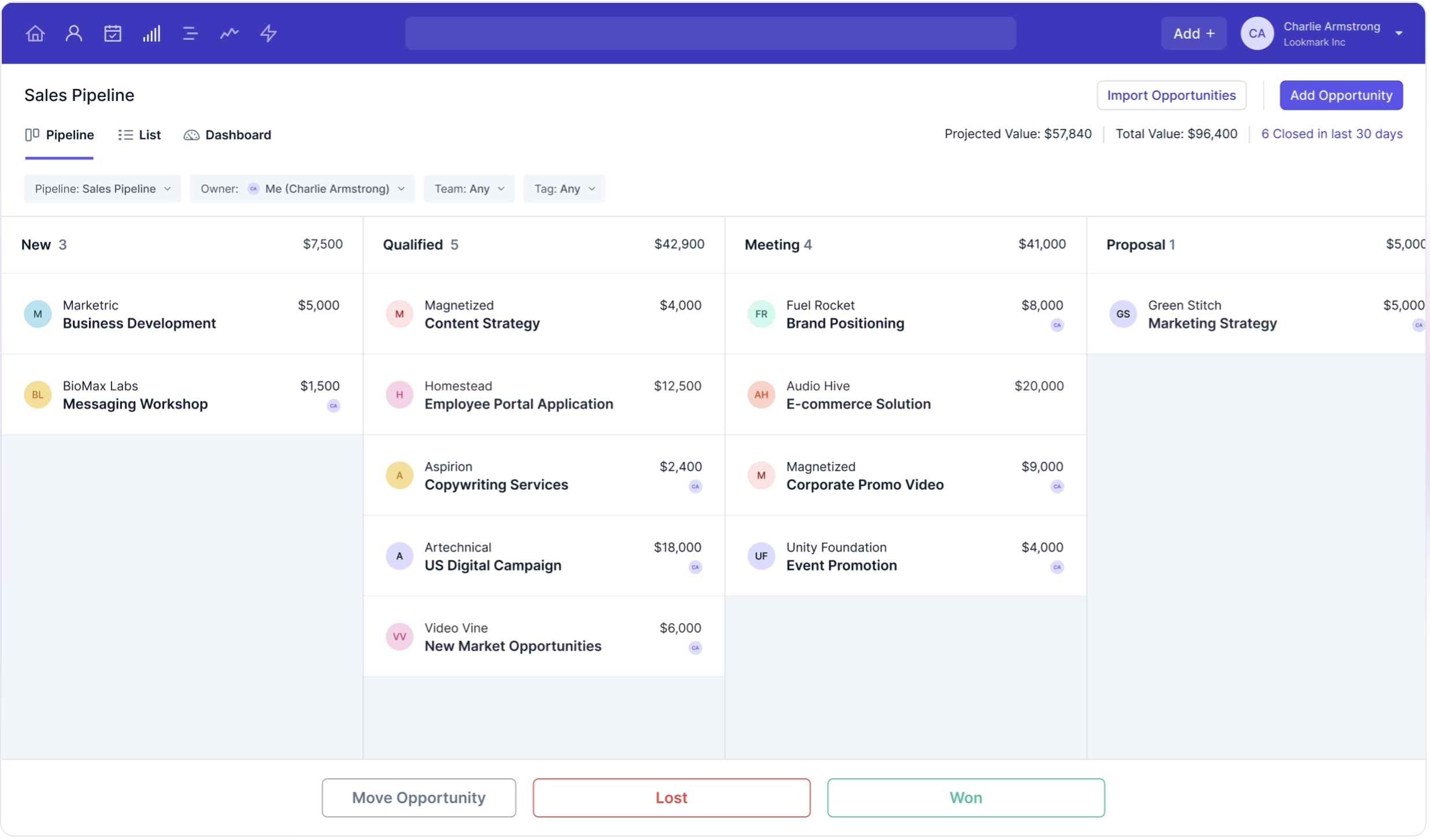
Pipedrive ein benutzerfreundliches Kanban-Board, das sich eng an traditionelle Prozesse des Vertriebs-Pipeline-Managements anlehnt und es den Benutzern ermöglicht, ihre Vertriebsaktivitäten intuitiv zu visualisieren und zu verwalten. Dieser visuelle Ansatz hilft Teams, organisiert zu bleiben und sich auf den effizienten Abschluss von Geschäften zu konzentrieren. Capsule CRM hingegen bietet eine vielseitige Pipeline-Management-Funktion, mit der Benutzer Verkaufschancen in verschiedenen Phasen verfolgen können. Die Flexibilität von Capsule, die Vertriebspipeline als Liste, Kanban oder dashboard anzuzeigen, dashboard dass Benutzer das Format wählen können, das ihren Workflow-Anforderungen am besten entspricht. Diese Anpassungsfähigkeit kann besonders für Teams von Vorteil sein, die einen individuell anpassbaren Ansatz für die Verwaltung ihrer Vertriebsprozesse bevorzugen. Sowohl Pipedrive Capsule CRM zeichnen sich durch Tools aus, die die Transparenz der Vertriebspipeline verbessern, aber die Wahl zwischen den beiden hängt letztendlich von den spezifischen visuellen und funktionalen Präferenzen des Benutzers oder Teams ab. Letztendlich zielen beide Plattformen darauf ab, den Vertriebsprozess zu optimieren, die Zusammenarbeit im Team zu verbessern und das Umsatzwachstum durch robuste Funktionen für das Pipeline-Management zu steigern.

2. Benutzerfreundlichkeit
Pipedrive bekannt für seine intuitive Benutzeroberfläche, die es den Benutzern leicht macht, ihre Vertriebsprozesse effizient zu steuern und zu verwalten. Capsule CRM bietet ebenfalls eine benutzerfreundliche Oberfläche mit einem übersichtlichen Design, das es den Benutzern ermöglicht, schnell auf die Funktionen zuzugreifen und diese ohne große Einarbeitungszeit zu nutzen.
3. Kontaktanreicherung
Die Kontaktanreicherungsfunktion Pipedrive funktioniert durch die Integration mit Tools wie Clay.com, um zusätzliche Informationen aus externen Quellen abzurufen und Felder automatisch mit relevanten Daten wie Berufsbezeichnungen, Unternehmensinformationen und Social-Media-Profilen zu füllen. Capsule CRM legt keinen großen Schwerpunkt auf die Kontaktanreicherung, sondern stützt sich eher auf die Eingabe grundlegender Daten und auf Benutzereingaben.
4. Öffentlichkeitsarbeit
Der E-Mail-Builder Pipedrive ist eher auf Kampagnen wie Newsletter und reaktionsschnellere E-Mail-Marketingkampagnen ausgerichtet. Die Outreach-Lösung von Capsule CRM konzentriert sich auf die Vereinfachung des E-Mail-Marketings und die Automatisierung von Follow-ups durch die Integration mit seinem E-Mail-Tool Transpond. Damit können Benutzer E-Mail-Kampagnen planen und automatisieren, um ihre Outreach-Bemühungen zu optimieren.
5. Automatisierung
Die Automatisierungsfunktion Pipedrive optimiert Vertriebsprozesse durch die Automatisierung sich wiederholender Aufgaben wie Dateneingabe, Nachverfolgung und Lead-Zuweisung. Capsule CRM bietet Automatisierungsfunktionen, die zur Optimierung von Vertriebs- und Kundenbeziehungsprozessen beitragen, darunter die Automatisierung sich wiederholender Aufgaben wie Nachverfolgung und Datenaktualisierung. Die Workflow-Automatisierung ermöglicht es Benutzern, Auslöser für Aktionen basierend auf Änderungen in Vertriebspipelines oder im Kundenstatus einzurichten.
6. Integration
Pipedrive über 300 Integrationen, sodass Benutzer das CRM mit verschiedenen Tools von Drittanbietern aus unterschiedlichen Kategorien verbinden können, darunter Marketing-Automatisierung und E-Mail-Plattformen. Capsule CRM lässt sich mit einer Vielzahl beliebter Anwendungen von Drittanbietern integrieren, darunter Produktivitätstools wie Google Workspace und Microsoft 365 für die E-Mail- und Kalendersynchronisierung. Es lässt sich auch mit Buchhaltungssoftware wie Xero verbinden.
7. Künstliche Intelligenz
Pipedrive KI in erster Linie über seinen Sales Assistant, der umsetzbare Erkenntnisse und Empfehlungen zur Optimierung der Vertriebsaktivitäten liefert. Capsule CRM verfügt im Vergleich zu fortschrittlicheren Plattformen nur über begrenzte KI-Integrationen und konzentriert sich in erster Linie auf die Steigerung der Effizienz durch grundlegende Automatisierung. Es unterstützt jedoch Integrationen mit Tools von Drittanbietern, die KI-Funktionen bieten.
Preis- und Tarifvergleich
Schauen wir uns die Preise und Tarife von Pipedrive Capsule CRM einmal genauer an.
Pipedrive
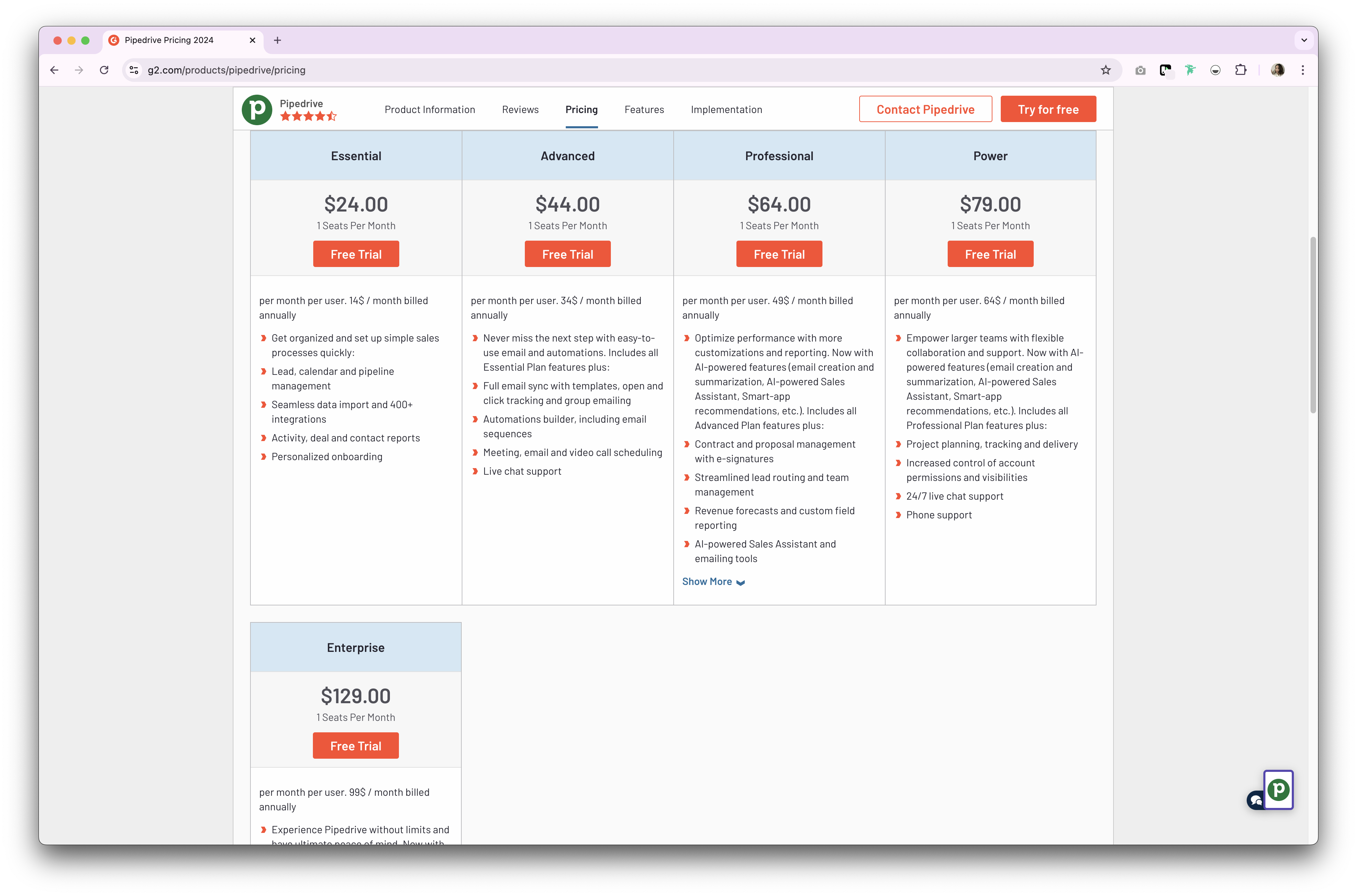
Pipedrive zwei Arten von Tarifen für sein CRM-Produkt Pipedrive . Diese sind entweder als Monats- oder Jahresabonnement erhältlich. Der Jahresabonnement-Tarif sieht wie folgt aus.
- Essential-Tarif: Ab 24 $ pro Benutzer und Monat.
- Erweiterter Tarif: Ab 44 $ pro Benutzer und Monat.
- Stromtarif: Ab 79 $ pro Benutzer und Monat.
- Enterprise-Plan: Ab 129 $ pro Benutzer und Monat.
👉🏼 Probieren Sie folk aus, um keine Fortsetzung zu verpassen.
Preise für Capsule CRM
- Starter-Tarif: Ab 21 $ pro Benutzer und Monat.
- Wachstumsplan: Ab 38 $ pro Benutzer und Monat.
- Erweiterter Tarif: Ab 60 $ pro Benutzer und Monat.
- Ultimativer Plan: Ab 75 $ pro Benutzer und Monat.

Wir stellen Ihnen folk vor: die beste Alternative zu Pipedrive Capsule CRM
Suchen Sie nach einer erschwinglichen Alternative? Wir empfehlen folk als optimale Wahl für Vertriebsteams mit 20 bis 50 Mitarbeitern. Diese preisgekrönte CRM-Plattform wurde speziell für wachsende Teams entwickelt und bietet gleichzeitig die Einfachheit, die mittelständische Vertriebsorganisationen benötigen, um agil und effizient zu bleiben.
Wichtigste Merkmale
- Benutzerfreundlichkeit und Anpassungsmöglichkeiten: Passen Sie Pipelines, dashboards, Automatisierungen und E-Mail-Sequenzen ganz einfach an, damit Sie sie für Ihren gesamten Vertriebszyklus und Ihr Pipeline-Management sowie für andere Geschäftsbereiche wie Personalbeschaffung, Marketing und mehr nutzen können.
- Social-Media-Integration: Importieren Sie Personen und Unternehmen aus LinkedIn, Sales Navigator, Instagram und X mit nur einem Klick dank der Google Chrome-Erweiterung folk.
- Kontaktsynchronisierung aus Gmail und Outlook: Vollständige E-Mail-Synchronisierung, mit der Benutzer alle Kommunikationen direkt aus dem CRM verwalten können.
- E-Mail-Adressen mit einem Klick finden: Kontaktanreicherung mit Apollo und Dropcontact Sie fehlende Daten mit einem Klick ergänzen können.
- E-Mail-Sequenzen: Versenden Sie E-Mail-Sequenzen mit Erinnerungen, wenn Ihre Leads nicht auf Ihre ersten E-Mails antworten. Dazu gehört eine KI-Integration, mit der Sie E-Mails in großem Umfang personalisieren können.


Preis und Pläne
folk eine 14-tägige kostenlose Testversion. Danach gibt es günstige Monats- oder Jahresabonnements. Das Jahresabonnement sieht wie folgt aus.
- Standard: 20 $ pro Benutzer und Monat.
- Premium: 40 $ pro Benutzer und Monat.
- Benutzerdefiniert: Ab 80 $ pro Benutzer und Monat.

Pipedrive . Capsule CRM: Wie lautet das Urteil?
Sowohl Pipedrive Capsule CRM bieten robuste Funktionen, die auf kleine und mittlere Unternehmen zugeschnitten sind. Pipedrive durch Vertriebsautomatisierung und Anpassungsmöglichkeiten Pipedrive , während Capsule CRM mit seiner benutzerfreundlichen Oberfläche und seinen Aufgabenverwaltungsfunktionen überzeugt. Für Vertriebsteams mit 20 bis 50 Mitarbeitern, die ein optimales Gleichgewicht zwischen fortschrittlicher Funktionalität und Kosteneffizienz suchen, ist jedoch folk die bessere Wahl. Es bietet Funktionen auf Unternehmensniveau zu einem Bruchteil der Kosten und bewahrt gleichzeitig die Flexibilität, die wachsende Teams benötigen.
👉🏼 Probieren Sie folk aus, um kontaktbasierte Erinnerungen mit Ihrem Team zu verwalten.
Häufig gestellte Fragen
Wofür wird Pipedrive ?
Pipedrive Vertriebsteams kleiner und mittlerer Unternehmen Pipedrive , Geschäfte und Pipelines zu verwalten, Aktivitäten zu verfolgen, E-Mails zu synchronisieren, Nachfassaktionen zu automatisieren und Berichte über die Leistung zu erstellen, um Umsätze zu prognostizieren und close Verkaufschancen close .
Was ist der Unterschied zwischen Pipedrive Capsule CRM?
Pipedrive Automatisierung, integrierte E-Mail-Funktionen und einen KI-Vertriebsassistenten. Capsule konzentriert sich auf einfache Kontakt- und Aufgabenverwaltung mit flexiblen Pipeline-Ansichten und E-Mail-Funktionen über Transpond. Beide bieten kleinen und mittleren Unternehmen Pipelines und Berichterstellung.
Verfügt Capsule CRM über E-Mail-Marketing?
Ja. Capsule ist mit Transpond für Newsletter, Drip-Kampagnen und automatisierte Follow-ups verbunden. Kontakte und Segmente werden aus Capsule synchronisiert, und Interaktionsdaten werden an Kontakte und Opportunities zurückgesendet.
Was ist eine gute Alternative zu Pipedrive Capsule?
folk bietet anpassbare Pipelines, Kontaktanreicherung, E-Mail-Sequenzen und Automatisierung zu geringeren Kosten. Jahrespläne: Standard 20 $/Benutzer/Monat, Premium , Individuell ab 80 $. Testen Sie folk mit einer 14-tägigen kostenlosen Testversion.
Entdecken Sie folk
Wie der Verkaufsassistent, den Ihr Team nie hatte