


Откройте для себя Folk — CRM для компаний, ориентированных на людей
Close vs. Pipeliner: quick overview
Choosing the right Customer Relationship Management (CRM) platform is crucial for any business looking to enhance customer interactions and boost sales. Close CRM and Pipeliner CRM are two popular options, each offering something different. While Close CRM focuses on simplifying sales processes for small businesses, Pipeliner CRM provides a visual and scalable approach suitable for diverse industries.
In this blog post, we'll explore their key features, pricing, and benefits, helping you determine which CRM aligns best with your business goals. We'll also introduce folk as a popular alternative that excels for sales teams of 20-50 people looking for the perfect balance of functionality and ease of use.
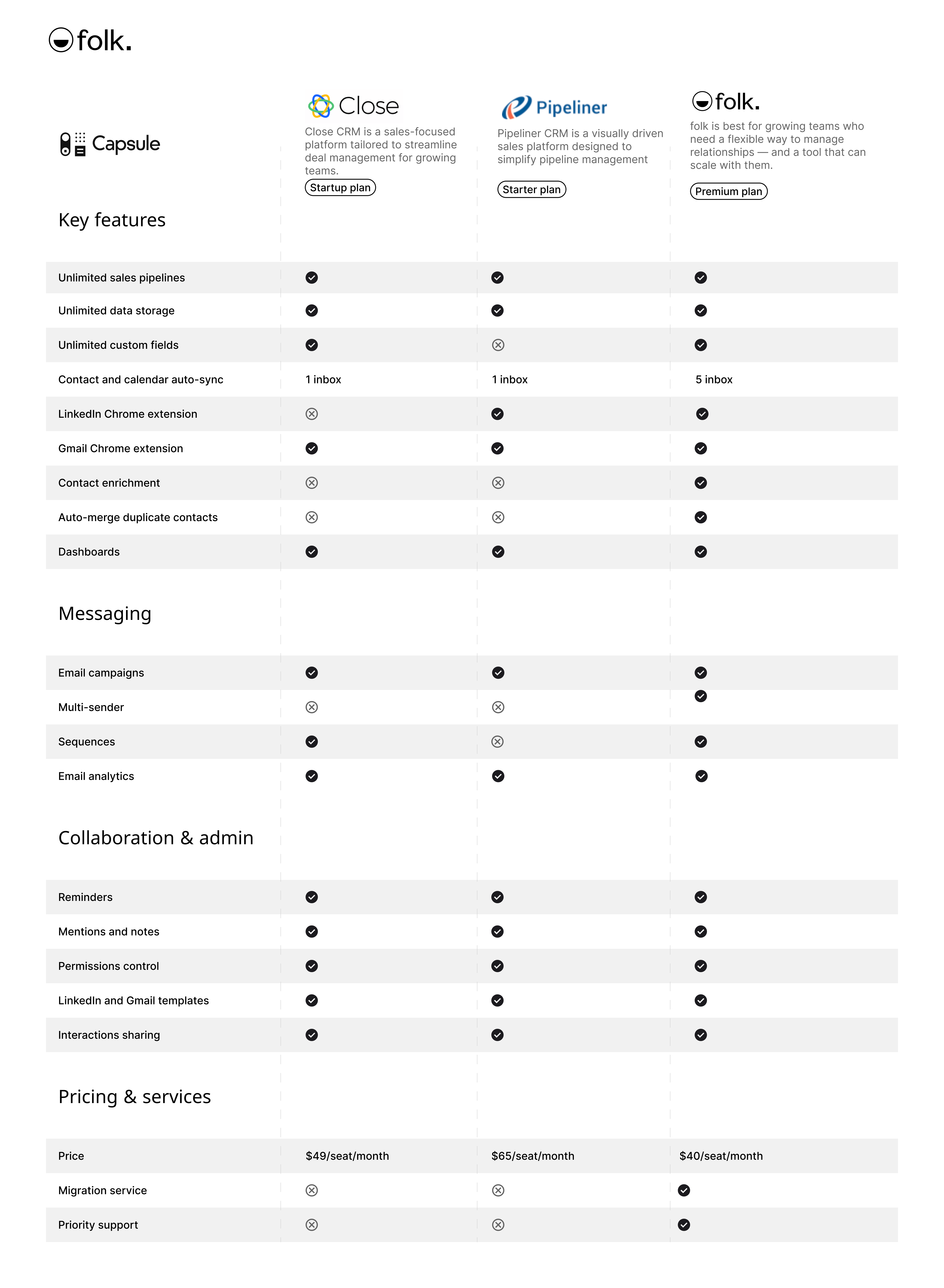
| Основные моменты |
|---|
|
Что такое Close CRM?
Close CRM is a sales-focused platform designed to eliminate the complexity of traditional CRMs, offering a streamlined and user-friendly experience tailored for small businesses with ambitious growth goals. Known for its intuitive design, Close provides robust features like automation to reduce manual work, built-in communication tools for faster follow-ups, and powerful integrations to fit seamlessly into any tech stack. Whether you're managing leads, collaborating with a team, or scaling sales efforts, Close is built to save time and help small businesses succeed.
Key features of Close CRM
- Fast setup: Simple and quick to implement, allowing teams to start using the platform without delay.
- Intuitive interface: Easy-to-navigate dashboard tailored for speed and productivity.
- Built-in communication: Integrated calling, email, and SMS tools for seamless interaction with leads and clients.
- Automation tools: Includes workflows, smart views, and task automation to streamline repetitive tasks.
- Powerful reporting: Customizable sales and activity reporting for actionable insights into team performance and revenue trends.
- Team collaboration: Features like shared inboxes and task assignments to keep teams aligned and efficient.
- Secure and scalable: Designed with robust security and scalability for growing businesses.
- Integrations: Offers over 100 native integrations and Zapier compatibility to sync seamlessly with existing tools.
Что такое Pipeliner CRM?
Pipeliner is an AI-powered sales CRM designed for small, mid-sized, and enterprise organizations, focusing on simplicity and scalability. It offers a visual approach to sales management, allowing teams to track pipelines, forecast outcomes, and automate workflows.
Основные функции Pipeliner CRM
- Автоматизация работы отдела продаж: автоматизирует рутинные задачи отдела продаж, помогая командам сосредоточиться на продажах и обеспечивая согласованность рабочих процессов.
- Управление ключевыми клиентами: предоставляет инструменты для управления и отслеживания отношений с высокоценными клиентами, обеспечивая индивидуальный подход и стратегию.
- Отслеживание коммуникаций и действий: регистрирует и систематизирует все взаимодействия, звонки и электронные письма, обеспечивая централизованный обзор коммуникаций с клиентами.
- Механизм отчетности: предлагает настраиваемые отчеты и панели инструментов для получения информации о результатах продаж и производительности команды.
- Process and workflow automation: Automates repetitive workflows, such as task assignments and approvals, to improve efficiency and reduce manual effort.
Close CRM vs. Pipeliner CRM: Feature Comparison
Let's break down the key features of Close CRM and Pipeliner CRM and take a closer look at their sales automation, email marketing tools, and user experience. For medium-sized sales teams of 20-50 people, these considerations are particularly important when evaluating CRM scalability and team coordination capabilities.
1. Управление каналом продаж
Close CRM's pipeline offers a streamlined, visual approach to managing sales processes, making it easy to track deals from start to finish. The 'Powerful Pipeline View' provides a clear snapshot of all active opportunities, enabling teams to focus on what matters most. With features like drag-and-drop deal management, users can effortlessly update the status of leads.
Pipeliner CRM's pipeline feature offers a visual interface to track sales opportunities through different stages. The drag-and-drop functionality allows you to move deals across stages, providing an overview of your sales progress. It supports multiple pipelines to accommodate different sales workflows, with integrated tools like automation and reporting to assist with task management and deal prioritization. While the feature is functional and adaptable, its focus is primarily on sales tracking, which may limit its utility for broader project management needs.


2. Простота использования
Close CRM is known for its intuitive interface, making it easy for sales teams to navigate and manage tasks efficiently. Pipeliner CRM, while offering a visually appealing interface, may require a steeper learning curve due to its extensive customization options and features.
3. Обогащение контактов
Close CRM does not provide its own contact enrichment feature. You can only access this using a third-party application, which might incur an additional cost. Pipeliner CRM offers a contact enrichment feature through its Auto Profiling integration. This feature only adds data if there is a high probability of accuracy and does not overwrite existing fields. It's also just an add-on and must be activated through the Pipeliner Automation Hub, making it a more selective and optional tool for contact enrichment.
4. Информационно-пропагандистская работа
Close CRM's outreach features integrate built-in calling, email, and SMS tools, enabling seamless multi-channel outreach without external apps. Pipeliner CRM includes basic outreach capabilities through its mass email feature, allowing users to send bulk emails and track engagement metrics. However, Pipeliner's tools are limited compared to dedicated platforms.
5. Автоматизация
Close CRM's automation features streamline workflows with custom workflows and Smart Views for lead prioritization. Pipeliner CRM offers automation for sales tasks and integrates with Automation Hub for enhanced functionality, although advanced setups may require third-party tools.
6. Интеграция
Close CRM offers integrations with various tools to enhance sales workflows and streamline data management. Pipeliner CRM integrates with over 50 popular applications, including Google Suite, Microsoft Suite, and various marketing, email, and data synchronization tools, to streamline workflows and enhance productivity.
7. Искусственный интеллект
Close CRM does not appear to have an AI integration. Pipeliner CRM integrates AI through Voyager AI Gen, providing data-driven insights for sales decision-making and prioritizing high-impact opportunities.
Сравнение цен и тарифных планов
Let's take a closer look at the price and plans of both Close CRM and Pipeliner CRM.
Close CRM prices
Close CRM offers a monthly and annual payment option. The annual subscription plan is as follows.
- Startup: $49/user/month.
- Professional: $99/user/month.
- Enterprise: $139/user/month.

Цены на Pipeliner CRM
Pipeliner offers several versions of its CRM, tailored to different price points.
- Стартовый пакет: от 65 долларов США за место в месяц.
- Бизнес: от 85 долларов США за место в месяц.
- Enterprise: от 115 долларов США за место в месяц.
- Без ограничений: от 150 долларов США за место в месяц.

Introducing folk CRM: the best alternative to Close CRM and Pipeliner CRM
Looking for an affordable alternative? We recommend folk. A multiple award-winning CRM platform specifically designed for medium-sized sales teams of 20-50 people who need a perfect balance of simplicity and powerful features. folk CRM is loved for its easy-to-use, plug-and-play CRM system that can be easily adapted to multiple business uses across sales, marketing, recruitment and more. Unlike other solutions, folk excels for teams of 20-50 people by providing the right level of sophistication without overwhelming complexity. You can use folk as a solopreneur, small to mid-size team, and large enterprise. Allowing it to grow with you as your business scales.
👉🏼 Try folk now to organize your reminders and follow-ups across Close- and Pipeliner-style pipelines
Основные характеристики
- Contact management: Bring all your contacts into one place seamlessly, from social media platforms such as LinkedIn, Instagram and X to multiple inboxes including Gmail and Outlook.
- Notes and reminders: Attach notes directly to a contact's profile in folk, and access them on the go. And assign reminders so you know exactly when to follow-up.
- Sales pipeline dashboard: Manage your entire sales cycle and leads with a highly customizable sales pipeline dashboard that can be used in Kanban-board view or listicle.
- Ease of use and customization: Easily customize the pipelines, dashboards, automation, email sequences, so that you can use it across your sales cycle and pipeline management – and other business functions such as recruitment, marketing, and more.
- Интеграция с социальными сетями: импортируйте людей и компании из LinkedIn, Sales Navigator, Instagram и X одним щелчком мыши благодаря расширению Folk для Google Chrome.
- Синхронизация контактов из Gmail и Outlook: полная синхронизация электронной почты, позволяющая пользователям управлять всей коммуникацией непосредственно из CRM.
- Найдите адреса электронной почты в один клик: обогащение контактов с помощью Apollo и Dropcontact, чтобы вы могли заполнить недостающие данные одним щелчком мыши.
- Последовательности писем: отправляйте последовательности писем с напоминаниями, если ваши потенциальные клиенты не отвечают на ваши первые письма. Включает в себя интеграцию с ИИ, позволяющую персонализировать письма в большом масштабе.
Цены и тарифные планы
folk предлагает 14-дневную бесплатную пробную версию. После этого доступны доступные по цене ежемесячные или годовые тарифные планы. Годовой тарифный план выглядит следующим образом.
- Стандартный: 20 долларов США за пользователя в месяц.
- Премиум: 40 долларов США за пользователя в месяц.
- Индивидуальный тариф: от 80 долларов США за пользователя в месяц.

Close CRM vs. Pipeliner CRM: What's the verdict?
Both Close CRM and Pipeliner CRM offer robust solutions tailored for different business needs. Close CRM has an intuitive design and focus on small business growth, while Pipeliner CRM provides a visual and scalable approach suitable for diverse industries. However, for sales teams of 20-50 people that need a more personalized approach to relationship management, folk CRM stands out as the superior choice. folk provides the perfect balance of functionality and simplicity that medium-sized sales teams need, offering better value and flexibility than these traditional CRM options.
👉🏼 Try folk now to never miss a follow-up when switching from Close or Pipeliner
Часто задаваемые вопросы
What is the difference between Close CRM and Pipeliner CRM?
Close emphasizes a streamlined sales workflow with built-in calling, email, and SMS for small teams. Pipeliner offers a visual, customizable pipeline with Voyager AI and broader scalability. Choose based on simplicity vs. depth and visualization.
How do Close CRM and Pipeliner pricing compare?
Close (annual): Startup $49, Professional $99, Enterprise $139 per user/month. Pipeliner: Starter $65, Business $85, Enterprise $115, Unlimited $150 per seat/month. Features vary by tier; verify current pricing with vendors.
Do Close CRM and Pipeliner include AI and contact enrichment?
Close lacks native AI and enrichment; third-party tools are needed. Pipeliner includes Voyager AI and optional Auto Profiling enrichment via Automation Hub, adding data only when confidence is high and avoiding overwriting.
What is a good alternative for a 20–50 person sales team?
Consider folk: customizable pipelines, enrichment, email sequences, and easy setup. Annual plans: Standard $20/user/month, Premium $40, Custom from $80. 14-day free trial available.
Откройте для себя народную CRM-систему
Как помощник по продажам, которого у вашей команды никогда не было
