


Ontdek folk het CRM-systeem voor bedrijven die door mensen worden aangestuurd
Salesforce ClickUp in één oogopslag
Bij het kiezen van een CRM-platform springen Salesforce ClickUp eruit als populaire keuzes. Salesforce bekend om zijn robuuste functionaliteit en richt zich op grote ondernemingen met uitgebreide tools voor verkoop, marketing en service. ClickUp staat bekend om zijn veelzijdigheid en integratiemogelijkheden en is aantrekkelijk voor bedrijven die op zoek zijn naar een flexibele, alles-in-één oplossing. In deze blogpost gaan we in op de unieke kenmerken, prijzen en voordelen van beide platforms.
We zullen ook folk als een aantrekkelijk alternatief om te overwegen, met name voor groeiende teams van 20-50 personen die op zoek zijn naar een intuïtieve CRM-oplossing die kracht en gebruiksgemak in evenwicht brengt.
| Belangrijkste punten |
|---|
|
Wat is Salesforce?
Salesforce is een robuust CRM-platform voor grote ondernemingen, dat tools biedt voor verkoop, marketing, service en analyse, met uitgebreide schaalbaarheid.
Belangrijkste kenmerken van Salesforce
- Uitgebreid ecosysteem: een uniform platform dat CRM, marketingautomatisering, klantenservice en ontwikkeling van aangepaste apps biedt, geschikt voor de uiteenlopende behoeften van grote ondernemingen.
- Aanpasbaarheid en schaalbaarheid: Salesforce in hoge mate aanpasbaar en schaalbaar, waardoor grote organisaties het platform kunnen afstemmen op complexe workflows en aanzienlijke groei kunnen beheren.
- Integratie van kunstmatige intelligentie (AI): Salesforce biedt AI-gestuurde analyses en automatisering, en levert inzichten die grote bedrijven helpen hun strategieën te optimaliseren.
- Uitgebreide integratiemogelijkheden: met Salesforce AppExchange kunnen grote bedrijven het platform integreren met een breed scala aan applicaties van derden, waardoor een naadloze werking tussen verschillende bedrijfssystemen wordt gegarandeerd.
- Beveiliging en compliance op bedrijfsniveau: Salesforce robuuste beveiligingsmaatregelen en compliancefuncties, die van cruciaal belang zijn voor grote organisaties die gevoelige klantgegevens verwerken.
Wat is ClickUp?
ClickUp is een platform voor projectbeheer en productiviteit dat is ontworpen om teams en individuen te helpen bij het organiseren van taken, het bijhouden van voortgang en het samenwerken in één werkruimte. Hoewel het in de eerste plaats een tool voor projectbeheer is, bevat ClickUp ook enkele CRM-elementen.
Belangrijkste kenmerken van ClickUp
- Taakbeheer: Met ClickUp kunnen gebruikers taken met aangepaste statussen aanmaken, toewijzen en volgen, wat flexibiliteit biedt bij het beheren van werkprocessen in verschillende projecten.
- Aangepaste weergaven: het platform biedt meerdere weergaven, zoals lijsten, borden, kalenders en Gantt-grafieken, zodat gebruikers taken en workflows kunnen visualiseren in een formaat dat bij hun voorkeuren past.
- Doelstellingen bijhouden: gebruikers kunnen binnen ClickUp doelstellingen instellen, bijhouden en beheren, waarbij taken en projecten worden afgestemd op bredere doelstellingen.
- Tijdregistratie: ClickUp bevat een ingebouwde functie voor tijdregistratie om de tijd die aan taken wordt besteed bij te houden, zodat gebruikers hun productiviteit of factureerbare uren kunnen controleren.
- Workflowautomatisering: Automatisering in ClickUp stelt gebruikers in staat om handmatige taken te verminderen door regels in te stellen die acties activeren, zoals statusupdates of meldingen, op basis van vooraf gedefinieerde voorwaarden.
- Aangepaste velden: Het platform biedt gebruikers de mogelijkheid om aangepaste velden aan taken toe te voegen, zodat ze specifieke gegevens kunnen bijhouden of taken kunnen categoriseren op basis van hun behoeften.
Salesforce ClickUp: vergelijking van functies
Laten we de belangrijkste functies van twee CRM-softwareoplossingen eens onder de loep nemen en hun verkoopautomatisering, e-mailmarketingtools en contactbeheer nader bekijken.
1. Beheer van de verkooppijplijn
De pijplijnbeheerfunctie Salesforce, bekend als Pipeline Inspection, biedt een uitgebreid overzicht van verkoopkansen door belangrijke statistieken, wijzigingen in deals en AI-gestuurde inzichten te consolideren in één interface. Hierdoor kunnen verkoopteams efficiënt de voortgang volgen, potentiële knelpunten identificeren en datagestuurde beslissingen nemen om hun verkoopstrategieën te verbeteren.
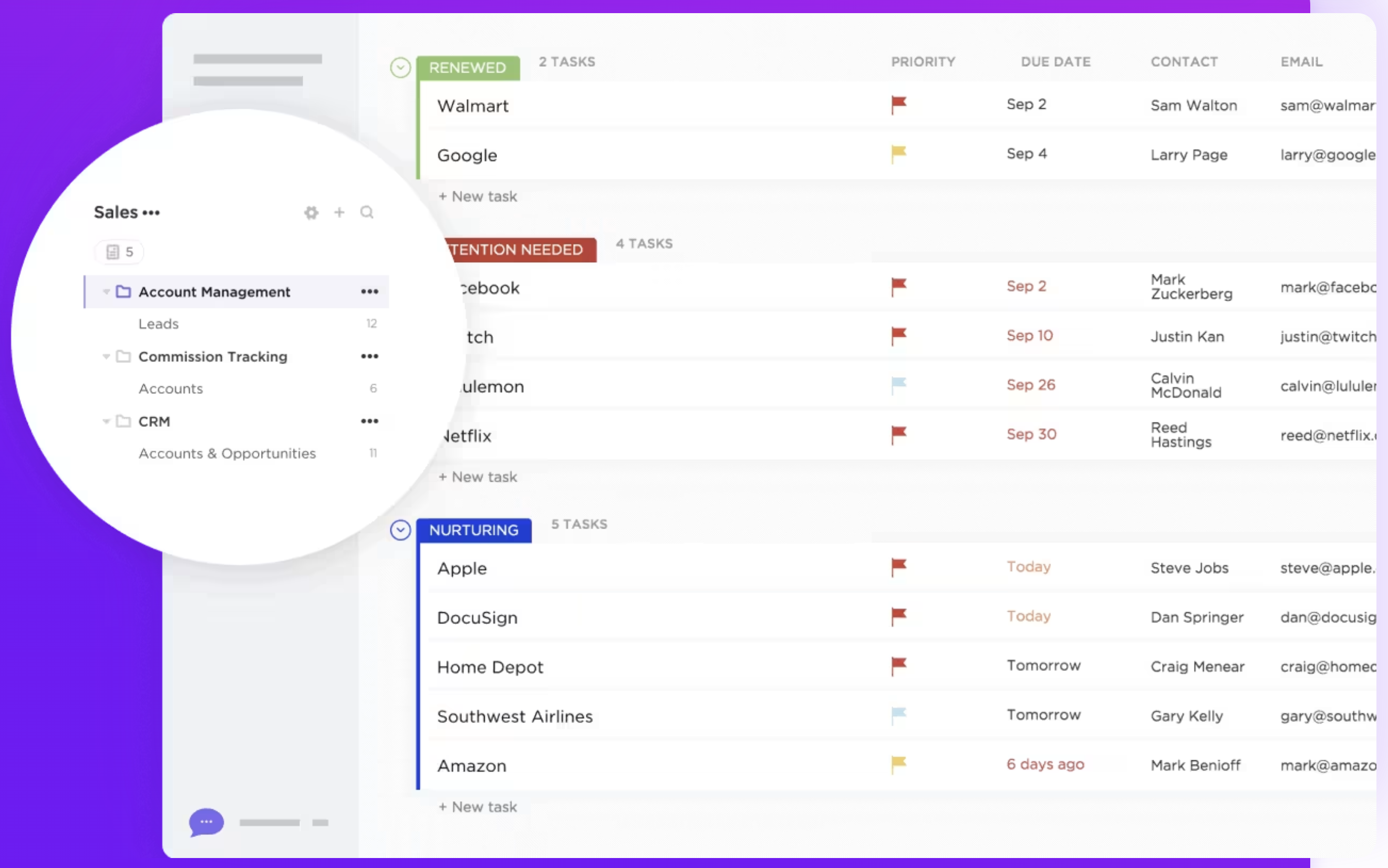
ClickUp heeft geen speciale pijplijnbeheerfunctie die specifiek is ontworpen voor verkoop- of CRM-doeleinden. Gebruikers kunnen echter aanpasbare pijplijnen maken met behulp van takenlijsten, borden en aangepaste statussen. Dankzij deze flexibiliteit kunnen teams hun workflow aanpassen aan hun specifieke behoeften, hoewel dit mogelijk meer handmatige instellingen vereist en de geavanceerde verkoopgerichte inzichten van Salesforce ontbreken. Kortom, Salesforce een robuuste, gespecialiseerde tool voor het beheer van verkooppijplijnen, ideaal voor bedrijven die op zoek zijn naar uitgebreide verkoopautomatisering. ClickUp is weliswaar veelzijdig en in hoge mate aanpasbaar, maar biedt mogelijk niet dezelfde diepgaande verkoopspecifieke functies. Het kan echter worden aangepast aan verschillende projectmanagementbehoeften. Voor middelgrote teams van 20-50 personen is folk de ideale middenweg, met speciale verkooppijplijnfuncties zonder de complexiteit van bedrijfsoplossingen.
👉🏼 Probeer folk om een aanpasbare verkooppijplijn te beheren met AI-ondersteunde outreach en geautomatiseerde follow-ups.

2. Gebruiksgemak
Salesforce is weliswaar krachtig, maar heeft een steilere leercurve vanwege de uitgebreide functies en aanpassingsmogelijkheden. ClickUp biedt daarentegen een gebruiksvriendelijkere interface met intuïtieve navigatie, waardoor teams het gemakkelijker kunnen adopteren en snel kunnen gebruiken zonder uitgebreide training.
3. Contactverrijking
De functie voor contactverrijking Salesforce maakt gebruik van tools zoals de Data Cloud om contactrecords automatisch en in realtime te verbeteren en bij te werken, waarbij gebruik wordt gemaakt van geverifieerde gegevensbronnen zoals LinkedIn en InsideView om realtime updates te bieden. ClickUp biedt geen functie voor contactverrijking als onderdeel van zijn kernfunctionaliteit. Hoewel gebruikers contactgegevens handmatig kunnen opslaan en ordenen met behulp van aangepaste velden en taakdetails, haalt het platform niet automatisch aanvullende gegevens over contacten uit externe bronnen op.
4. Outreach
De outreach-oplossing Salesforce wordt aangedreven door zijn AI-mogelijkheden, met name door de integratie van Einstein AI en hun Outreach-lijst, waarmee gebruikers cross-sales-paden en leads kunnen zien waarmee ze aan de slag moeten. ClickUp heeft geen speciale outreach-functie die specifiek is ontworpen voor communicatie met externe contacten, zoals klanten of leads. Gebruikers kunnen outreach-taken echter beheren met behulp van aangepaste workflows, die handmatig moeten worden ingesteld.
5. Automatisering
Salesforce robuuste automatiseringsfuncties die zijn ontworpen om bedrijfsprocessen te stroomlijnen. De automatiseringsmogelijkheden omvatten workflowregels en flowbuilders, goedkeuringsprocessen en AI-automatisering via Einstein AI. De automatiseringsmogelijkheden van ClickUp zijn algemeen en niet specifiek afgestemd op CRM-functies zoals lead nurturing of contactsegmentatie, waardoor mogelijk aanvullende aanpassingen nodig zijn om aan meer geavanceerde CRM-behoeften te voldoen.
6. Integratie
Salesforce via zijn AppExchange-marktplaats Salesforce met een breed scala aan applicaties van derden, waardoor gebruikers tools voor marketingautomatisering, klantenservice, analyse, projectbeheer en financiën kunnen koppelen. Populaire integraties zijn onder meer platforms zoals Slack voor teamsamenwerking en Mailchimp e-mailmarketing. ClickUp biedt integraties met verschillende tools van derden, zoals Google Workspace, Slack, Zoom en Dropbox, om de efficiëntie van de workflow en de samenwerking binnen het platform te verbeteren.
7. Kunstmatige intelligentie
Salesforce integreert AI via het Einstein-platform, dat de besluitvorming verbetert door voorspellende analyses, intelligente aanbevelingen en geautomatiseerde inzichten te bieden. Het helpt bij het automatiseren van taken zoals leadscoring, prognoses van kansen en gegevensinvoer, terwijl het ook natuurlijke taalverwerking biedt voor het analyseren van klantensentiment. De AI-integratie van ClickUp is relatief nieuw en komt in de vorm van 'Chat'. Het verbindt taken, documenten, mensen en alle kennis van uw bedrijf met AI. Door deze informatie te gebruiken om een kennismanager te worden, helpt het u bij het beheren van uw taken en het schrijven.
Prijs- en pakketvergelijking
Laten we eens nader kijken naar de prijzen en abonnementen van zowel Salesforce ClickUp.
Salesforce
De prijzen voor Salesforce Cloud zijn als volgt.
- Starterspakket: $ 25 per gebruiker per maand biedt basisfuncties voor CRM voor kleine bedrijven
- Pro-pakket: $ 80 per gebruiker per maand, inclusief geavanceerde tools voor groeiende bedrijven
- Enterprise-abonnement: $ 165/gebruiker/maand biedt uitgebreide aanpassingsmogelijkheden en automatisering voor grote bedrijven
- Onbeperkt abonnement: $ 330/gebruiker/maand biedt uitgebreide functies voor grote ondernemingen
- Einstein 1 Verkoop: $ 500/gebruiker/maand biedt AI-gestuurde inzichten en geavanceerde functies voor grote ondernemingen

Prijzen van ClickUp
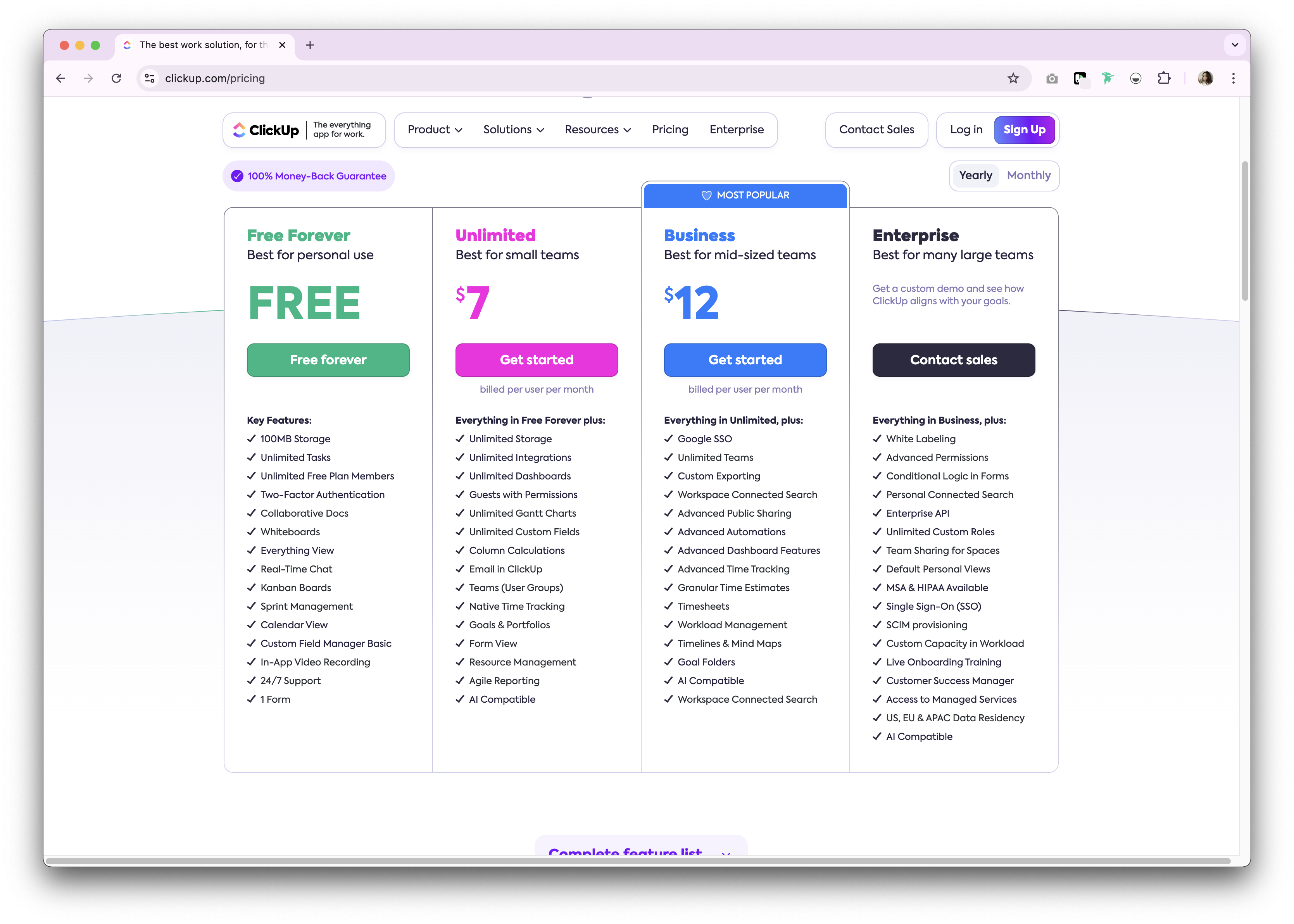
ClickUp biedt een gratis abonnement voor persoonlijk gebruik. Premium zijn beschikbaar als maandelijks of jaarlijks abonnement. Hieronder volgt een algemeen overzicht van de beschikbare jaarlijkse abonnementen.
- Onbeperkt: $7/gebruiker/maand.
- Zakelijk: $ 12 per gebruiker per maand.
- Onderneming: Niet bekendgemaakt.
Maak kennis met folk : het beste alternatief voor Salesforce ClickUp
Op zoek naar een betaalbaar alternatief dat perfect is voor groeiende bedrijven met 20 tot 50 teamleden? Wij raden folk aan. Een meermaals bekroond CRM-platform dat geliefd is om zijn gebruiksvriendelijke, plug-and-play CRM-systeem dat speciaal is ontworpen voor middelgrote teams die krachtige functionaliteit nodig hebben zonder de complexiteit van een groot bedrijf.

.png)
Belangrijkste kenmerken
- Gebruiksgemak en aanpasbaarheid: Pas de pijplijnen, dashboards, automatisering en e-mailreeksen eenvoudig aan, zodat u ze kunt gebruiken in uw verkoopcyclus en pijplijnbeheer, maar ook in andere bedrijfsfuncties zoals werving, marketing en meer.
- Integratie met sociale media: importeer personen en bedrijven uit LinkedIn, Sales Navigator, Instagram en X met één klik dankzij de Google Chrome-extensie folk.
- Contactsynchronisatie vanuit Gmail en Outlook: volledige e-mailsynchronisatie waarmee gebruikers alle communicatie rechtstreeks vanuit het CRM kunnen beheren.
- Vind e-mailadressen met één klik: contactverrijking mogelijk gemaakt door Apollo en Dropcontact u ontbrekende gegevens met één klik kunt invullen.
- E-mailreeksen: verstuur e-mailreeksen met herinneringen als uw leads niet op uw eerste e-mails reageren. Het bevat een AI-integratie waarmee u e-mails op grote schaal kunt personaliseren.
- Mobiele app: Bekijk je contacten en beheer je relaties onderweg met de folk appfolk .
Prijs en abonnementen
folk een gratis proefperiode van 14 dagen. Daarna zijn er betaalbare maand- of jaarabonnementen beschikbaar. Het jaarabonnement is als volgt.
- Standaard: $ 20 per gebruiker, per maand.
- Premium: $40 per gebruiker, per maand.
- Aangepast: vanaf $ 80 per gebruiker per maand.

Salesforce ClickUp: wat is het oordeel?
Het is duidelijk dat zowel Salesforce ClickUp hun eigen unieke sterke punten hebben. Salesforce een uitgebreid ecosysteem en is schaalbaar, waardoor het ideaal is voor grote ondernemingen met complexe behoeften. De veelzijdigheid en kosteneffectiviteit van ClickUp zijn zeer geschikt voor kleinere teams die op zoek zijn naar een uniforme oplossing voor taak- en projectbeheer. Voor groeiende bedrijven met 20-50 werknemers die een meer gepersonaliseerde benadering van relatiebeheer nodig hebben, biedt folk echter de optimale oplossing, waarbij gebruiksgemak wordt gecombineerd met krachtige aanpassingsmogelijkheden die speciaal zijn ontworpen voor middelgrote verkoopteams die functies op bedrijfsniveau willen zonder de complexiteit of kosten.
👉🏼 Probeer folk om een gebruiksvriendelijk, betaalbaar CRM te krijgen dat uw team binnen enkele minuten kan implementeren.
Veelgestelde vragen
Is ClickUp een CRM?
ClickUp is een projectmanagementtool met enkele CRM-achtige opties. Het mist native verkooppijplijnen, contactverrijking en outreach. Voor CRM-gebruik zijn aangepaste velden, weergaven en automatiseringen nodig, met beperkte verkooprapportage.
Kan ClickUp worden geïntegreerd met Salesforce?
Ja. ClickUp biedt een Salesforce om taken te koppelen aan kansen en accounts, ClickUp-taken aan te maken vanuit Salesforce en updates te synchroniseren. Connectors van derden, zoals Zapier of Make, kunnen workflows uitbreiden.
Hoe verhouden de prijzen Salesforce ClickUp zich tot elkaar?
Salesforce Cloud: Starter $25, Pro $80, Enterprise $165, Unlimited $330, Einstein 1 Sales $500 per gebruiker/maand. ClickUp: Gratis; Unlimited $7, Business $12 per gebruiker/maand; Enterprise op maat. Prijzen kunnen variëren afhankelijk van de factureringsperiode.
Wat is een goed alternatief voor Salesforce ClickUp?
folk biedt aanpasbare pijplijnen, contactverrijking, e-mailsynchronisatie en sequenties met automatisering. Jaarabonnementen: Standaard $ 20/gebruiker/maand, Premium , Aangepast vanaf $ 80, plus een proefperiode van 14 dagen. Meer informatie vindt u op folk.
Ontdek folk -
Net als de verkoopassistent die uw team nooit heeft gehad