



Discover folk - 人材主導型ビジネス向けCRM
Looking for a way to export the contact information you’ve been storing in Google? You’re in the right place.
In this blog post, we’ll cover:
- Google連絡先をエクスポートする方法のステップバイステップガイド
- 代わりに使えるクイックリンクです。
- 手間がかからず時間を節約できる選択肢。
Let’s get started.
Googleから連絡先をダウンロードする方法
You can export your contacts from your desktop, or mobile phone. Let’s look at how this works on the desktop first.
あなたのデスクトップから
1. Log into your Gmail account. Click the three-by-three icon on the top right to reveal a drop-down menu.

2. Click the Contacts icon - note that the order in which you see the icons might not be in this exact order, as this is customizable.
3. This will take you to your Google contact page. Alternatively, you can copy and paste contacts.google.com into the URL.
エクスポートする適切な連絡先を選択する
Googleの連絡先マネージャーから、エクスポートしたい連絡先を選択できます。これを行うには、次の2つの方法から選択できます:
- Select each contact individually: By checking the box next to your contact’s name.
- すべての連絡先を選択する:左上へ移動 > 選択アクション > すべて
選択した内容をエクスポートする
After you choose the contacts you want to export, at the top right, click More Actions > Export.
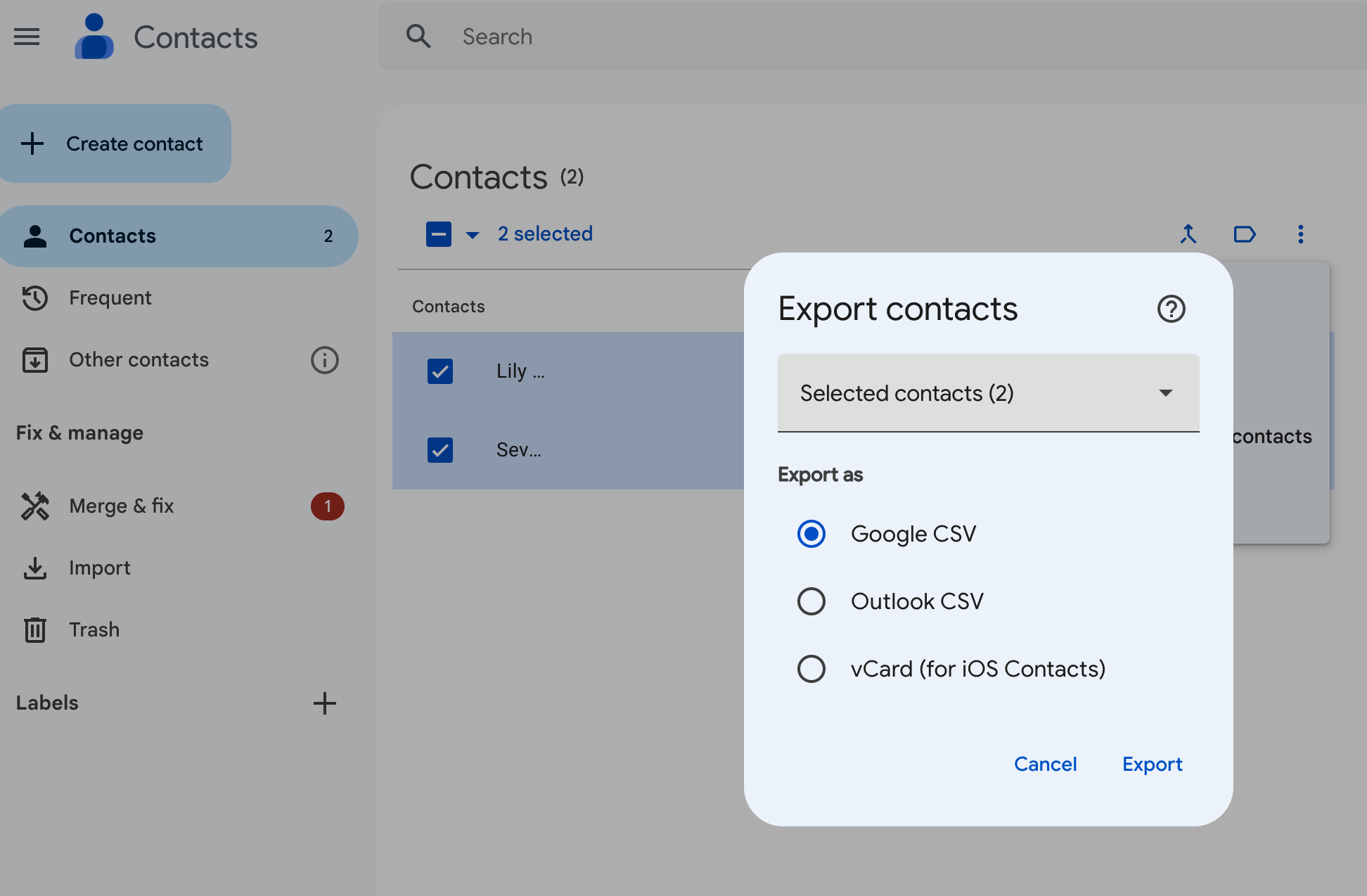
以下の3つの選択肢から選んでください:
- Google CSV:バックアップや連絡先を別のGoogleアカウントにインポートする場合に最適な方法です。
- Outlook CSV:このオプションは、連絡先をMicrosoft OutlookアカウントにOutlook連絡先としてインポートするためのものです。
- vCard: この オプションは、複数の連絡先をAppleアドレスブックにインポートするために使用します。CRMやその他のアプリケーションにも使用できます。
ご自身のニーズに最も関連性の高いオプションを選択し、「エクスポート」をクリックしてください。
あなたのAndroid端末から
Android users have the option of exporting their Google contacts from an Android mobile or tablet device. Unfortunately, if you’re on an iOS device, you’ll only be able to sync your contacts from Google.
Androidデバイスから連絡先をエクスポートするには:
- お使いの端末で連絡先アプリを開いてください
- 下部から「修正と管理」をタップし、次に「ファイルにエクスポート」を選択します。
- 連絡先をエクスポートするアカウントを1つ以上選択してください。
- Tap Export to .VCF file. (It’s not possible to export your contacts as a CSV format at the time of writing.)
なぜ連絡先をCRMと同期させるべきなのか
Make the most of folk’s contact sync feature so that you don’t waste time exporting your contacts manually.

すべての連絡先を一箇所に集約し、自動的に最新の状態に保ちます。LinkedIn(Sales Navigatorを含む)、Twitter、Instagramなどのソーシャルメディアプラットフォームや、GoogleやMicrosoft Outlookなどのメールアカウントから連絡先を同期できます。
Intrigued? There’s more on how that works, here.
結論
There you have it folks. Two ways to download your Google contacts – and a less cumbersome way of getting all your contacts into one place through folk. Try folk today, free.
フォークCRMを発見
あなたのチームがこれまで持っていなかったような販売アシスタントのように
