


Discoverfolk 人材主導型ビジネス向けCRM
AI agents are quickly moving beyond simple chat interfaces. They can search documents, update CRMs, schedule meetings, write code, and interact with business software. The challenge has never been the model itself. The challenge has been giving every AI system a reliable way to access external data and perform actions without building a custom integration every time.
That is exactly what the Model Context Protocol (MCP) was designed to solve. Instead of creating separate connections for every application and every AI model, MCP provides a standardized way for AI assistants to communicate with external tools, databases, and services.
As adoption continues to grow across products such as Claude, Cursor, and enterprise AI platforms, understanding MCP has become essential for developers, technical teams, and businesses building AI-powered workflows. The protocol is changing how applications expose data to AI and making intelligent automation significantly easier to scale.
What Is MCP? A Clear Definition
💡 The Model Context Protocol (MCP) is an open standard that allows AI models to securely communicate with external applications, data sources, and business tools through a common interface. Instead of creating a different integration for every model and every service, developers can expose their systems once through an MCP server and make them accessible to any compatible AI client.
In practical terms, MCP acts as a bridge between an AI assistant and the software it needs to use. Rather than relying only on the information available in its training data, an AI model can retrieve live information, execute actions, and work with real business context while following a standardized protocol.
An MCP ecosystem typically consists of three components:
- An MCP client, such as Claude Desktop, Cursor, or another compatible AI application, that sends requests.
- An MCP server, which exposes data, tools, and actions from a specific application or service.
- The underlying system, such as a CRM, database, email platform, file storage, or internal application, where the information actually lives.
For example, an AI sales assistant connected to a CRM through MCP can search for a company, retrieve recent conversations, create a new contact, update deal information, or generate a personalized follow-up without requiring a custom integration built specifically for that AI model.
As more software vendors adopt MCP, the protocol is becoming a common way to connect AI agents with the business systems they need to access, making integrations easier to build, maintain, and reuse across different AI platforms.
Why Use a MCP?
The real value of MCP is not the protocol itself. It is the ability to connect AI models with business applications through a single, standardized interface.
Instead of building and maintaining separate integrations for every AI platform, organizations can expose their data and actions once through an MCP server and make them available to any compatible AI client.
This approach reduces development effort while making AI systems far more useful in day-to-day operations. Rather than answering questions based only on training data, AI agents can access live business information, perform actions, and interact with the same systems employees already use.
MCP brings several practical advantages:
✔ Reduce integration work. Build one connection instead of maintaining separate integrations for every AI platform.
✔️ Access live business data. AI agents can retrieve up-to-date information from CRMs, databases, calendars, documentation, and other business tools.
✔️ Perform real actions. Beyond answering questions, AI can create records, update customer information, trigger workflows, or search company knowledge.
✔️ Support multiple AI clients. The same MCP server can work with compatible applications such as Claude Desktop, Cursor, and other AI tools without significant changes.
✔️ Keep sensitive data under control. Organizations decide which resources, tools, and permissions are exposed, making governance much easier than ad hoc integrations.
✔️ Future-proof AI integrations. As new AI models emerge, applications already exposed through MCP remain compatible without requiring an entirely new integration.
For businesses adopting AI agents, MCP removes one of the biggest barriers to deployment: connecting models to the software where work actually happens. Instead of building isolated AI experiences, teams can create assistants that understand business context and interact directly with operational systems.
How MCP Actually Works?
MCP follows a client-server architecture that gives AI models a standardized way to interact with external systems. Instead of communicating directly with every application, an AI assistant sends requests through an MCP client, which connects to one or more MCP servers exposing specific tools and data.
A typical MCP workflow looks like this:
- The user submits a request. For example, "Show every deal worth more than $20,000 that hasn't been updated this month."
- The AI client identifies the required tool. If the request requires external data, the client forwards it to the appropriate MCP server instead of relying only on the model's internal knowledge.
- The MCP server communicates with the application. It retrieves information or performs an action through the application's existing APIs or internal services.
- The application returns the result. The MCP server formats the response according to the protocol and sends it back to the AI client.
- The AI generates the final response. Because the model receives structured, real-time information, it can answer questions or complete tasks with accurate business context.
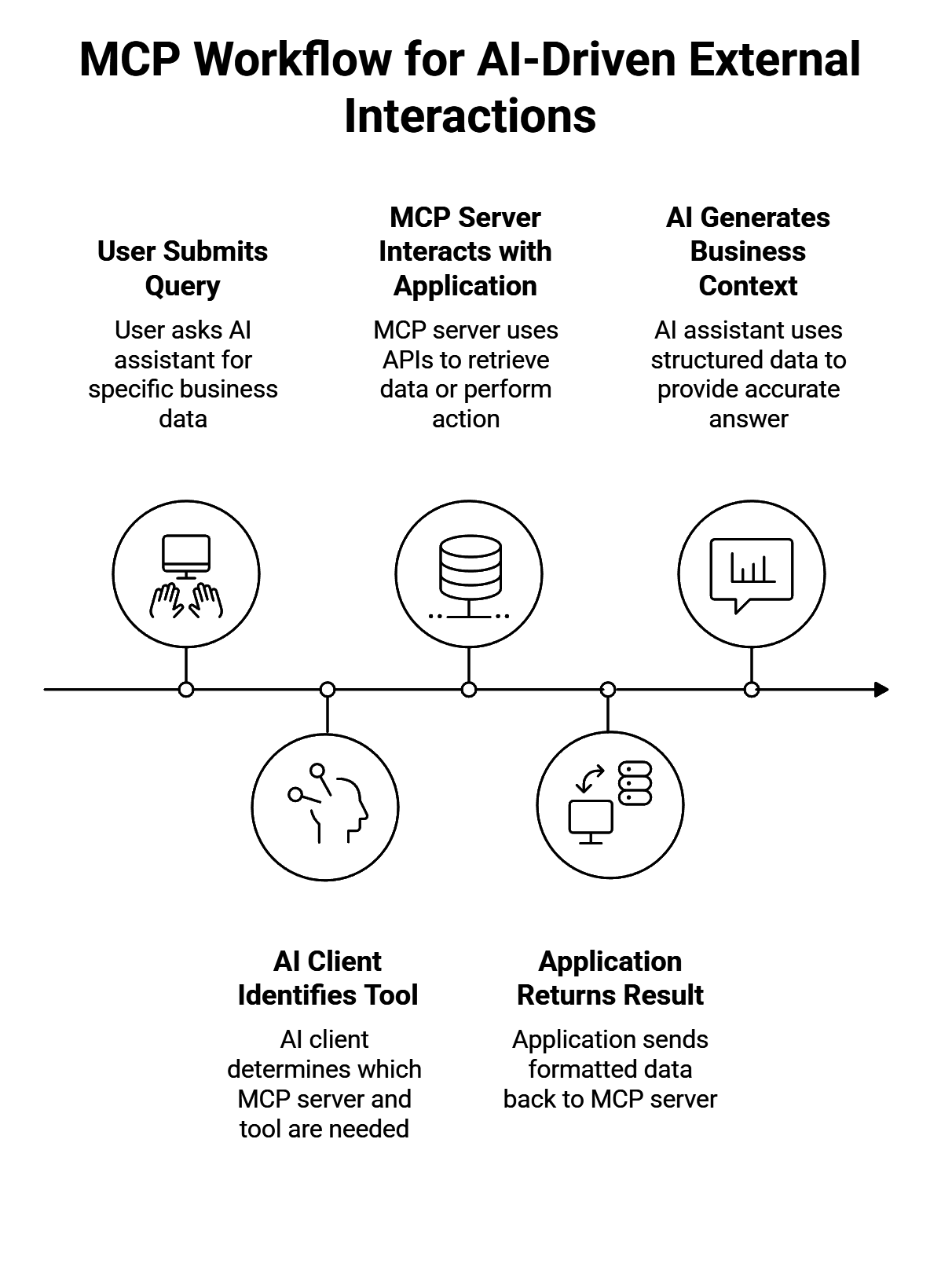
Several components make this possible:
→ MCP Client: The AI application that sends requests to MCP servers. Examples include Claude Desktop, Cursor, and other compatible AI assistants.
→ MCP Server: The connector that exposes tools, resources, and actions from an application.
→ Tools: Functions the AI can execute, such as creating a contact, updating a CRM record, sending an email, or searching a database.
→ Resources: Readable data sources, including documents, CRM records, files, knowledge bases, or databases.
→ Prompts: Reusable instructions that help AI clients perform recurring workflows more consistently.
This standardized architecture allows one AI client to connect with many business applications through different MCP servers, while each application only needs to expose its capabilities once. The result is a more scalable and maintainable foundation for AI-powered workflows.
MCP vs. APIs: What's the Difference?
👉 MCP and APIs are closely related, but they solve different problems. An API allows software applications to communicate with each other. MCP provides a standardized way for AI clients to use those APIs, tools, and data sources without requiring a custom integration for every model.
In other words, MCP does not replace APIs. It sits on top of them.
For example, a CRM may already expose an API to search contacts, create companies, or update deals. An MCP server wraps those capabilities in a format that any compatible AI client can understand. Once the server is available, the same functionality can be used by multiple AI applications without rebuilding the integration.
How to Create an MCP Server? 5 Easy Steps
Creating an MCP server means defining which data and actions an AI client can access, then exposing them through the protocol in a structured format. The server usually sits between the AI application and an existing API, database, or internal system.
A practical setup follows five steps:
- Choose the system to connect. Start with a clear use case, such as searching CRM records, querying a database, retrieving internal documents, or updating project information.
- Define the available tools. Each tool should represent a specific action the AI can perform, such as finding a contact, creating a deal, updating a field, or generating a report. Narrow, well-defined tools produce more reliable results than broad instructions.
- Expose relevant resources. Resources give the AI access to readable context, including files, records, documentation, account history, or structured datasets. Only expose the information required for the intended workflow.
- Configure authentication and permissions. The MCP server must respect the access rules of the underlying application. Authentication tokens, user permissions, and data scopes determine what the AI client can read or change.
- Connect and test an MCP-compatible client. Once the server is running, connect it to an AI client and test common requests, edge cases, permission failures, and ambiguous prompts before deploying the workflow more widely.
A reliable MCP server should expose a limited set of predictable capabilities rather than the entire underlying system. Clear tool descriptions, structured inputs, validation rules, and permission controls reduce errors and help the AI select the correct action.
💡 folk tip: The server also needs monitoring. Teams should track failed requests, tool usage, authentication issues, and unexpected outputs as workflows evolve. MCP standardizes the connection, but the quality of the implementation still depends on how carefully each tool and resource is designed.
How folk MCP Connects AI Agents to Your CRM!
AI agents are only as effective as the business context they can access. A CRM contains customer relationships, sales activity, pipeline data, meeting history, and account information, making it one of the most valuable systems to connect through MCP.
The folk MCP server allows compatible AI clients to interact directly with your CRM. Instead of switching between applications or manually searching for information, AI agents can retrieve customer context, update records, and perform CRM actions from a single conversation.
With folk MCP, AI agents can:
✔️ Search contacts and companies.
✔️ Retrieve customer profiles and relationship history.
✔️ Access pipeline and deal information.
✔️ Create new contacts and companies.
✔️ Update existing CRM records.
✔️ Find account owners and collaborators.
✔️ Work with live CRM data instead of outdated snapshots.
These capabilities support a wide range of sales workflows. An AI assistant can summarize an account before a meeting, identify stalled opportunities, retrieve the latest customer interactions, or update a deal immediately after a call. Instead of acting as a standalone chatbot, the assistant becomes an active participant in the sales process.
Because folk combines CRM data with AI-native workflows, the MCP server helps organizations integrate AI into everyday operations without building custom connectors for every assistant. As more AI clients adopt MCP, the same CRM connection can support new workflows while keeping customer data centralized and up to date.
結論
The Model Context Protocol is becoming a common standard for connecting AI models to the systems where business data lives. Instead of building separate integrations for every AI platform, organizations can expose their applications once and make them available to any compatible AI client.
For developers, MCP simplifies integration work. For businesses, it makes AI agents far more useful by giving them access to live data and real business actions rather than static knowledge alone.
When those workflows involve customer relationships, a CRM becomes one of the most valuable systems to connect. With folk MCP, AI assistants can search contacts, update records, retrieve pipeline information, and interact with CRM data in real time, making sales workflows faster, more consistent, and easier to scale.
よくあるご質問
Is MCP an API?
❌ No. MCP is not an API. APIs allow applications to communicate with each other, while MCP provides a standardized way for AI clients to access APIs, tools, and data sources. In most cases, an MCP server uses existing APIs to expose functionality to AI assistants.
Which AI applications support MCP?
The number of compatible AI applications continues to grow. Popular examples include Claude Desktop, Cursor, and other AI development environments that support the Model Context Protocol. As adoption increases, more AI platforms are expected to add native MCP support.
Is MCP only for developers?
No. Developers typically build and maintain MCP servers, but the benefits extend to entire organizations. Sales, customer support, engineering, operations, and marketing teams can all use AI assistants connected through MCP to access business data and automate repetitive tasks.
Can MCP connect AI to a CRM?
Yes. One of the most common business use cases for MCP is connecting AI assistants to CRM platforms. An MCP server can allow AI agents to search contacts, retrieve customer history, update deals, create new records, and interact with live CRM data instead of relying on outdated information.
folk を発見
あなたのチームがこれまで持っていなかったような販売アシスタントのように