


Discoverfolk 人材主導型ビジネス向けCRM
ビジネスニーズに合ったCRMを選ぶ際、Pipedrive よく候補に挙がる人気の選択肢です。両プラットフォームとも中小企業向けに設計されており、営業パイプライン管理、連絡先整理、タスク自動化のためのツールを提供しています。ただし、CRMへのアプローチは異なるため、それぞれの主要機能、強み、制限を理解することが重要です。
このブログ記事では、Pipedrive CRMPipedrive 比較し、どちらが御社のワークフローや成長目標により合致するか判断するお手伝いをします。さらに、 folk という有力な代替案もご紹介します。

| 主なポイント |
|---|
|
Pipedrive何ですか?
Pipedrive は中小企業向けのウェブベースCRMで、リード管理、自動化、メール連携、カスタマイズ可能なパイプラインを提供し、営業活動を最適化します。
Pipedriveの主な機能:
- リードおよび案件管理:顧客データ、インタラクション、販売パイプラインを一元管理するツールにより、チームが迅速に機会に対応できるよう支援します。
- 営業自動化:ワークフロー自動化により、リードの振り分け、フォローアップ、メールシーケンスなどの反復作業を処理し、営業チームが成約に集中できるようにします。
- メール連携:完全なメール同期、テンプレート、追跡機能により、ユーザーはCRMから直接すべてのコミュニケーションを管理できます。
- 高度なレポートと分析:販売実績の追跡、収益予測、実用的なインサイトの獲得を実現するリアルタイムデータ分析とカスタムレポートツール。
- カスタマイズとセキュリティ:パイプライン、フィールド、ユーザー権限をカスタマイズするオプションと、データを保護する堅牢なセキュリティ対策。
カプセルCRMとは何ですか?
カプセルCRMは、中小企業向けに設計された使いやすい顧客関係管理プラットフォームです。洗練された直感的なインターフェースにより、ユーザーは顧客関係の管理、販売パイプラインの追跡、タスクやコミュニケーションの効率的な整理を実現できます。
カプセルCRMの主な機能
- コンタクト管理:ユーザーが顧客情報を整理し、連絡履歴を追跡し、関係を一元的に管理できるようにします。
- 営業パイプライン管理:商談や取引の進捗を追跡し、営業段階を視覚的に把握できる概要を提供することで、進捗状況を監視します。
- タスク管理:リマインダーの設定、ToDoリストの作成、締切の追跡が可能で、効率的な生産性を実現します。
- カスタマイズオプション:特定のビジネスニーズに合わせてCRMを調整するためのカスタマイズ可能なフィールドとワークフローを提供します。
- サードパーティ連携:Google Workspace、Xero、Mailchimpなどの人気ツールと連携し、機能をMailchimp 。
Pipedrive . Capsule CRM:機能比較
主な違いを一目で
- Pipedrive:強化された自動化、統合メールツール、AIセールスアシスタント。
- カプセル:よりシンプルなUI、タスク優先のワークフロー、トランスポンによるアウトリーチ。
- 中小企業向けパイプライン、レポート作成、および連携機能。
2つのCRMソフトウェアソリューションの主要機能を分析し、販売自動化、メールマーケティングツール、および連絡先管理について詳しく見ていきましょう。
1. 営業パイプライン管理
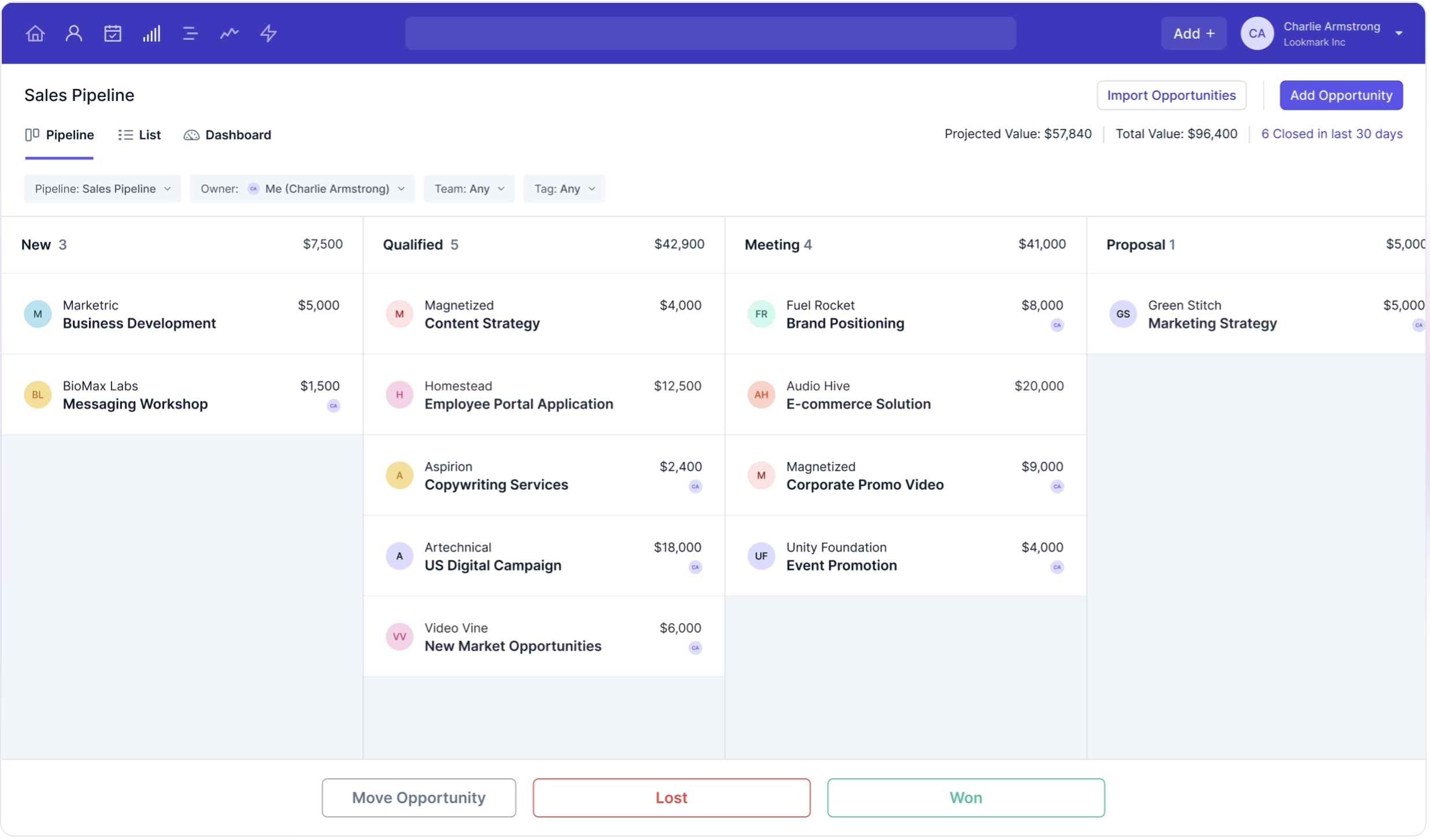
Pipedrive 、従来の販売パイプライン管理プロセスに密接に沿ったユーザーフレンドリーなカンバンPipedrive 、ユーザーが直感的に販売活動を可視化・管理できるようにします。この視覚的なアプローチにより、チームは整理された状態を保ち、効率的に取引を成立させることに集中できます。一方、Capsule CRMは多機能なパイプライン管理機能を提供し、ユーザーが様々な段階を通じて販売機会を追跡できるようにします。 Capsuleでは、営業パイプラインをリスト、カンバン、dashboard で表示dashboard ワークフローのニーズに最適な形式dashboard 。この適応性は、営業プロセスの管理によりカスタマイズされたアプローチを好むチームにとって特に有益です。Pipedrive の双方は、営業パイプラインの可視性を高めるツールの提供に優れていますが、どちらを選択するかは、ユーザーやチームの具体的な視覚的・機能的な好みに左右される可能性があります。 結局のところ、両プラットフォームとも、強力なパイプライン管理機能を提供することで、営業プロセスの効率化、チームコラボレーションの向上、収益成長の促進を目指しています。

2. 使いやすさ
Pipedrive 直感的なインターフェースでPipedrive 、ユーザーが効率的に営業プロセスを管理しナビゲートすることを容易にします。Capsule CRMもまた、ユーザーフレンドリーな体験を提供し、シンプルなデザインにより急な学習曲線なしに機能を素早くアクセス・活用できます。
3. コンタクトエンリッチメント
Pipedrive連絡先情報充実機能Pipedrive、Clay.comなどのツールと連携して外部ソースから追加情報を取得し、役職、企業情報、ソーシャルメディアのプロフィールなどの関連データを自動的にフィールドに入力する仕組みになっています。一方、Capsule CRMは連絡先情報の充実機能に重点を置いておらず、基本的なデータ入力やユーザーによる入力に依存する傾向があります。
4. アウトリーチ
PipedriveビルダーPipedrive、ニュースレターなどのキャンペーンや、レスポンシブなメールマーケティングキャンペーン向けに設計されています。Capsule CRMのアウトリーチソリューションは、メールツール「Transpond」との連携により、メールマーケティングの簡素化とフォローアップの自動化に重点を置いています。これによりユーザーはメールキャンペーンをスケジュール設定・自動化でき、アウトリーチ活動を効率化できます。
5. 自動化
Pipedrive機能Pipedrive、データ入力、フォローアップ、リード割り当てなどの反復作業を自動化することで、営業プロセスを効率化します。Capsule CRMは、フォローアップやデータ更新といった反復作業の自動化を含む、営業および顧客関係プロセスの効率化を支援する自動化機能を提供します。そのワークフロー自動化により、ユーザーは営業パイプラインや顧客ステータスの変化に基づいてアクションのトリガーを設定できます。
6. 統合
Pipedrive 300以上の連携Pipedrive 、ユーザーがCRMをマーケティングオートメーションやメールプラットフォームなど、様々なカテゴリーのサードパーティ製ツールと接続できるようにします。Capsule CRMは、メールやカレンダーの同期のためのGoogle WorkspaceやMicrosoft 365といった生産性向上ツールを含む、様々な人気サードパーティ製アプリケーションと連携します。また、Xeroなどの会計ソフトウェアとも接続します。
7. 人工知能
Pipedrive Assistantを通じてAIPipedrive 、営業活動を最適化するための実用的な洞察と提案を提供します。Capsule CRMはより高度なプラットフォームと比較してAI統合機能が限定的であり、主に基本的な自動化による効率向上に焦点を当てています。ただし、AI機能を提供するサードパーティ製ツールとの連携はサポートしています。
価格とプランの比較
Pipedrive Capsule CRMの価格とプランについて詳しく見ていきましょう。
Pipedrive
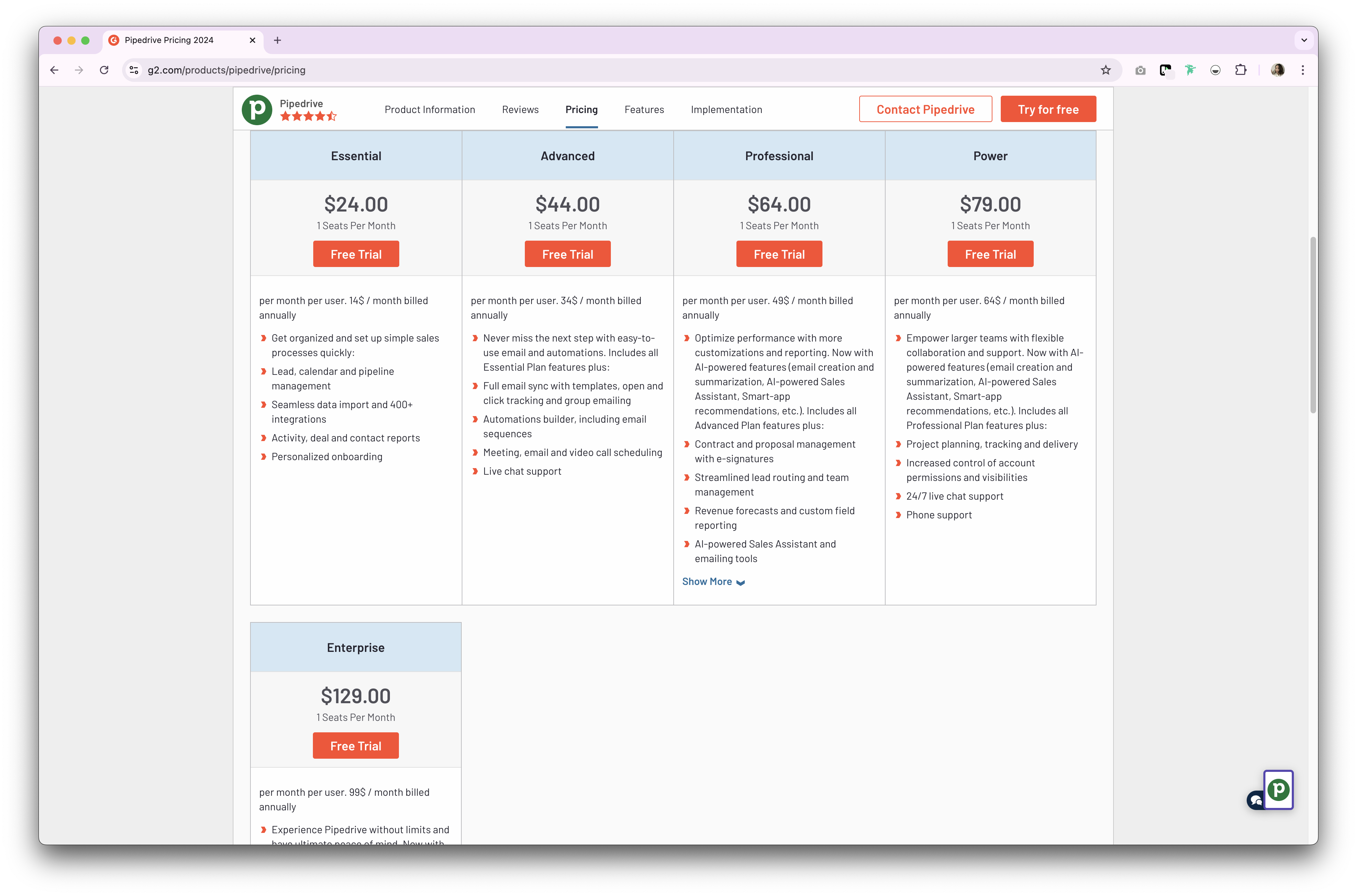
Pipedrive 、CRM製品向けに2種類のプランPipedrive 。いずれも月額または年額サブスクリプション形式です。年額サブスクリプションプランは以下の通りです。
- 基本プラン:ユーザー1人あたり月額24ドルから。
- アドバンスプラン:ユーザーあたり月額44ドルから。
- 料金プラン:ユーザーあたり月額79ドルから。
- エンタープライズプラン:ユーザーあたり月額129ドルから。
👉🏼folk を試して、フォローアップを見逃さないようにしましょう
カプセルCRMの価格
- スタータープラン: ユーザー1人あたり月額21ドルから。
- 成長プラン: ユーザーあたり月額38ドルから。
- アドバンスプラン: ユーザーあたり月額60ドルから。
- 究極プラン: ユーザーあたり月額75ドルから。

folk のご紹介:Pipedrive Capsule CRMに代わる最良の選択肢
手頃な価格の代替案をお探しですか?20~50名規模の営業チームには、folk 最適な選択肢です。この受賞歴のあるCRMプラットフォームは、中規模営業組織が俊敏性と効率性を維持するために必要なシンプルさを保ちつつ、成長するチームに合わせて拡張できるよう特別に設計されています。
主な特徴
- 使いやすさとカスタマイズ性:パイプライン、dashboards、自動化、メールシーケンスを簡単にカスタマイズできるため、営業サイクルやパイプライン管理はもちろん、採用、マーケティングなど他の業務機能にも幅広く活用できます。
- ソーシャルメディア連携: folk Chrome拡張機能により、LinkedIn、Sales Navigator、Instagram、Xからワンクリックで人物や企業をインポートできます。
- GmailおよびOutlookからの連絡先同期:完全なメール同期により、ユーザーはCRMから直接すべての通信を管理できます。
- ワンクリックでメールアドレスを検索: ApolloとDropcontact による連絡先情報補完機能で、不足しているデータポイントをワンクリックで入力可能Dropcontact
- メールシーケンス:見込み客が最初のメールに返信しない場合、リマインダー付きのメールシーケンスを送信します。AI統合機能により、大規模なメールパーソナライゼーションを実現します。


価格とプラン
folk 14日間の無料トライアルfolk 。その後は、手頃な月額または年額サブスクリプションプランが利用可能です。年額サブスクリプションプランは以下の通りです。
- スタンダードプラン:1ユーザーあたり月額20ドル。
- Premium:ユーザー1人あたり月額40ドル。
- カスタムプラン:ユーザー1人あたり月額80ドルから。

Pipedrive . Capsule CRM:どちらが勝者か?
Pipedrive CRMはどちらも、中小企業向けに設計された強力な機能を提供しています。Pipedrive 営業自動化とカスタマイズ性にPipedrive 、Capsule CRMは直感的なインターフェースとタスク管理機能が特徴です。しかし、20~50名の営業チームが高度な機能性とコスト効率の最適なバランスを求める場合、folk 優れた選択肢となります。成長中のチームに必要な柔軟性を維持しつつ、企業向けレベルの機能を低コストで提供します。
👉🏼folk を試して、チームでコンタクトベースのリマインダーを管理しましょう
よくある質問
Pipedrive は何に使われますか?
Pipedrive 、中小企業の営業チームが商談とパイプラインを管理し、活動を追跡し、メールを同期し、フォローアップを自動化し、業績を報告して収益を予測し、close 商談をclose Pipedrive 。
Pipedrive Capsule CRMの違いは何ですか?
Pipedrive 自動化、統合メール、AIセールスアシスタントPipedrive 。Capsuleは柔軟なパイプラインビューとTranspond経由のメール機能を備えた、シンプルな連絡先・タスク管理に焦点を当てています。両者ともパイプラインとレポート機能で中小企業(SMB)を支援します。
Capsule CRMにはメールマーケティング機能はありますか?
はい。Capsuleはニュースレター、ドリップキャンペーン、自動フォローアップのためにTranspondと接続します。連絡先とセグメントはCapsuleから同期され、エンゲージメントデータは連絡先と商談機会に戻ります。
Pipedrive Capsuleの代わりになる良いツールは何ですか?
folk 、カスタマイズ可能なパイプライン、コンタクトエンリッチメント、メールシーケンス、自動化機能を低コストで提供します。年間プラン:スタンダード $20/ユーザー/月、Premium 、カスタム $80~から。14日間の無料トライアルfolk をお試しください。
folk を発見
あなたのチームがこれまで持っていなかったような販売アシスタントのように