


Entdecken Sie folk das CRM für personenorientierte Unternehmen
An SDR sends an email on Monday. A teammate contacts the same prospect on LinkedIn on Tuesday. By Wednesday, the prospect replies, but the next automated follow-up still goes out. The team uses several channels. The conversation falls apart.
Multichannel outreach connects email, LinkedIn, phone calls, and other relevant channels through a coordinated sales process. Each touchpoint builds on the previous one, with a clear purpose and someone responsible for what happens next.
For sales teams, the challenge starts with deciding who to contact, what to say, and when to switch channels. This guide covers how to build that strategy, create a practical outreach sequence, and choose tools that help SDRs turn scattered activity into qualified conversations.
Multichannel Outreach: Quick Overview
- What it means: Use two or more channels to reach prospects through a coordinated sales process.
- Where to start: Choose a specific audience, identify a relevant reason to reach out, and select channels your prospects use.
- What a sequence includes: Messages, timing, assigned owners, and rules that stop follow-ups after a reply, opt-out, or booked meeting.
- What to measure: Positive replies, qualified meetings, and pipeline generated.
- What tools support: Prospect research, campaign execution, and a shared record of conversations in a CRM for sales teams.
What is multichannel outreach?
💡 Multichannel outreach is a sales approach that combines two or more communication channels to reach prospects through coordinated touchpoints. Sales teams typically use email, LinkedIn, and phone calls to start conversations and follow up.
For example, an SDR emails a sales leader about a hiring announcement, connects with them on LinkedIn, then calls to ask how the team manages onboarding. Each interaction approaches the same business issue from a different angle.
The coordination matters. Before reaching out, reps check previous messages, account ownership, and responses. When a prospect replies, that conversation determines the next action.
Which channels belong in a multichannel outreach strategy?
Each channel needs a purpose. Choose your mix based on where prospects spend time, how they communicate, and whether you already have a relationship.
✅ Email: Explain your reason for reaching out and ask a focused question. A company expansion, leadership change, or hiring announcement can provide a relevant starting point.
✅ LinkedIn: Research the prospect’s responsibilities, establish professional context, and start a conversation around a specific business priority. LinkedIn outreach tools help reps organize prospecting activity and follow-ups.
✅ Phone: Explore a problem through a direct conversation. Use previous touchpoints as context, then ask how the prospect currently handles the challenge.
✅ WhatsApp or SMS: Continue an exchange when the prospect agrees to use that channel. These channels suit requested updates and agreed next steps when the relationship and applicable requirements support their use.
Start with the channels your team can manage consistently. Adding another channel creates little value if reps miss replies or repeat messages.
Multichannel vs. omnichannel outreach: What’s the difference?
Multichannel outreach emphasizes the use of several channels. Omnichannel outreach emphasizes continuity between them. The terms overlap when teams share conversation history and adapt their next steps to prospect responses.
👉 Multichannel outreach: An SDR organizes email, LinkedIn, and phone touchpoints within a prospecting sequence. Each channel gives the rep another way to reach the prospect.
👉 Omnichannel outreach: The team connects those interactions so the conversation carries across channels. A LinkedIn reply, for example, prompts the SDR to pause scheduled outreach and respond using the context already available.
For sales teams, the practical priority stays the same: every rep needs to know what happens in the conversation before making the next move.
What is a multichannel outreach sequence?
A multichannel outreach sequence is a planned series of sales interactions across two or more channels, with a defined order, timing, and rules for what happens next. It tells reps when to send an email, make a call, or follow up on LinkedIn—and when to stop.
For example, a sequence starts with an email about a prospect’s hiring plans. Two days later, the SDR sends a LinkedIn connection request. A call follows to discuss how the team handles onboarding as headcount grows. If the prospect answers the first email, the rep pauses the remaining prospecting steps and continues the conversation.
The five elements of an effective sequence
- A defined audience: Group prospects who share a relevant challenge, role, or buying context. A sequence for sales leaders hiring SDRs needs different messaging from one targeting founders who manage sales themselves.
- A specific reason to reach out: Connect your offer to something that matters to the prospect. Explain why the conversation makes sense now, using a verified business signal or a problem relevant to their responsibilities.
- A purpose and timing for each touchpoint: Decide what each interaction adds and how much time separates it from the previous step. A follow-up can introduce evidence, ask a sharper question, or reach the prospect through another channel.
- A clear owner and next action: Assign responsibility for the contact and each manual task. Reps need to see which actions they complete and which ones remain outstanding.
- Explicit stop rules: Define how replies, opt-outs, booked meetings, and invalid contact details affect the sequence. A response on one channel needs to inform activity across the others.
Automated steps vs. manual sales tasks
A sequence can combine automation with actions that require a rep’s judgment. The distinction matters when you build the workflow and compare tools.
- Automated steps execute according to configured conditions. For example, email sequences schedule follow-up messages after a specified delay.
- Manual tasks prompt a rep to take action, such as calling a prospect, reviewing an account, or writing a contextual LinkedIn message.
- Conditional steps change the workflow based on an outcome, where the tool supports that behavior. An email reply might stop subsequent emails, while a response on another channel may require the rep to pause the sequence manually.
Check exactly what your platform detects and stops. An email reply rule does not necessarily recognize a phone conversation or a LinkedIn response.
How to Create a Multichannel Outreach Strategy in 7 Steps
A multichannel outreach strategy gives your team a repeatable way to select prospects, coordinate touchpoints, and turn replies into sales conversations. Build the workflow before you enroll your first contacts.
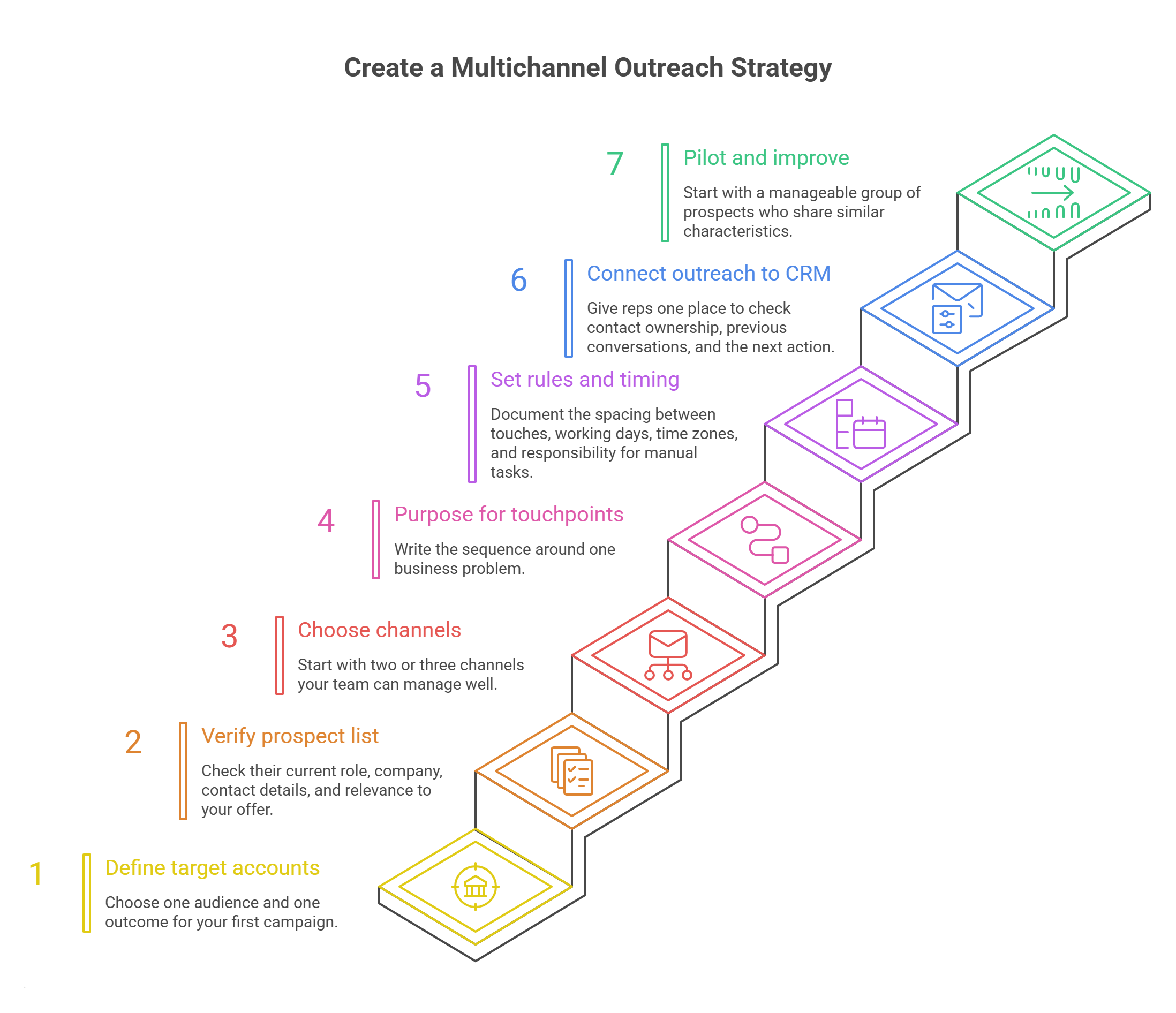
1. Define your target accounts and sales objective
Choose one audience and one outcome for your first campaign. “Book qualified discovery calls with sales leaders at growing B2B SaaS companies” gives SDRs a clearer direction than “generate more leads.”
Document the criteria that determine who belongs in the campaign:
✅ Account fit: Industry, company size, market, and relevant business conditions.
✅ Contact fit: Responsibilities, decision-making role, and likely involvement in the problem.
✅ Exclusions: Current customers, active opportunities, previous opt-outs, and accounts another rep already manages.
✅ Qualification: What makes a conversation worth passing to an account executive.
Use these criteria to review prospects before adding them to a sequence.
2. Build and verify your prospect list
Create a focused list of contacts who meet your criteria. Check their current role, company, contact details, and relevance to your offer.
Add enough context to explain why each person belongs in the campaign. A verified hiring announcement or a recent conversation gives a rep something useful to reference.
Before launch:
→ Remove duplicate contacts and overlapping account assignments.
→ Verify email addresses and check available phone numbers.
→ Record the source of each contact.
→ Assign an owner.
→ Check suppression lists and previous interactions.
Keep these details in the contact record so teammates can review them without searching through separate spreadsheets.
3. Choose channels your prospects actually use
Start with two or three channels your team can manage well. Consider the prospect’s role, market, and existing relationship with your company.
LinkedIn can provide useful professional context for an active sales leader. Phone outreach may suit a buyer who spends little time on the platform. An existing contact may already express a preference for email.
Give each channel a job:
- Email: Explain the business relevance of your outreach.
- LinkedIn: Establish professional context and make a connection.
- Phone: Ask questions and assess whether a deeper conversation makes sense.
Add other channels when prospect preferences and permissions support their use.
4. Give every touchpoint a distinct purpose
Write the sequence around one business problem, then decide what each interaction contributes.
For a sales leader expanding an SDR team, the progression might look like this:
- First email: Ask how the team assigns prospect ownership as headcount grows.
- LinkedIn interaction: Establish a connection using relevant professional context.
- Call: Explore how reps currently coordinate their outreach.
- Follow-up email: Share a concrete example of how a team handles the same challenge.
- Final message: Ask whether the issue deserves attention now or whether to pause.
Keep each message focused on one next step. A short question often gives the prospect an easier way to respond than several requests packed into one email.
5. Set your timing, ownership, and stop rules
Decide how the sequence works when nobody responds and how it changes when someone does.
Document the spacing between touches, working days, time zones, and responsibility for manual tasks. Review the total contact pressure across the account, especially when several stakeholders enter different sequences.
Set clear rules for common outcomes:
- Positive reply: Pause prospecting and assign the response to the owner.
- Booked meeting: Stop acquisition messages and move to meeting preparation.
- “Contact me next month”: Pause activity and create a dated follow-up.
- Opt-out: Record the request and suppress further outreach as appropriate.
- Wrong contact: Update the record and assess any referral before proceeding.
Check which rules your software handles automatically. For example, folk documents a stop-if-replies condition for email sequences. Teams still need a process for responses that arrive through other channels.
6. Connect outreach activity to your CRM
Give reps one place to check contact ownership, previous conversations, and the next action. Connect the tools your team uses and define how reps record activity that does not sync automatically.
Each prospect record needs a few practical details:
- Contact and account owner.
- Relevant business context.
- Latest interaction and response.
- Current outreach status.
- Next action and due date.
- Qualification notes for the handoff.
A CRM for sales teams helps keep this context accessible as prospects move from initial outreach to active opportunities. In folk, teams can organize contacts, manage pipelines, and coordinate follow-ups around shared records.
👉 Try folk CRM for free (14 days, no credit card)
7. Launch a small pilot and improve one variable at a time
Start with a manageable group of prospects who share similar characteristics. Check that messages send correctly, tasks reach the right reps, and stop rules work before expanding the campaign.
Review both results and conversations. Positive replies reveal what resonates; objections can expose weak targeting, unclear messaging, or poor timing.
Choose one variable to test:
- The audience segment.
- The opening message.
- The call to action.
- The channel order.
- The spacing between touchpoints.
Compare outcomes over a consistent observation period and account for differences in prospect quality. Use the findings to refine the next batch, with qualified conversations and pipeline as the measures that guide expansion.
A Multichannel Outreach Sequence Example for B2B Sales
This sequence targets a sales leader who is hiring SDRs and needs to coordinate prospect ownership and follow-ups. It combines email, LinkedIn, and phone over two weeks.
Use the timing as a starting point to test. Check for responses before each touchpoint, and pause scheduled prospecting as soon as a conversation starts.
How the Sequence Changes When a Prospect Responds
👉 Describes a relevant problem: Pause the sequence, answer their questions, and suggest a specific next step.
👉 Requests information: Send the requested details and agree on whether a follow-up makes sense.
👉 Refers you to a colleague: Confirm the referral context before contacting that person.
👉 Suggests a later date: Pause current outreach and create a dated follow-up task.
👉 Books a meeting: Stop prospecting messages and prepare for the conversation.
👉 Declines or opts out: Record the response and stop further prospecting as appropriate.
👉 Does not respond: Finish the planned sequence, then pause rather than automatically increasing contact frequency.
6 Best Multichannel Outreach Tools for SDR Teams
1. folk
⭐⭐⭐⭐⭐ (G2)
Best for: Sales teams that need shared contact records, email outreach, and coordinated follow-ups.
folk brings contact management and outreach into the same workspace. Reps capture prospects from LinkedIn, enrich contact details, organize segmented lists, and manage opportunities without maintaining separate spreadsheets.
For multichannel outreach, its value centers on continuity. Email and WhatsApp synchronization help teammates review previous exchanges, while shared notes and reminders make the next action easier to identify. Reps also use native email sequences to schedule follow-ups.
Funktionen
- LinkedIn contact capture: Import prospects through the folkX Chrome extension.
- Contact enrichment: Find additional contact details and prepare prospect lists.
- Email campaigns and sequences: Personalize outreach and schedule email follow-ups.
- Shared relationship context: Review synced interactions, notes, and reminders on contact records.
- Pipeline management: Track prospects as conversations develop into opportunities.
Vorteile
- ✅ Combines prospect organization, email outreach, and pipeline tracking.
- ✅ Gives teammates access to shared context before they contact a prospect.
- ✅ Supports segmentation and personalized messages using contact fields.
Nachteile
- ❌ Email sequences do not provide a complete native sequence builder for automated LinkedIn actions and phone calls.
- ❌ Teams that need advanced dialing or extensive cross-channel automation require additional tools.
Preisgestaltung
- Standard: $24 per member per month, billed annually.
- Premium: $48 per member per month, billed annually. Includes email sequences.
- See folk pricing for plan limits and billing options.
2. lemlist
⭐⭐⭐⭐⭐ (G2)
Best for: SDR teams that prioritize personalized campaigns across email, LinkedIn, and phone.
lemlist focuses on outreach execution. Reps build sequences that combine email follow-ups, LinkedIn actions, and calling steps, with prospecting and enrichment tools available in the same platform.
Funktionen
- Multichannel sequences: Coordinate email, LinkedIn, calls, and SMS.
- LinkedIn automation: Include connection requests and messages in campaigns.
- Built-in dialer: Make calls within the outreach workflow.
- Prospect data: Find contacts and enrich email addresses and phone numbers.
- Deliverability tools: Monitor sending infrastructure and email delivery.
Vorteile
- ✅ Combines several outreach channels in one sequence.
- ✅ Includes prospecting tools alongside campaign execution.
- ✅ Supports teams that need both automated messages and calling steps.
Nachteile
- ❌ The Email plan excludes the broader multichannel feature set.
- ❌ WhatsApp automation and additional data needs can increase costs.
Preisgestaltung
- Email: From $55 per month, billed annually.
- Multichannel: From $87 per user per month, billed annually.
- Enterprise: Individuelle Preisgestaltung.
- Additional costs: WhatsApp automation and data add-ons depend on requirements.
3. Apollo
⭐⭐⭐⭐⭐ (G2)
Best for: SDR teams that need prospect data and outreach execution in the same platform.
Apollo connects contact discovery with sales engagement. Reps search for relevant accounts, build prospect lists, and enroll contacts in sequences without transferring every list between separate tools.
Its multichannel workflows combine email with calling and LinkedIn tasks. Teams should distinguish those tasks from fully automated LinkedIn messaging.
Funktionen
- Contact and account search: Build lists using company and contact criteria.
- Data enrichment: Add prospect details to existing records.
- Sales sequences: Organize automated emails and manual follow-up tasks.
- Calling: Access dialer capabilities according to the plan.
- CRM integrations: Connect prospecting activity with existing sales records.
Vorteile
- ✅ Brings prospect research and engagement together.
- ✅ Offers a free plan for evaluating the platform.
- ✅ Supports teams that regularly build new outbound lists.
Nachteile
- ❌ Data access and enrichment require credit management.
- ❌ Dialer capabilities and workflow features vary by plan.
Preisgestaltung
- Free: $0.
- Basic: $49 per user per month, billed annually.
- Professional: $79 per user per month, billed annually.
- Organization: $119 per user per month, billed annually, with a three-user minimum.
4. La Growth Machine
⭐⭐⭐⭐⭐ (G2)
Best for: Teams that build their prospecting workflow around LinkedIn and email.
La Growth Machine organizes outreach around sending identities. Teams pay for the identities that run campaigns, while colleagues can help prepare lists and manage responses within plan limits.
LinkedIn and email sequences form the core workflow. Higher plans add custom sequences, calling capabilities, and CRM synchronization.
Funktionen
- LinkedIn and email sequences: Coordinate interactions across both channels.
- Voice messages: Add LinkedIn voice messages to outreach.
- Enrichment: Find email addresses and phone numbers through multiple providers.
- Multichannel inbox: Manage conversations on supported plans.
- Custom sequences and testing: Adapt campaigns and compare variations on Pro and above.
Vorteile
- ✅ Combines LinkedIn and email from the entry plan.
- ✅ Lets teammates collaborate without purchasing a sending identity for everyone.
- ✅ Offers templates for getting initial campaigns running.
Nachteile
- ❌ Native HubSpot and Pipedrive synchronization requires Ultimate.
- ❌ Costs rise as the team adds sending identities.
Preisgestaltung
- Basic: €50 per identity per month, billed annually.
- Pro: €100 per identity per month, billed annually.
- Ultimate: €150 per identity per month, billed annually.
- Monthly billing: €60, €120, and €180 per identity, respectively.
5. Reply.io
⭐⭐⭐⭐⭐ (G2)
Best for: SDR teams that need conditional sequences across several outreach channels.
Reply.io helps teams coordinate email, LinkedIn, calls, and SMS. Its sequence builder supports workflows that change according to configured conditions, while reporting helps managers compare channel performance.
The distinction between its Email Volume and Multichannel plans matters: an email-focused subscription can require extra channel purchases.
Funktionen
- Conditional sequences: Define different paths through an outreach workflow.
- LinkedIn automation: Add LinkedIn activity to supported campaigns.
- Calls and SMS: Include additional contact methods alongside email.
- Unified inbox: Organize responses in a shared interface.
- Performance reports: Review team activity and channel efficiency.
Vorteile
- ✅ Supports several channels within one outreach platform.
- ✅ Offers conditional workflows for more flexible sequences.
- ✅ Includes reporting for team and channel performance.
Nachteile
- ❌ Email Volume pricing does not include every outreach channel.
- ❌ Extra accounts and separate AI SDR packages complicate budget comparisons.
Preisgestaltung
- Email Volume: From $49 per month, billed annually, for the entry contact tier.
- Multichannel: From $89 per user per month, billed annually.
- Email Volume add-ons: LinkedIn automation starts at $69 per account per month; calls and SMS start at $29 per account per month.
6. Salesloft
⭐⭐⭐⭐⭐ (G2)
Best for: Sales organizations that need shared cadences and structured rep workflows.
Salesloft gives teams a framework for organizing daily sales activity through Cadence. Managers establish repeatable outreach processes, while reps work through emails, calls, and other assigned steps.
Its broader platform also covers conversation intelligence, opportunity management, and analytics. Teams need to confirm which capabilities their proposed package includes.
Funktionen
- Multichannel cadences: Structure outreach across email, calls, and other sales tasks.
- Sales dialer: Call buyers and capture activity within the workflow.
- Templates and snippets: Give reps reusable messaging resources.
- Automation rules: Reduce repetitive workflow tasks.
- Mobile access: Manage cadence steps away from a desktop.
Vorteile
- ✅ Gives teams a consistent framework for executing outreach.
- ✅ Combines cadence management with calling and personalization.
- ✅ Offers broader capabilities for organizations coordinating multiple sales functions.
Nachteile
- ❌ Public pricing does not support a straightforward cost comparison.
- ❌ Buyers need to clarify package scope and implementation needs with sales.
Preisgestaltung
- Subscription: Custom quote.
- Package scope: Confirm included capabilities, seats, and implementation services with Salesloft.
Which Multichannel Outreach Tool Fits Your Team?
Choose tools around the work your team needs to improve. Several platforms cover overlapping needs, but their strengths differ.
- You need shared prospect context and clear ownership → folk CRM or Salesloft. folk suits teams that organize outreach around shared contact records, conversation history, and follow-up tasks. Salesloft fits organizations that need standardized cadences within a broader sales workflow.
- You need email sequences alongside contact management → folk CRM or Apollo. folk keeps email outreach close to relationship and pipeline management. Apollo combines sequencing with prospect discovery, making it useful for teams that regularly source new outbound lists.
- You need automated campaigns across LinkedIn and email → lemlist, La Growth Machine, or Reply.io. Compare the actions each platform automates, its response handling, and the flexibility of its sequence builder. Check whether the plan includes every channel your team uses.
- You need prospect data and enrichment → Apollo, lemlist, or folk CRM. Apollo and lemlist combine searchable prospect databases with outreach capabilities. folk fits teams that capture or import prospects and enrich those records before contacting them.
- You need calling within your outreach workflow → Salesloft, Apollo, lemlist, or Reply.io. Evaluate dialer availability, geographic coverage, usage charges, and how calls appear in the contact history.
- You need flexible sequences with conditional paths → Reply.io or La Growth Machine. Review the available conditions and plan requirements against real scenarios, such as an accepted connection request or an unanswered email.
Schlussfolgerung
Effective multichannel outreach gives every interaction a purpose. Email introduces a relevant problem, LinkedIn adds professional context, and calls help reps explore whether a conversation deserves more time. Clear ownership and stop rules keep those interactions coordinated.
Start with a focused audience and a manageable sequence. Review the replies, measure qualified meetings and pipeline, and improve the steps that create useful conversations.
Häufig gestellte Fragen
What Is Multichannel Outreach?
Multichannel outreach combines two or more communication channels, such as email, LinkedIn, and phone, to contact sales prospects through coordinated touchpoints. Each interaction has a purpose and builds on the available context. Teams use shared records, assigned owners, and follow-up rules to keep conversations organized across channels.
What Is a Multichannel Outreach Sequence?
A multichannel outreach sequence is a planned series of sales interactions across several channels. It defines the order, timing, message, and owner of each step. For example, a sequence combines an introductory email, a LinkedIn connection request, a call, and a follow-up email, with rules that pause outreach when the prospect responds.
How Do You Create a Multichannel Outreach Strategy?
Define your target audience and sales objective, then build a verified prospect list. Choose relevant channels, give each touchpoint a distinct purpose, and set timing, ownership, and stop rules. Connect activity to your CRM, launch a small pilot, and refine the strategy using positive replies, qualified meetings, and opportunities.
What Is the Best Multichannel Outreach Tool for SDR Teams?
The best tool depends on the team’s workflow. folk suits teams that need shared contact records, email sequences, and relationship management. lemlist, La Growth Machine, and Reply.io support broader campaign automation. Apollo combines prospect data with outreach, while Salesloft supports structured sales cadences. Compare channel coverage, integrations, and total costs before choosing.
How Many Touchpoints Should a Multichannel Outreach Sequence Include?
There is no universal ideal number. The right cadence depends on the audience, business context, channel mix, and relevance of each message. The six-touchpoint example in this guide provides a starting point to test. Pause when a prospect responds, respect opt-outs, and avoid extending a sequence simply because someone stays silent.
What Is the Difference Between Multichannel and Omnichannel Outreach?
Multichannel outreach emphasizes reaching prospects through several channels. Omnichannel outreach emphasizes continuity between those interactions, using shared context to guide the next action. The approaches overlap: a coordinated multichannel strategy can provide a connected experience when reps review conversation history and adjust scheduled activity after a response.
How Do You Measure Multichannel Outreach Success?
Measure positive replies, qualified meetings, opportunities, and pipeline generated. Use consistent definitions and count unique prospects when calculating sequence-level conversion rates. Channel metrics, such as email bounces and phone connections, help diagnose problems. Review results by audience and sequence so differences in prospect quality do not obscure what works.
Lernen Sie „ folk “ kennen – das KI-gestützte CRM für Ihren gesamten Vertriebsprozess.