



探索Folk——专为以人为本的企业打造的客户关系管理平台
Looking for a way to export the contact information you’ve been storing in Google? You’re in the right place.
In this blog post, we’ll cover:
- 如何导出Google联系人分步指南
- 您可以使用的快速链接。
- 一种更省时省力的选择。
Let’s get started.
如何从谷歌下载联系人
You can export your contacts from your desktop, or mobile phone. Let’s look at how this works on the desktop first.
从您的桌面
1. Log into your Gmail account. Click the three-by-three icon on the top right to reveal a drop-down menu.

2. Click the Contacts icon - note that the order in which you see the icons might not be in this exact order, as this is customizable.
3. This will take you to your Google contact page. Alternatively, you can copy and paste contacts.google.com into the URL.
选择要导出的正确联系人
在您的谷歌联系人管理器中,您可以选择要导出的联系人。为此,您有两种方式可供选择:
- Select each contact individually: By checking the box next to your contact’s name.
- 选择所有联系人:前往左上角 > 选择操作 > 全部。
导出您的选择
After you choose the contacts you want to export, at the top right, click More Actions > Export.
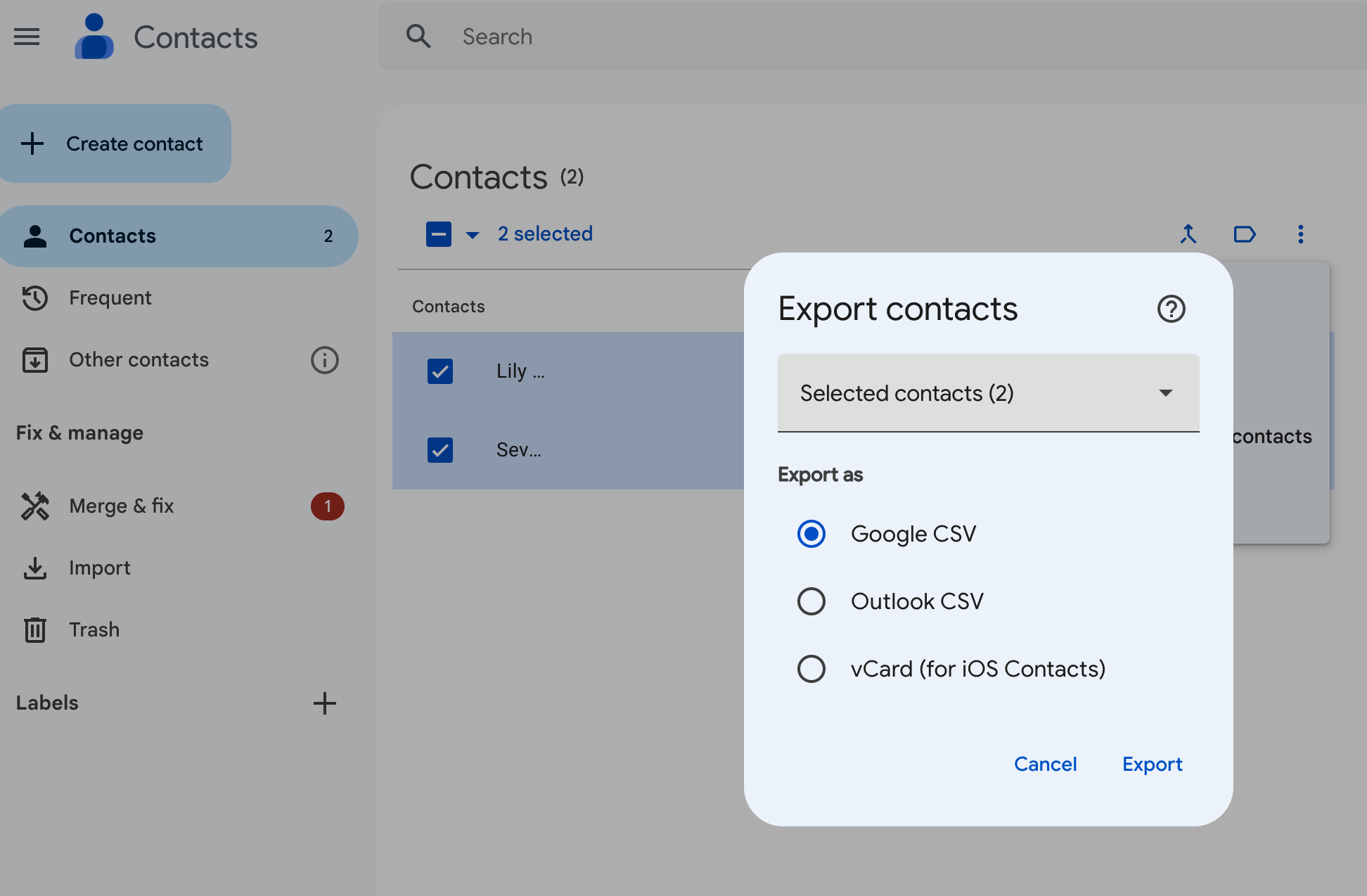
您有三种选择:
- Google CSV:这是备份或将联系人导入其他Google账户的最佳选择。
- Outlook CSV:此选项主要用于将联系人导入您的Microsoft Outlook账户,作为Outlook联系人使用。
- vCard:此 选项可将多个联系人导入Apple通讯录,也可用于客户关系管理(CRM)或其他应用程序。
选择最符合您需求的选项,然后点击“导出”。
从您的安卓设备
Android users have the option of exporting their Google contacts from an Android mobile or tablet device. Unfortunately, if you’re on an iOS device, you’ll only be able to sync your contacts from Google.
要从您的 Android 设备导出联系人:
- 在您的设备上打开“联系人”应用
- 从底部轻点“修复与管理”,然后选择“导出到文件”。
- 选择一个或多个要导出联系人的账户。
- Tap Export to .VCF file. (It’s not possible to export your contacts as a CSV format at the time of writing.)
为何您应该将联系人同步至CRM系统
Make the most of folk’s contact sync feature so that you don’t waste time exporting your contacts manually.

它能将所有联系人集中管理,并自动保持信息更新。您可同步来自LinkedIn(含Sales Navigator)、Twitter和Instagram等社交媒体平台的联系人,同时支持Google邮箱、Microsoft Outlook等电子邮箱账户的联系人同步。
Intrigued? There’s more on how that works, here.
结论
There you have it folks. Two ways to download your Google contacts – and a less cumbersome way of getting all your contacts into one place through folk. Try folk today, free.
探索民间CRM
如同团队从未拥有过的销售助手
