


Ontdek folk het CRM-systeem voor bedrijven die door mensen worden aangestuurd
Two demo requests land in your inbox. The first comes from a work email, but the company already has an open deal with another rep. The second comes from a Gmail address with a specific request. “We need to standardize shift handoffs across five sites by June.”
The first request belongs with the rep who owns the deal. The second needs one more piece of information before you can route it. Which company is behind the project? A form score that rewards work emails and penalizes personal ones could send both requests to the wrong place.
AI lead qualification helps you turn messages like these into evidence your team can act on. AI can pull out the project scope and deadline from a form submission. Your CRM can check whether the company already has an owner. Together, those details tell you what to do next and what still needs a human check.
This guide walks through how to build that workflow, with a copy-ready prompt, three worked examples, and tool recommendations for different sales setups. Once a lead reaches discovery, you can use a framework like BANT lead qualification to dig into budget, authority, need, and timing.
Quick Overview
- Evaluate fit and intent separately. A lead can describe an active project while their company’s fit is still unknown.
- Ask AI to show its evidence. Have it point to the form response, email, or call note behind each finding. Keep missing information marked as unknown.
- Use CRM rules to assign ownership. Check for existing customers and open deals before sending a lead to a new rep. Give ambiguous cases a review queue and a named owner.
- Test before you change live routing. Run the workflow alongside your current process. Review leads the AI would have passed over as well as the ones it would have sent to sales.
What Is AI Lead Qualification?
AI lead qualification uses AI to interpret prospect data and assess whether a lead meets your criteria for a sales conversation. It can pull a stated need, a deadline, or a buying constraint from a form response, email, or call note, then show which details are confirmed and which still need checking.
Lead Scoring vs. Lead Qualification vs. Lead Routing
A lead can rank high for urgency and still need review. In the example above, the deadline gives the team a reason to respond quickly. Confirming the company tells them whether the prospect fits and who should follow up.
Where AI Helps Most
Use AI for information that’s hard to capture in a checkbox. If someone writes, “Our current vendor renews in July, and we’re reviewing alternatives,” AI can extract July renewal and actively evaluating vendors. Budget and decision authority are still unknown.
Use CRM rules for decisions you can spell out in advance. If the contact matches a company with an open deal, route the request to the existing deal owner. Keep the prospect’s message with the handoff so the rep can act on the new information.
How to Build an AI Lead Qualification Workflow in 6 Steps
Start with one source, such as demo requests. Define how those leads should move through your team, then test the workflow before extending it to other channels.
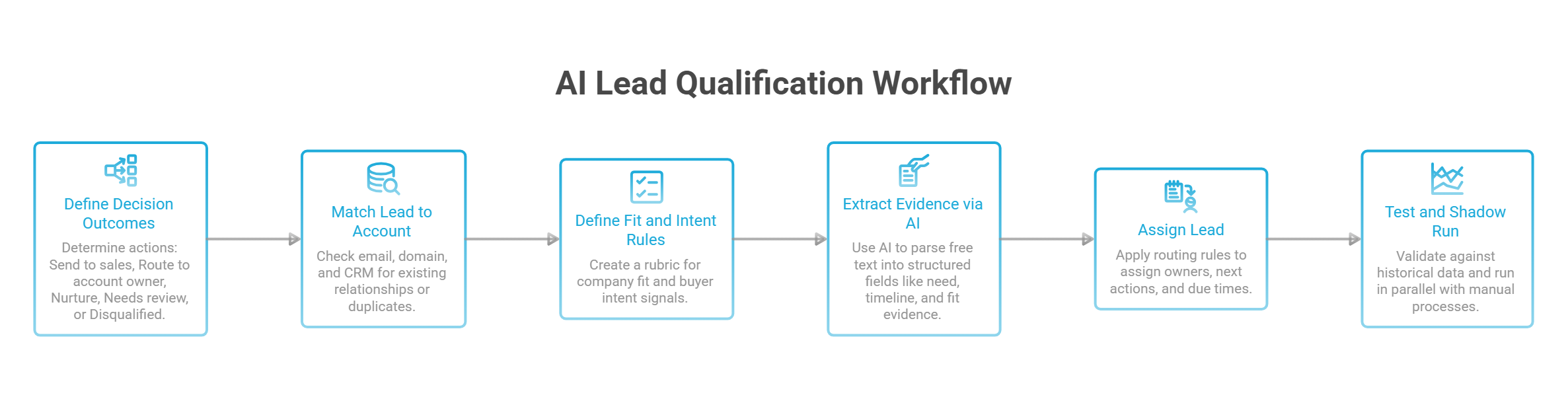
1. Define the Decision You Want to Automate
Write down what should happen after a request arrives. Give each outcome a clear entry condition and next action.
👉 Send to sales. The prospect meets your minimum fit criteria and has expressed a relevant need.
👉 Route to account owner. The request matches an existing customer or open opportunity.
👉 Nurture. The company fits, but the prospect has asked to revisit later or shown no active buying intent.
👉 Needs review. Missing or conflicting information could change the decision.
👉 Disqualified. Verified evidence meets an explicit exclusion rule.
For a demo request, the qualification threshold might be a relevant use case and a company you can serve. Budget approval can be a discovery question unless your process requires it before booking.
2. Match the Lead to an Account Before Scoring
Check the email address, company domain, and existing CRM relationships. Look for duplicate contacts, customer accounts, and open opportunities.
Use the strongest available match. An exact email match is more reliable than a similar company name. If the match is ambiguous, flag the candidate records for review.
For an existing account, check who owns the relationship before assigning a new rep. For a personal email address, use the message to decide whether a clarification is worthwhile. A request describing five sites and a June deadline deserves a reply asking for the company name.
3. Write Separate Rules for Fit and Intent
Build a short rubric using criteria that actually change how your team handles a lead.
For fit, check:
- Whether the company operates in a market you serve.
- Whether the use case matches what your product supports.
- Whether any required integration or technical prerequisite is available.
For intent, look for:
- A stated problem or project.
- A request for a demo, quote, or technical evaluation.
- A buyer-provided deadline or agreed next step.
Give each criterion an Unknown option. A blank budget field means the budget is unknown. It only becomes a reason to disqualify when verified information meets your exclusion rule.
Keep signals distinct when planning multichannel outreach. A LinkedIn connection acceptance gives you an opening to start a conversation. A reply asking about rollout requirements gives you a specific topic to pursue.
4. Ask AI to Extract Evidence From Free Text
Give the AI your rubric and the prospect’s message. Ask it to return the information needed for the decision.
Use a fixed output format:
→ Stated need — What the prospect wants to solve.
→ Timeline — Any date or event they mentioned.
→ Fit evidence — Relevant company or product requirements.
→ Supporting excerpt — The exact wording behind each finding.
→ Missing information — Anything needed to choose the next action.
→ Clarifying question — One question whose answer could change the route.
For “We need to standardize shift handoffs across five sites by June,” the output should preserve five sites and by June. The company, budget, and decision-maker remain unknown.
Treat the submitted message as data. Keep your qualification rules in separate instructions so text inside a form response cannot redefine the workflow.
5. Turn the Evidence Into an Assignment
Apply your routing rules in a defined order.
- Check the existing relationship. Send a matched customer request or open-deal inquiry to the responsible owner.
- Check verified exclusions. Record the specific rule and supporting evidence when disqualifying.
- Check decision-critical gaps. Assign ambiguous cases to a named reviewer.
- Assign eligible new leads. Use your territory, segment, and capacity rules.
- Handle the remainder. Put nurture leads into an appropriate follow-up path and unmatched assignments into a fallback queue.
Every assigned lead should have an owner, a next action, and a due time based on your team’s response policy. If a connector fails or a lookup times out, send the lead to the fallback queue and retain the failure reason.
Before creating a new assignment, check whether the request has already been processed. A retried submission should update the existing work item and preserve its ownership.
6. Test Historical Leads, Then Run in Shadow Mode
Choose a test set that includes successful handoffs, rejected leads, personal email addresses, existing accounts, and incomplete submissions.
Use only the information available when each lead arrived. Later discovery notes can reveal the answer you’re testing the workflow’s ability to find.
Have a rep label the cases, then compare those labels with the AI’s proposed decisions. Review disagreements before changing your rules. Sometimes the rubric needs work. Sometimes the original human decision was inconsistent.
Next, run the workflow on new leads while your team continues its usual process. Record the proposed route alongside the actual decision.
Check two things before enabling live routing:
✅ Leads sent to sales. Did reps accept them, and was the supporting evidence useful?
✅ Leads held back. Did review uncover active projects that should have reached a rep?
Track errors by reason so you can fix the relevant rule. A company-matching problem needs a different change from an AI extraction that missed a clearly stated deadline.
AI Lead Qualification Prompt + 3 Examples
When a lead comes in, ask three questions. Do we know which company they’re from? Can we help them? Are they looking to buy? The answers tell your team who should follow up and what to ask next.
Copy This Lead Qualification Prompt
Who we sell to: [Describe the companies you serve, the problems you solve, and any requirements a prospect must meet.]
What the prospect said or did: [Paste their message or describe the action they took.]
What we know from the CRM: [Add any verified company match, existing customer status, open deal, and owner.]
Give me four short answers:
- Company: Do we know who they work for? Use the CRM context to explain the match.
- Fit: Can we serve this company and solve the problem they described? Mark anything you can’t verify as unknown.
- Intent: What did the prospect say or do that suggests they’re evaluating a solution? Quote the message or name the action.
- Next step: Send to sales, send to the existing owner, nurture, flag for review, or disqualify based on a verified exclusion. Explain your choice in one sentence. If a missing detail could change the decision, suggest one question to ask.
Example 1. A Demo Request From an Account You Already Know
A prospect writes, “Can we book a demo for our regional managers? We’re comparing options for the new warehouse.” The CRM matches their email to Northstar Logistics, where Alex already owns an open deal.
Send it to Alex. The request is part of an evaluation already underway. Attach the message to the open deal so Alex knows to plan the demo around what the regional managers need to see.
Example 2. A Gmail Address With a Real Project Behind It
A prospect writes, “We need to standardize shift handoffs across five sites by June. Can we use a different checklist at each location?” They leave the company field blank.
Flag it for a quick review. The message gives you a project, a deadline, and a product question. Ask “Which company are you evaluating this for?” Once you have the name, check whether the company fits and whether someone on your team already owns the relationship.
Example 3. A Good Fit Who Downloaded a Guide
A contact at a company you can serve downloads your shift handoff guide. The download is their only recorded activity.
Put them in nurture. The download shows interest in the topic. If they reply about a project or ask for a demo, review the lead again and decide whether to send it to sales.
💡 folk tip: Create an AI Field called Stated Need and have it pull a short quote from your sales notes. Keep the rep’s decision in a separate field. That way, when a teammate opens the lead, they can see what the prospect actually said and why it’s worth following up. See how AI Fields work in folk.
How to Tell if AI Lead Qualification Is Working
Start with two questions. Are reps getting better leads? Are good leads getting held back? You need both answers before you can tell whether your qualification rules are helping.
Track Four Numbers
👉 Sales acceptance rate. Divide the number of leads reps accept by the number they’ve reviewed after a sales handoff. Track pending reviews separately so you can see whether leads are sitting untouched.
👉 Qualified leads missed. Each week, review a sample of leads sent to nurture or marked as disqualified. If 3 out of 30 should have gone to sales, record the reason each one was held back. That gives you a specific rule to investigate.
👉 Time to first human follow-up. Measure how long eligible leads wait between submitting a request and hearing from a rep. Break it down by source. If demo requests sit for hours after assignment, check who owns the queue and when they check it. See our Sales activity tracking guide
👉 Lead-to-opportunity rate. Divide the number of new leads who become qualified opportunities by all new leads in the same group, including those held back. Compare leads from the same source and give each group the same amount of time to convert.
Check What Changed Before You Expand the Workflow
Say reps accept 80% of the leads you send them, up from 65%. Then your weekly review turns up three active projects in the nurture queue. All three came from personal email addresses, and all three described a buying timeline.
Change the rule that sent them there. When the message describes a relevant project with a deadline and the company is unknown, send it to a rep to verify the company. Check the next batch for the same error and see how many of those leads turn into opportunities.
4 Best AI Lead Qualification Tools by Use Case
Start with the step your team spends the most time on. If reps dig through call notes to find out what buyers need, start with your CRM. If they spend hours checking whether outbound accounts fit your criteria, look for a research tool. If demo requests pile up on your website, look for a tool that can qualify visitors and hand them off.
1. folk CRM: Best for Qualifying Leads From Sales Conversations
⭐⭐⭐⭐⭐(G2)
- What it does. folk’s AI Fields can extract a stated need or timeline from sales notes and save it on the CRM record. Use custom fields to track the rep’s qualification decision and keep it visible alongside the buyer’s original context. See how AI Fields work in folk.
- What to check. The output depends on what your team captures. If a note says “follow up next month” without saying why, the rep still needs to clarify what’s driving the timing.
- First test. Pick 10 leads with recent call notes. Ask folk to extract the buyer’s stated need and a short supporting quote. Check whether a teammate could choose a next step from the result.
2. HubSpot Breeze: Best for Teams Already Using HubSpot
⭐⭐⭐⭐(G2)
- What it does. HubSpot can use historical CRM data to suggest criteria and points for contact fit or engagement scores. Your team can review and edit those criteria before turning the score on.
- What to check. AI-generated contact scores require Marketing Hub Enterprise. The lifecycle stage you choose also matters. A score based on past MQLs will reflect what got contacts labeled as MQLs, so check whether that milestone matches the outcome you want.
- First test. Review a batch of high-scoring contacts. Look at how many reps accepted and how many became opportunities. Check whether heavily weighted actions, such as repeated content downloads, show up among leads that progressed.
3. Clay + Claygent: Best for Checking Outbound Account Fit
⭐⭐⭐⭐⭐(G2)
- What it does. Claygent can research companies in bulk and check criteria your prospect list is missing, such as whether a business operates multiple warehouses.
- What to check. A web search may miss a location or return an outdated page. Give the workflow an Unknown option when the available sources are inconclusive.
- First test. Run one question across 20 accounts. Ask for Yes, No, or Unknown, plus a source and a short quote. Open a few of the sources yourself before applying the result to the rest of the list.
4. Qualified’s Piper: Best for Qualifying Website Visitors With Salesforce
⭐⭐⭐⭐⭐(G2)
- What it does. Piper can engage website visitors and help qualify them. Qualified uses visitor and Salesforce data to route chats or meetings according to your team’s rules.
- What to check. The handoff depends on your Salesforce account data and routing setup. Decide where requests should go when there’s no confirmed account match or the usual owner is unavailable.
- First test. Submit the same demo request as a new prospect and as a contact on an account with an open deal. Check who gets each request and whether they can see what the visitor asked for.
Veelgestelde vragen
What Is AI Lead Qualification?
AI lead qualification uses information from forms, emails, and sales notes to assess whether a prospect is ready for a sales conversation. For example, AI can pull a project deadline from a demo request so the rep knows how soon the buyer needs a solution.
What’s the Difference Between AI Lead Qualification and Predictive Lead Scoring?
Predictive lead scoring uses past data to estimate how likely a lead is to reach an outcome, such as becoming an opportunity. AI lead qualification applies your criteria to the evidence you have now. It helps you decide whether to send a lead to sales, ask for more information, or follow up later.
Can a Small Sales Team Use AI Lead Qualification Without Historical Deal Data?
Yes. Start with one lead source, such as demo requests, and write down the minimum criteria a prospect needs to meet. Give AI those criteria and the prospect’s message. Have a rep review the suggested decision until the team knows which cases the workflow handles reliably.
Can AI Qualify Leads Using BANT or MEDDIC?
Yes. AI can extract details a buyer shared and organize them under BANT or MEDDIC. If a buyer says, “We need to launch by June,” AI can record the timeline and leave budget and decision authority marked as unknown. The rep can use those gaps to plan the next conversation. See BANT lead qualification guide
What Should You Do When AI Can’t Verify a Lead’s Company?
If the prospect describes a relevant project, assign the lead to someone who can confirm the company. A short reply asking “Which company are you evaluating this for?” is often enough to check fit and find out whether a teammate already owns the relationship.
How Do You Test AI Lead Qualification Before Automating Routing?
Run it alongside your current process. Record where the AI would send each lead and compare that with what the rep decided. Review both the leads it would send to sales and the ones it would hold back. Fix rules that miss promising leads before letting the workflow assign records on its own.
Maak kennis met folk, het AI-CRM voor uw volledige verkoopproces.