



Discover folk - 사람 중심 비즈니스의 CRM
Looking for a way to export the contact information you’ve been storing in Google? You’re in the right place.
In this blog post, we’ll cover:
- Google 연락처를 내보내는 방법에 대한 단계별 안내서
- 대신 사용할 수 있는 빠른 링크입니다.
- 시간을 절약해 주는 덜 번거로운 선택지.
Let’s get started.
Google에서 연락처를 다운로드하는 방법
You can export your contacts from your desktop, or mobile phone. Let’s look at how this works on the desktop first.
데스크톱에서
1. Log into your Gmail account. Click the three-by-three icon on the top right to reveal a drop-down menu.

2. Click the Contacts icon - note that the order in which you see the icons might not be in this exact order, as this is customizable.
3. This will take you to your Google contact page. Alternatively, you can copy and paste contacts.google.com into the URL.
내보낼 올바른 연락처 선택하기
Google 연락처 관리자에서 내보내려는 연락처를 선택할 수 있습니다. 이를 위해 두 가지 방법 중 하나를 선택할 수 있습니다:
- Select each contact individually: By checking the box next to your contact’s name.
- 모든 연락처 선택: 왼쪽 상단 > 선택 작업 > 모두를 선택합니다.
선택 항목 내보내기
After you choose the contacts you want to export, at the top right, click More Actions > Export.
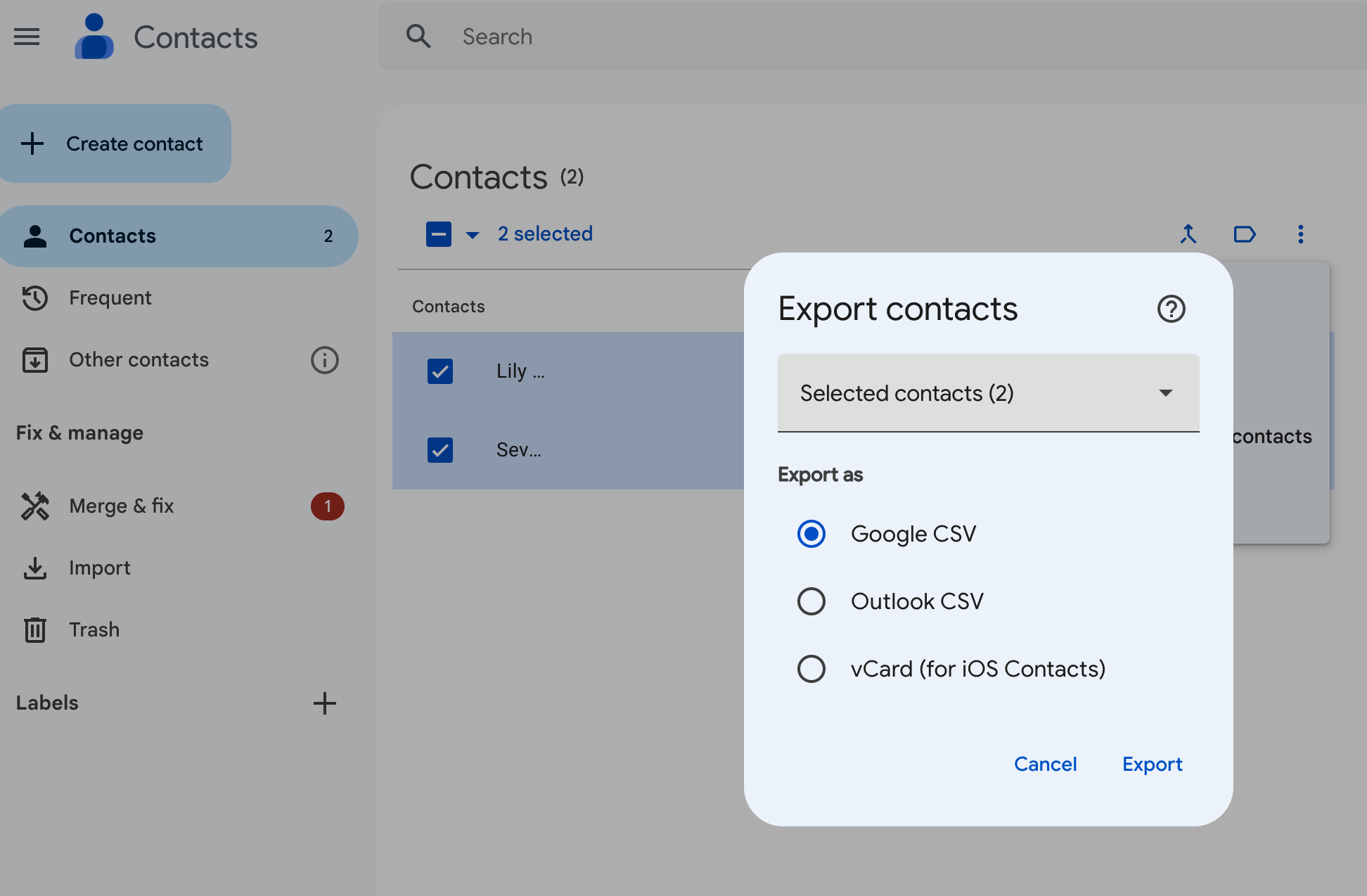
다음 세 가지 옵션 중에서 선택하실 수 있습니다:
- Google CSV: 백업이나 연락처를 다른 Google 계정으로 가져오기에 가장 적합한 옵션입니다.
- Outlook CSV: 이 옵션은 연락처를 Microsoft Outlook 계정의 Outlook 연락처로 가져오기 위한 것입니다.
- vCard: 이 옵션은 여러 연락처를 Apple 주소록으로 가져오기 위한 것입니다. CRM이나 다른 애플리케이션에도 사용할 수 있습니다.
가장 적합한 옵션을 선택한 후 내보내기를 클릭하세요.
귀하의 Android 기기에서
Android users have the option of exporting their Google contacts from an Android mobile or tablet device. Unfortunately, if you’re on an iOS device, you’ll only be able to sync your contacts from Google.
안드로이드 기기에서 연락처를 내보내려면:
- 기기에서 연락처 앱을 엽니다
- 하단에서 '수정 및 관리'를 탭한 다음 '파일로 내보내기'를 선택하세요.
- 연락처를 내보낼 계정을 하나 이상 선택하세요.
- Tap Export to .VCF file. (It’s not possible to export your contacts as a CSV format at the time of writing.)
왜 연락처를 CRM과 동기화해야 하는가
Make the most of folk’s contact sync feature so that you don’t waste time exporting your contacts manually.

모든 연락처를 한곳에 모아 자동으로 최신 상태로 유지해 줍니다. LinkedIn(Sales Navigator 포함), Twitter, Instagram과 같은 소셜 미디어 플랫폼의 연락처를 동기화할 수 있습니다. Google, Microsoft Outlook을 포함한 이메일 계정의 연락처도 동기화 가능합니다.
Intrigued? There’s more on how that works, here.
결론
There you have it folks. Two ways to download your Google contacts – and a less cumbersome way of getting all your contacts into one place through folk. Try folk today, free.
포크 CRM을 만나보세요
팀에 없었던 영업 보조처럼
