


Discover folk 사람 중심 비즈니스의 CRM
Pipedrive . 클릭업: 개요
Pipedrive 클릭업(ClickUp)은 각각 다른 비즈니스 요구에 맞춰 차별화된 기능을 제공하는 두 가지 인기 CRM 솔루션입니다. Pipedrive 강력한 자동화 및 보고 도구를 갖춘 영업 파이프라인 관리에 중점을 둔 전통적인 Pipedrive 반면, 클릭업은 일부 CRM 기능을 갖춘 프로젝트 관리 플랫폼입니다. 이 블로그 글에서는 두 솔루션의 핵심 기능, 가격 정책 및 장점을 살펴보겠습니다.
또한 folk를 소개할 예정입니다. 이는 CRM 요구 사항을 고려할 때 인기 있는 대안입니다.
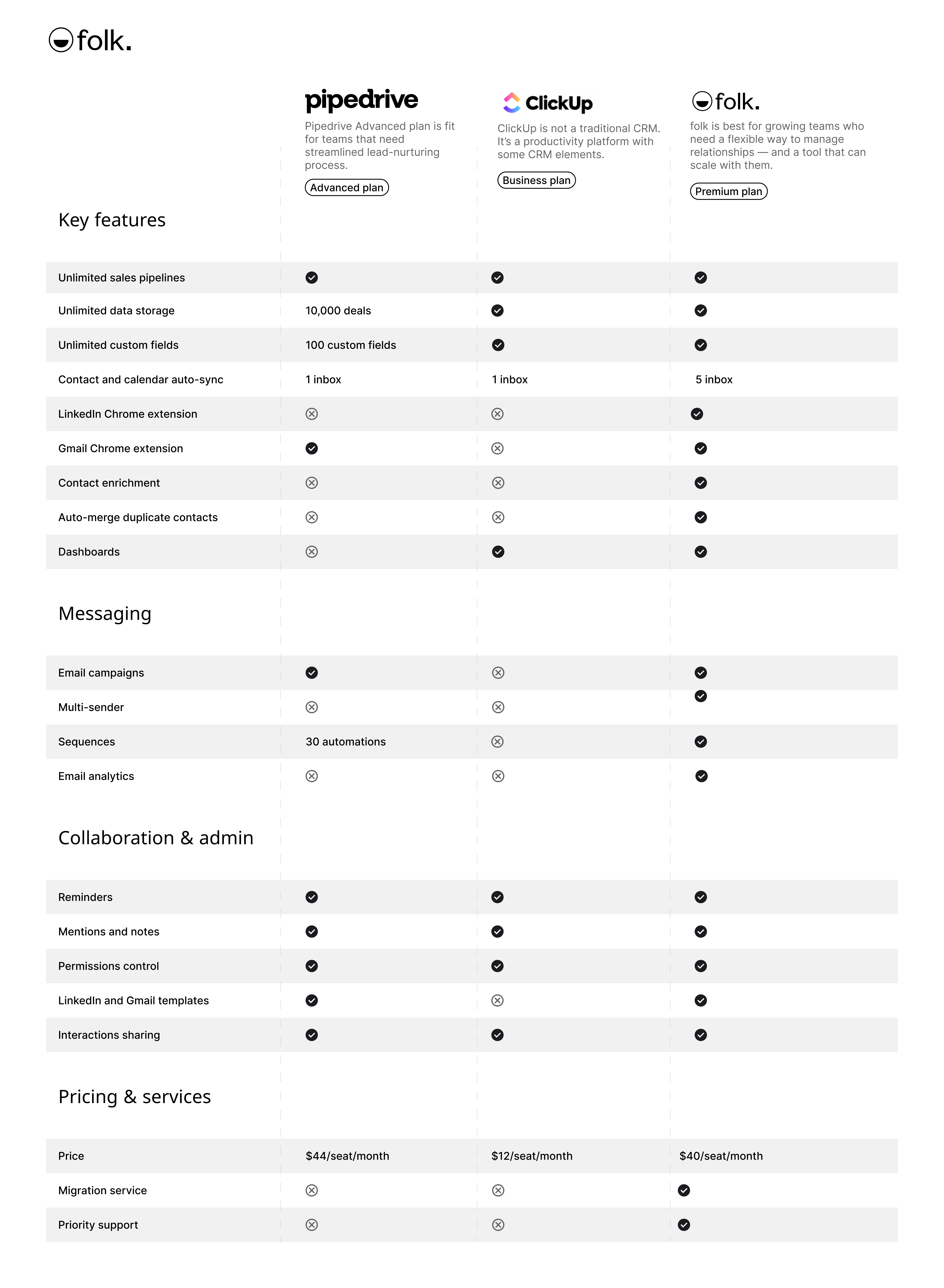
| 주요 사항 |
|---|
|
Pipedrive 무엇인가요?
Pipedrive 소규모 기업을 위한 웹 기반 CRM으로, 영업 최적화를 위한 리드 관리, 자동화, 이메일 통합 및 맞춤형 파이프라인을 제공합니다.
Pipedrive의 주요 기능
- 리드 및 거래 관리: 고객 데이터, 상호작용, 영업 파이프라인을 관리하는 중앙 집중식 도구로, 팀이 기회를 신속하게 활용할 수 있도록 지원합니다.
- 영업 자동화: 리드 라우팅, 후속 조치, 이메일 시퀀스 등 반복적인 업무를 처리하는 워크플로 자동화로 영업 팀이 거래 성사에 집중할 수 있도록 지원합니다.
- 이메일 통합: 완전한 이메일 동기화, 템플릿 및 추적 기능을 제공하여 사용자가 CRM에서 직접 모든 커뮤니케이션을 관리할 수 있도록 합니다.
- 고급 보고 및 분석: 실시간 데이터 분석 및 맞춤형 보고 도구를 통해 영업 성과를 추적하고, 매출을 예측하며, 실행 가능한 인사이트를 확보합니다.
- 사용자 지정 및 보안: 파이프라인, 필드 및 사용자 권한을 사용자 지정할 수 있는 옵션과 데이터를 보호하기 위한 강력한 보안 조치.
ClickUp이란 무엇인가요?
ClickUp은 팀과 개인이 한 작업 공간에서 작업을 정리하고 진행 상황을 추적하며 협업할 수 있도록 설계된 프로젝트 관리 및 생산성 플랫폼입니다. 주로 프로젝트 관리 도구이지만, ClickUp에는 일부 기본적인 CRM 기능도 포함되어 있습니다.
ClickUp의 주요 기능:
- 작업 관리: ClickUp은 사용자가 맞춤형 상태로 작업을 생성, 할당 및 추적할 수 있도록 하여 다양한 프로젝트 전반에 걸친 업무 프로세스 관리에 유연성을 제공합니다.
- 사용자 지정 보기: 플랫폼은 목록, 보드, 캘린더, 간트 차트 등 다양한 보기를 제공하여 사용자가 선호하는 형식으로 작업과 워크플로를 시각화할 수 있도록 합니다.
- 목표 추적: 사용자는 ClickUp 내에서 목표를 설정, 추적 및 관리하며, 작업과 프로젝트를 더 큰 목표와 연계할 수 있습니다.
- 시간 추적: ClickUp에는 작업에 소요된 시간을 기록하는 내장형 시간 추적 기능이 포함되어 있어, 사용자가 생산성 또는 청구 가능한 시간을 모니터링할 수 있습니다.
- 워크플로 자동화: ClickUp의 자동화 기능을 통해 사용자는 미리 정의된 조건에 따라 상태 업데이트나 알림과 같은 작업을 트리거하는 규칙을 설정함으로써 수동 작업을 줄일 수 있습니다.
- 사용자 정의 필드: 플랫폼은 사용자가 작업에 사용자 정의 필드를 추가할 수 있도록 하여 특정 데이터 포인트를 추적하거나 필요에 따라 작업을 분류할 수 있게 합니다.
Pipedrive . 클릭업: 기능 비교
두 CRM 소프트웨어 솔루션의 주요 기능을 분석해보고, 영업 자동화, 이메일 마케팅 도구, 연락처 관리 기능을 자세히 살펴보겠습니다.
1. 영업 파이프라인 관리
Pipedrive 전통적인 영업 파이프라인 관리 프로세스와 밀접하게 연계된 사용자 친화적인 칸반 보드 인터페이스를 Pipedrive . 이러한 시각적 접근 방식은 영업 팀이 거래를 쉽게 추적하고, 맞춤형 단계를 설정하며, 반복적인 작업을 자동화할 수 있게 하여 효율적인 영업 중심 CRM을 찾는 이들에게 이상적인 선택입니다.
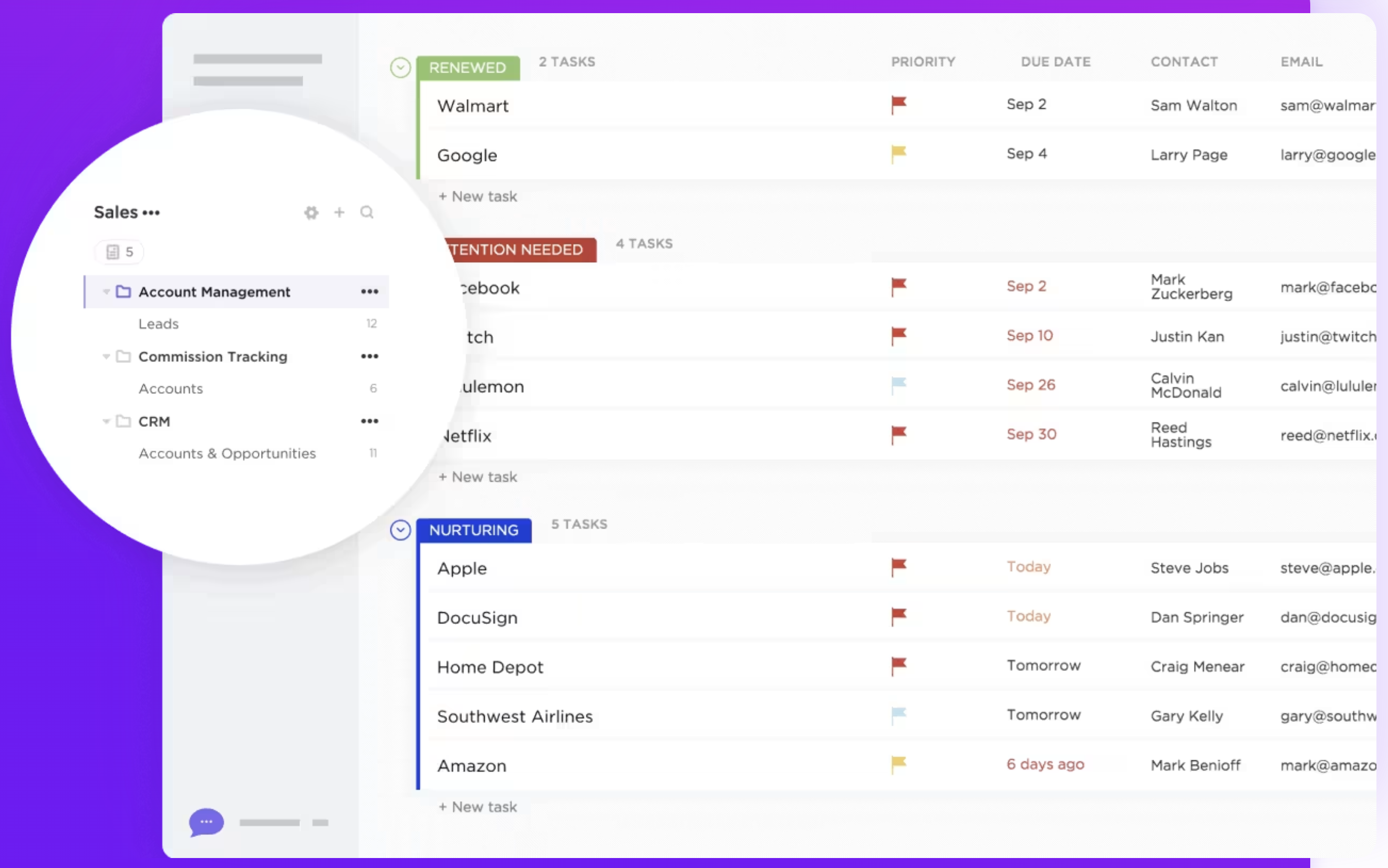
ClickUp에는 영업 또는 CRM 목적으로 특별히 설계된 전용 파이프라인 관리 기능이 없습니다. 그러나 사용자는 작업 목록, 보드 및 사용자 정의 상태를 활용하여 맞춤형 파이프라인을 생성할 수 있습니다. 이러한 유연성 덕분에 ClickUp은 다양한 워크플로우에 적용될 수 있지만, 영업 전용 파이프라인을 구현하려면 더 많은 설정이 필요할 수 있습니다. 20~50명의 중간 규모 영업 팀이 CRM 옵션을 평가할 때, folk 성장하는 조직을 압도하는 복잡성 없이 영업 팀을 위해 특별히 설계된 직관적인 파이프라인 관리를 제공하여 우수한 선택으로 부상합니다. 궁극적으로 Pipedrive 특화된 도구는 영업 중심 팀에 더 적합한 반면, ClickUp의 다용도성은 영업 프로세스를 포함하도록 맞춤 설정할 수 있는 광범위한 프로젝트 관리 솔루션이 필요한 사용자에게 좋은 옵션입니다.
👉🏼 folk 사용해 팀과 함께 연락처 기반 알림을 관리하세요

2. 사용 편의성
Pipedrive 영업 팀을 위해 특별히 설계된 직관적인 인터페이스를 Pipedrive 영업 파이프라인을 쉽게 탐색하고 관리할 수 있게 합니다. 반면 클릭업은 다용도이지만, 방대한 기능과 맞춤 설정 옵션으로 인해 학습 곡선이 가파르며, 이는 주로 CRM 업무에 집중하는 사용자에게 부담스러울 수 있습니다.
3. 접촉 강화
Pipedrive 연락처 보강 기능은 외부 소스에서 추가 정보를 가져오기 위해 도구와 연동하여 작동하며, 직책, 회사 정보, 소셜 미디어 프로필 등 관련 데이터로 필드를 자동으로 채웁니다. 클릭업은 핵심 기능의 일부로 연락처 보강 기능을 제공하지 않습니다. 사용자가 사용자 정의 필드와 작업 세부 정보를 사용하여 연락처 정보를 수동으로 저장하고 정리할 수는 있지만, 플랫폼은 외부 소스에서 연락처에 대한 추가 데이터를 자동으로 가져오지 않습니다.
4. 외부 협력
Pipedrive 이메일 빌더는 뉴스레터와 같은 캠페인 및 반응형 이메일 마케팅 캠페인에 더 적합합니다. 클릭업에는 고객이나 리드와 같은 외부 연락처와의 커뮤니케이션을 위해 특별히 설계된 전용 아웃리치 기능이 없습니다. 그러나 사용자는 수동 설정이 필요한 맞춤형 워크플로를 사용하여 아웃리치 작업을 관리할 수 있습니다.
5. 자동화
Pipedrive 자동화 기능은 데이터 입력, 후속 조치, 리드 할당과 같은 반복 작업을 자동화하여 영업 프로세스를 간소화합니다. 클릭업의 자동화 기능은 범용적이며 리드 육성이나 연락처 세분화와 같은 CRM 기능에 특화되어 있지 않아, 보다 고급 CRM 요구사항을 충족시키려면 추가적인 맞춤 설정이 필요할 수 있습니다.
6. 통합
Pipedrive 300개 이상의 통합 기능을 Pipedrive 사용자가 마케팅 자동화 및 이메일 플랫폼을 포함한 다양한 범주의 타사 도구와 CRM을 연결할 수 있도록 합니다. 클릭업은 구글 워크스페이스, 슬랙, 줌, 드롭박스 등 다양한 타사 도구와의 통합을 제공하여 플랫폼 내 워크플로우 효율성과 협업을 강화합니다.
7. 인공 지능
Pipedrive 주로 세일즈 어시스턴트를 통해 AI를 Pipedrive . 이 기능은 실행 가능한 인사이트와 권장 사항을 제공하여 영업 활동을 최적화합니다. 클릭업의 AI 통합은 비교적 새로운 기능으로 '챗' 형태로 제공됩니다. 이 기능은 작업, 문서, 사람 및 회사의 모든 지식을 AI와 연결합니다. 이 정보를 활용하여 지식 관리자가 되어 작업 관리와 문서 작성을 지원합니다.
가격 및 요금제 비교
Pipedrive ClickUp의 가격 및 요금제를 자세히 살펴보겠습니다.
Pipedrive
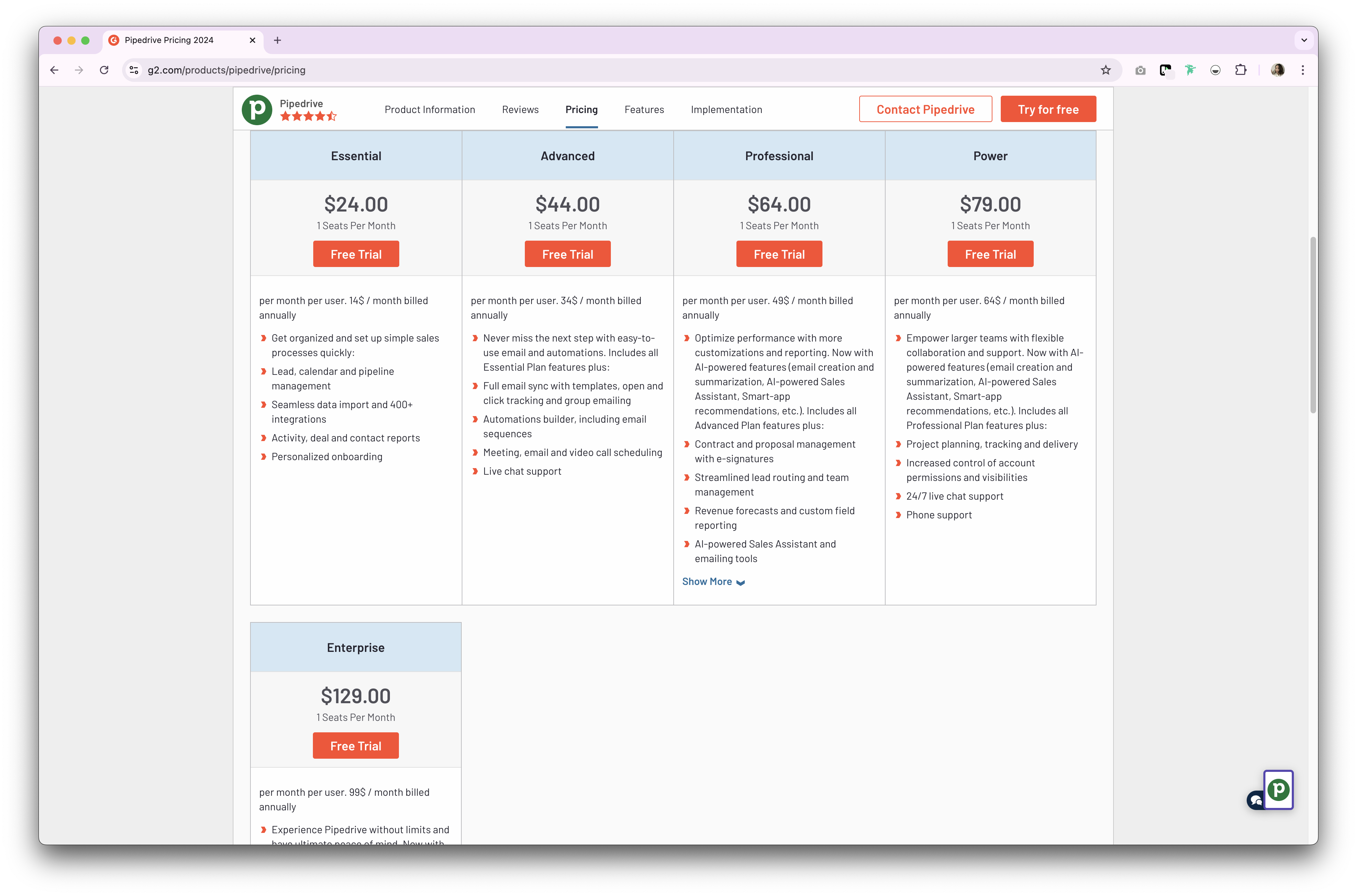
Pipedrive CRM 제품에 대해 두 가지 유형의 플랜을 Pipedrive . 월간 또는 연간 구독 방식으로 이용 가능합니다. 연간 구독 플랜은 다음과 같습니다.
- 기본 플랜: 사용자당 월 $24부터 시작합니다.
- 고급 플랜: 사용자당 월 $44부터 시작합니다.
- 프로페셔널 플랜:사용자당 월 $64부터 시작합니다.
- 전원 계획: 사용자당 월 $79부터 시작합니다.
- 엔터프라이즈 플랜: 사용자당 월 $129부터 시작합니다.
ClickUp 가격
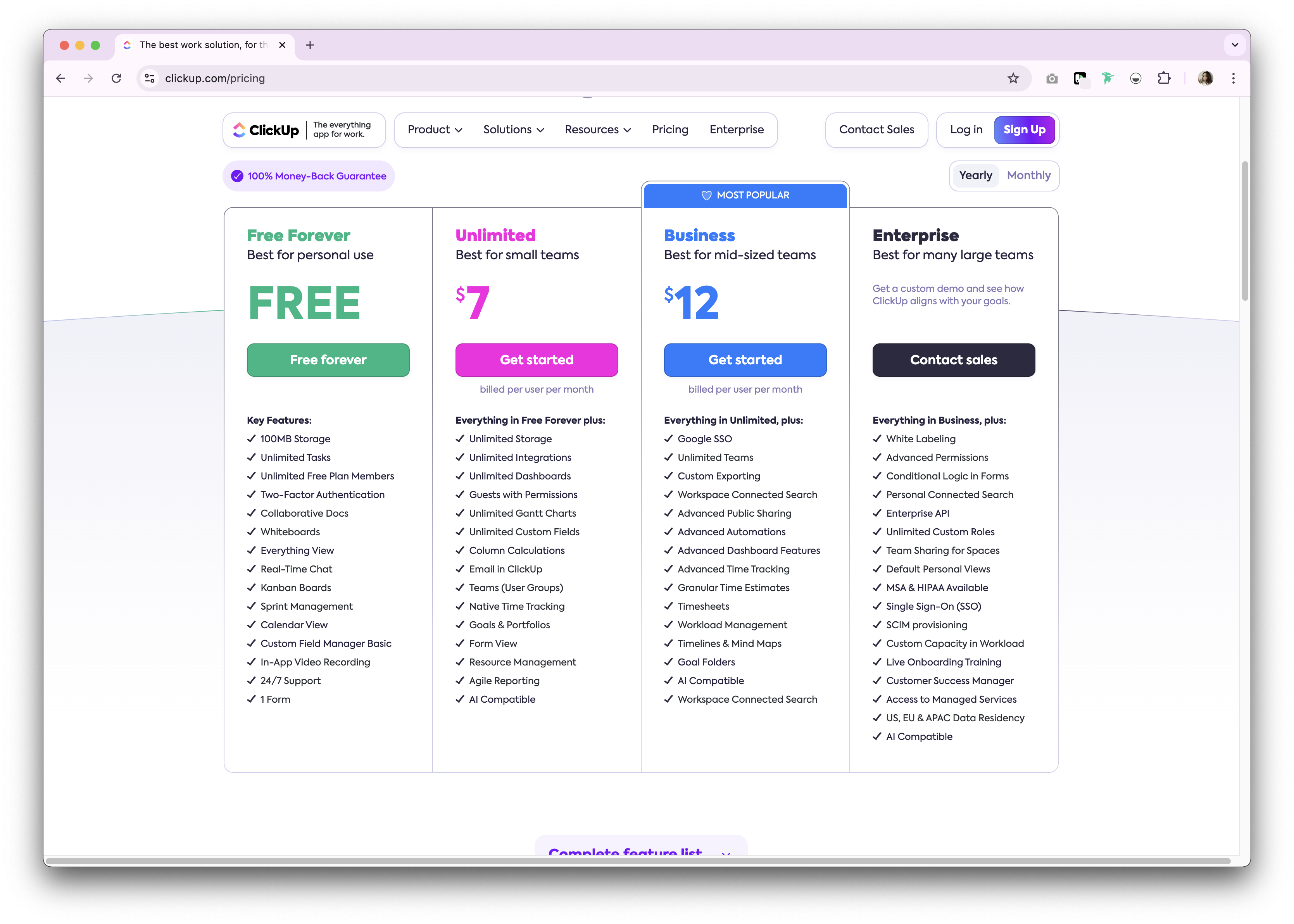
ClickUp은 개인용으로 영구 무료 플랜을 제공합니다. Premium 월간 및 연간 구독 플랜으로 이용 가능합니다. 다음은 이용 가능한 연간 구독 플랜에 대한 개요입니다.
- 무제한: 사용자당 월 7달러.
- 비즈니스: 사용자당 월 12달러.
- 기업: 비공개.
folk 소개: Pipedrive ClickUp의 최고의 대안
저렴한 대안을 찾고 계신가요? folk 추천합니다. 수상 경력이 다수 있는 CRM 플랫폼으로, 사용하기 쉬운 플러그 앤 플레이 방식의 CRM 시스템으로 사랑받고 있습니다. 20~50명의 성장 중인 영업 팀을 위해 특별히 설계되었으며, 기업 수준의 복잡성 없이도 강력한 CRM 기능이 필요한 팀에 적합합니다.

.png)
.png)
주요 기능
- 사용 편의성과 맞춤 설정: 파이프라인, dashboards, 자동화, 이메일 시퀀스를 손쉽게 맞춤 설정하여 영업 주기 및 파이프라인 관리 전반에 활용할 수 있습니다. 또한 채용, 마케팅 등 기타 비즈니스 기능에도 적용 가능합니다.
- 소셜 미디어 통합: folk Google Chrome 확장 프로그램을 통해 LinkedIn, Sales Navigator, Instagram, X의 사람 및 기업 정보를 클릭 한 번으로 가져올 수 있습니다.
- Gmail 및 Outlook 연락처 동기화: 이메일 전체 동기화를 통해 사용자가 CRM에서 직접 모든 커뮤니케이션을 관리할 수 있습니다.
- 클릭 한 번으로 이메일 주소 찾기: Apollo와 Dropcontact 연락처 보강 기능으로 누락된 데이터 항목을 1클릭으로 채울 수 있습니다 Dropcontact
- 이메일 시퀀스: 잠재 고객이 첫 번째 이메일에 답장하지 않을 경우, 리마인더가 포함된 이메일 시퀀스를 발송하세요. AI 통합 기능을 통해 대규모로 이메일을 개인화할 수 있습니다.
- 메모 및 알림: folk 연락처 프로필에 메모를 직접 첨부하고 , 이동 중에도 확인할 수 있습니다. 또한 알림을 설정하여 후속 조치를 취해야 할 정확한 시점을 파악하세요.
가격 및 요금제
folk 14일 무료 체험을 folk . 이후에는 합리적인 월간 또는 연간 구독 플랜이 있습니다. 연간 구독 플랜은 다음과 같습니다.
- 표준: 사용자당 월 20달러.
- Premium: 사용자당 월 40달러.
- 맞춤형: 사용자당 월 $80부터 시작합니다.
👉🏼 folk 사용해 보세요. 후속 조치를 놓치지 않고 연락을 효율적으로 관리하세요.

Pipedrive . 클릭업: 결론은?
Pipedrive ClickUp Pipedrive 비교해 보면, 두 CRM 플랫폼 모두 영업 및 프로젝트 관리를 강화하기 위해 맞춤화된 강력한 기능을 제공합니다. Pipedrive 영업 자동화 및 파이프라인 관리에 Pipedrive 반면, ClickUp은 작업 관리와 협업에서 다재다능함을 제공합니다. 그러나 관계 관리에 보다 개인화된 접근을 원하는 20~50명의 영업 팀에게는 folk 가장 매력적인 솔루션을 제시합니다. 중규모 영업 팀을 위해 특별히 맞춤화된 사용 편의성과 커스터마이징 기능을 갖춘 folk 두 플랫폼의 장점을 folk 성장하는 조직을 압도하지 않으면서도 다양한 비즈니스 요구에 적응하는 유연한 CRM 솔루션을 제공합니다.
자주 묻는 질문
ClickUp은 CRM인가요?
ClickUp은 기본적인 CRM 요소를 갖춘 프로젝트 관리 도구입니다. 전용 영업 파이프라인, 연락처 보강 기능, 기본 제공 아웃리치 기능이 부족합니다. 작업, 사용자 정의 필드, 보기를 통해 CRM 기능을 대략 구현할 수 있지만, 설정 과정이 수동이며 영업 중심적이지 않습니다.
영업 파이프라인 관리에 더 효과적인 방법은 무엇인가요?
Pipedrive 내장형 시각적 파이프라인, 거래 단계, 영업 자동화 기능을 Pipedrive . 클릭업은 목록이나 보드로 파이프라인을 구현할 수 있지만 더 많은 설정이 필요합니다. 성장 중인 영업 팀을 위해 folk 직관적이고 맞춤 설정 가능한 파이프라인을 제공합니다.
Pipedrive 클릭업 Pipedrive 가격은 어떻게 비교되나요?
연간 결제 기준: Pipedrive Essential, Advanced, Professional, Power, Enterprise 플랜에 걸쳐 사용자당 월 Pipedrive $129까지입니다. ClickUp: 무료 플랜 이후 Unlimited 플랜은 사용자당 월 $7, Business 플랜은 $12이며, Enterprise 플랜은 맞춤형입니다. 가격은 지역 및 등급에 따라 다를 수 있습니다.
Pipedrive ClickUp의 좋은 대안은 무엇인가요?
folk 판매 준비 완료 CRM을 제공합니다. 맞춤형 파이프라인, 연락처 보강, 이메일 시퀀스, 자동화 기능을 포함합니다. 연간 결제 기준 가격: 스탠다드 $20, Premium , 커스텀 $80/사용자/월부터. 14일 무료 체험 제공.
folk 만나보세요
팀에 없었던 영업 보조처럼