


Ontdek folk het CRM-systeem voor bedrijven die door mensen worden aangestuurd
Als het gaat om het kiezen van een CRM-systeem dat aansluit bij uw zakelijke behoeften, zijn Pipedrive Capsule CRM twee populaire opties die vaak naar voren komen. Beide platforms zijn gericht op kleine en middelgrote bedrijven en bieden tools voor het beheer van de verkooppijplijn, het organiseren van contacten en het automatiseren van taken. Hun benadering van CRM verschilt echter, waardoor het cruciaal is om de belangrijkste kenmerken, sterke punten en beperkingen van elk systeem te begrijpen.
In deze blogpost vergelijken we Pipedrive Capsule CRM om u te helpen bepalen welke het beste aansluit bij de workflow en groeidoelstellingen van uw bedrijf. Daarnaast introduceren we folk als een populair alternatief dat het overwegen waard is.

| Belangrijkste punten |
|---|
|
Wat is Pipedrive?
Pipedrive is een webgebaseerd CRM-systeem voor kleine bedrijven, dat leadbeheer, automatisering, e-mailintegratie en aanpasbare pijplijnen biedt om de verkoop te optimaliseren.
Belangrijkste kenmerken van Pipedrive:
- Lead- en dealbeheer: gecentraliseerde tools voor het beheren van klantgegevens, interacties en verkooppijplijnen, zodat teams snel kunnen reageren op kansen.
- Verkoopautomatisering: Workflowautomatisering voor het afhandelen van repetitieve taken, zoals het doorsturen van leads, follow-ups en e-mailreeksen, zodat verkoopteams zich kunnen concentreren op het sluiten van deals.
- E-mailintegratie: volledige e-mailsynchronisatie, sjablonen en trackingfuncties, waardoor gebruikers alle communicatie rechtstreeks vanuit het CRM kunnen beheren.
- Geavanceerde rapportage en analyse: realtime data-analyse en aangepaste rapportagetools om verkoopprestaties bij te houden, omzet te voorspellen en bruikbare inzichten te verkrijgen.
- Aanpassing en beveiliging: opties om pijplijnen, velden en gebruikersrechten aan te passen, met robuuste beveiligingsmaatregelen om gegevens te beschermen.
Wat is Capsule CRM?
Capsule CRM is een gebruiksvriendelijk platform voor klantrelatiebeheer dat is ontworpen voor kleine en middelgrote bedrijven. Het biedt een overzichtelijke, intuïtieve interface waarmee gebruikers klantrelaties kunnen beheren, verkooppijplijnen kunnen volgen en taken en communicatie efficiënt kunnen organiseren.
Belangrijkste kenmerken van Capsule CRM
- Contactbeheer: Hiermee kunnen gebruikers klantinformatie ordenen, de communicatiegeschiedenis bijhouden en relaties op één plek beheren.
- Verkoop pijplijnbeheer: helpt bij het bijhouden van kansen en deals en biedt een visueel overzicht van de verkoopfasen om de voortgang te volgen.
- Taakbeheer: stelt gebruikers in staat om herinneringen in te stellen, takenlijsten te maken en deadlines bij te houden voor een gestroomlijnde productiviteit.
- Aanpassingsopties: biedt aanpasbare velden en workflows om het CRM aan te passen aan specifieke zakelijke behoeften.
- Integraties van derden: integreert met populaire tools zoals Google Workspace, Xero en Mailchimp de functionaliteit uit te breiden.
Pipedrive Capsule CRM: vergelijking van functies
De belangrijkste verschillen in één oogopslag
- Pipedrive: krachtigere automatisering, geïntegreerde e-mailtools en AI Sales Assistant.
- Capsule: eenvoudigere gebruikersinterface, taakgerichte workflows, outreach via Transpond.
- Beide: pijplijnen, rapportage en integraties gericht op het MKB.
Laten we de belangrijkste functies van twee CRM-softwareoplossingen eens onder de loep nemen en hun verkoopautomatisering, e-mailmarketingtools en contactbeheer nader bekijken.
1. Beheer van de verkooppijplijn
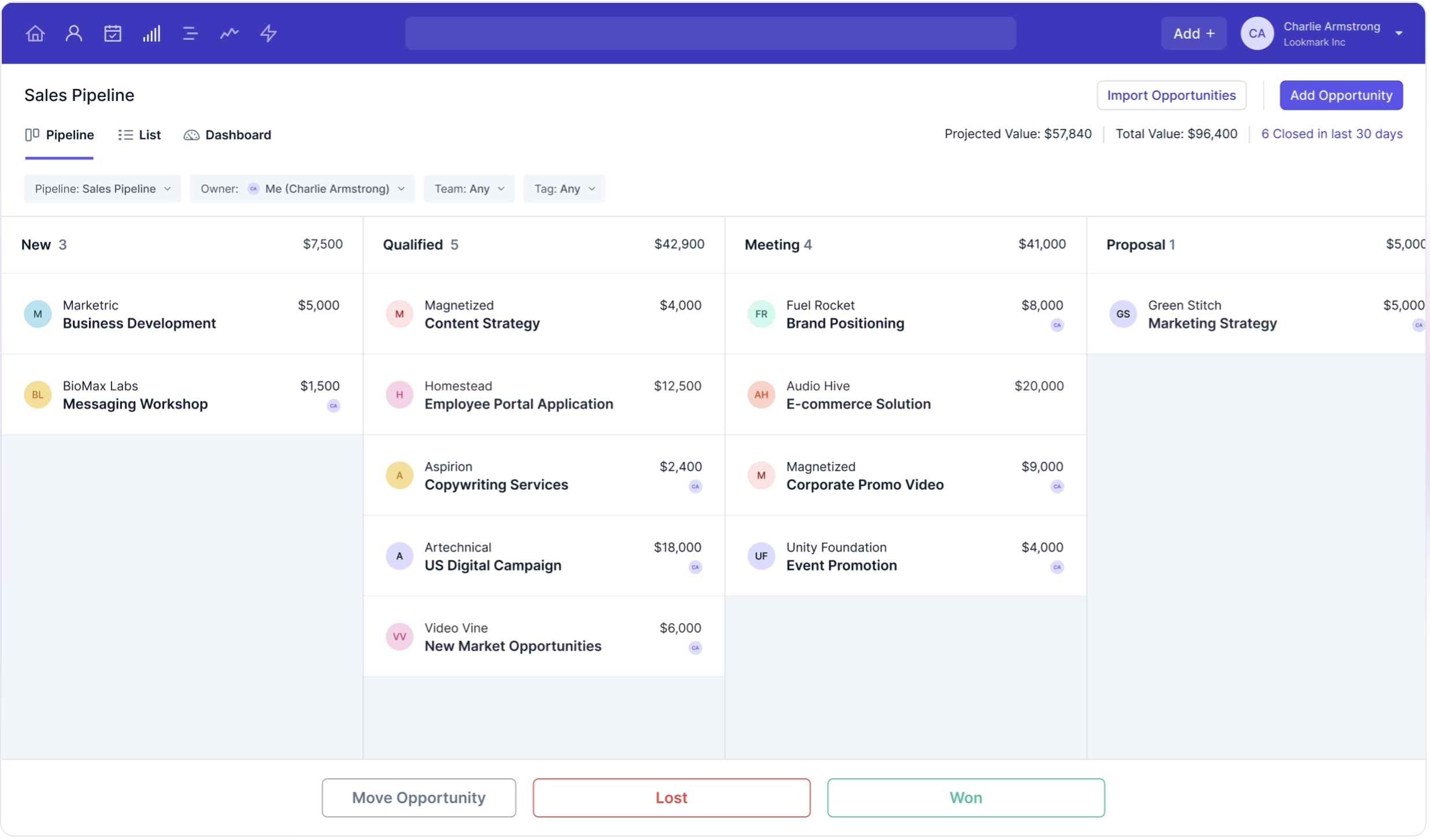
Pipedrive een gebruiksvriendelijk Kanban-bord dat nauw aansluit bij traditionele processen voor het beheer van de verkooppijplijn, waardoor gebruikers hun verkoopactiviteiten intuïtief kunnen visualiseren en beheren. Deze visuele aanpak helpt teams om georganiseerd te blijven en zich te concentreren op het efficiënt sluiten van deals. Capsule CRM biedt daarentegen een veelzijdige functie voor pijplijnbeheer waarmee gebruikers verkoopkansen in verschillende stadia kunnen volgen. dashboard de flexibiliteit van Capsule om de verkooppijplijn als lijst, Kanban of dashboard weer te geven dashboard kunnen gebruikers het formaat kiezen dat het beste bij hun workflow past. Deze aanpasbaarheid kan met name gunstig zijn voor teams die de voorkeur geven aan een meer aanpasbare aanpak voor het beheer van hun verkoopprocessen. Zowel Pipedrive Capsule CRM blinken uit in het bieden van tools die de zichtbaarheid van de verkooppijplijn verbeteren, maar de keuze tussen beide kan uiteindelijk afhangen van de specifieke visuele en functionele voorkeuren van de gebruiker of het team. Uiteindelijk zijn beide platforms erop gericht om het verkoopproces te stroomlijnen, de samenwerking binnen het team te verbeteren en de omzetgroei te stimuleren door robuuste functies voor pijplijnbeheer aan te bieden.

2. Gebruiksgemak
Pipedrive bekend om zijn intuïtieve interface, waardoor gebruikers gemakkelijk kunnen navigeren en hun verkoopprocessen efficiënt kunnen beheren. Capsule CRM biedt ook een gebruiksvriendelijke ervaring, met een eenvoudig ontwerp waarmee gebruikers snel toegang hebben tot de functies en deze kunnen gebruiken zonder een steile leercurve.
3. Contactverrijking
De functie voor contactverrijking Pipedrive werkt door te integreren met tools zoals Clay.com om aanvullende informatie uit externe bronnen op te halen, waarbij velden automatisch worden ingevuld met relevante gegevens zoals functietitels, bedrijfsinformatie en profielen op sociale media. Capsule CRM legt niet zozeer de nadruk op contactverrijking, maar vertrouwt meer op het invoeren van basisgegevens en gebruikersinvoer.
4. Outreach
De e-mailbouwer Pipedrive is meer gericht op campagnes zoals nieuwsbrieven en responsievere e-mailmarketingcampagnes. De outreach-oplossing van Capsule CRM richt zich op het vereenvoudigen van e-mailmarketing en het automatiseren van follow-ups door integratie met zijn e-mailtool, Transpond. Hiermee kunnen gebruikers e-mailcampagnes plannen en automatiseren om hun outreach-inspanningen te stroomlijnen.
5. Automatisering
De automatiseringsfunctie Pipedrive stroomlijnt verkoopprocessen door repetitieve taken, zoals gegevensinvoer, follow-ups en leadtoewijzing, te automatiseren. Capsule CRM biedt automatiseringsfuncties die helpen bij het stroomlijnen van verkoop- en klantrelatieprocessen, waaronder het automatiseren van repetitieve taken zoals follow-ups en gegevensupdates. Dankzij de workflowautomatisering kunnen gebruikers triggers instellen voor acties op basis van veranderingen in verkooppijplijnen of de status van klanten.
6. Integratie
Pipedrive meer dan 300 integraties, waardoor gebruikers het CRM kunnen koppelen aan verschillende tools van derden in verschillende categorieën, waaronder marketingautomatisering en e-mailplatforms. Capsule CRM kan worden geïntegreerd met een groot aantal populaire applicaties van derden, waaronder productiviteitstools zoals Google Workspace en Microsoft 365 voor e-mail- en agendasynchronisatie. Het kan ook worden gekoppeld aan boekhoudsoftware zoals Xero.
7. Kunstmatige intelligentie
Pipedrive AI voornamelijk via zijn Sales Assistant, die bruikbare inzichten en aanbevelingen biedt om verkoopactiviteiten te optimaliseren. Capsule CRM heeft beperkte AI-integraties in vergelijking met meer geavanceerde platforms en richt zich voornamelijk op het verbeteren van de efficiëntie door middel van basisautomatisering. Het ondersteunt echter integraties met tools van derden die AI-functionaliteiten bieden.
Prijs- en pakketvergelijking
Laten we eens nader kijken naar de prijzen en abonnementen van zowel Pipedrive Capsule CRM.
Pipedrive
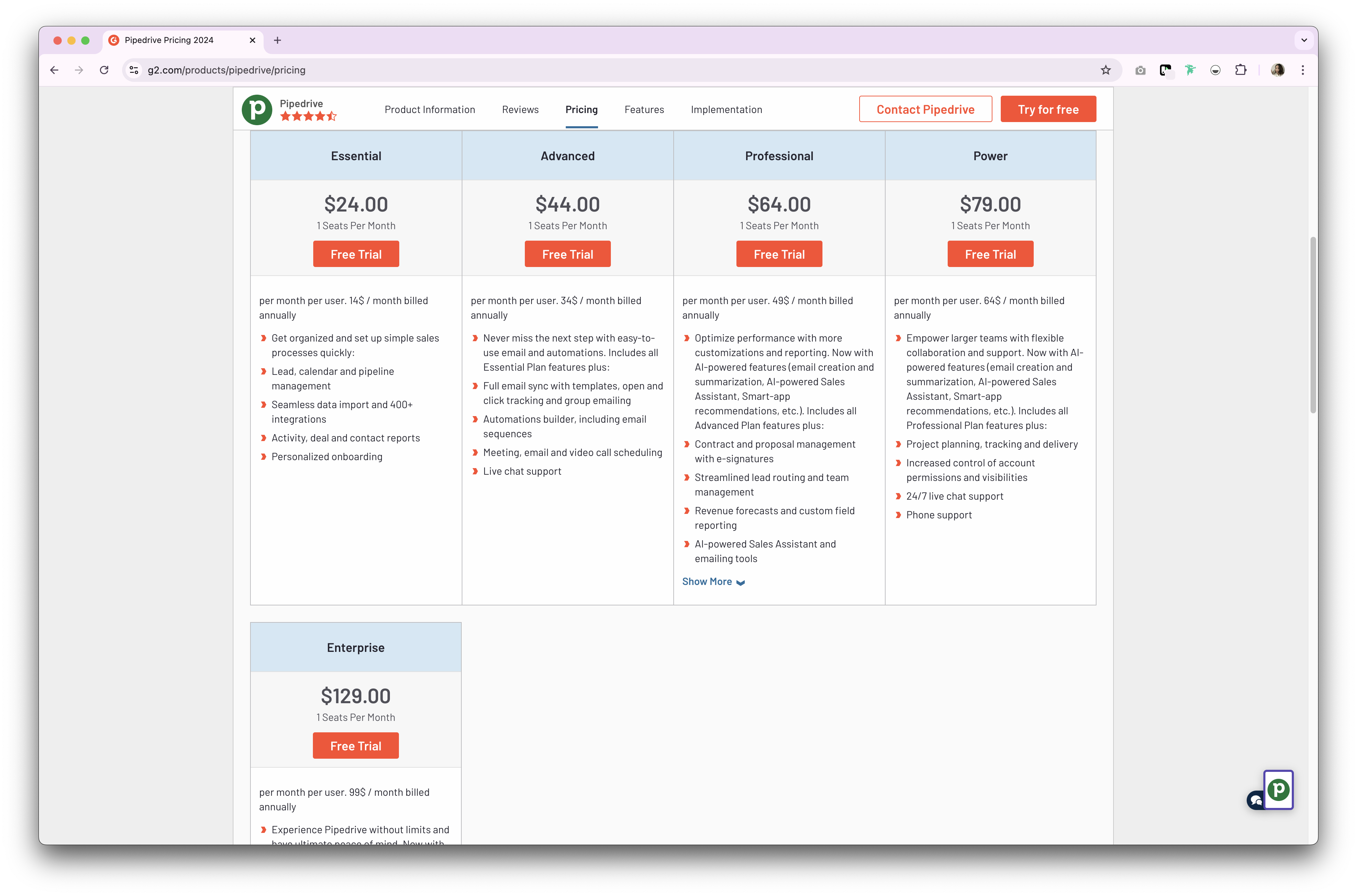
Pipedrive twee soorten abonnementen Pipedrive , beide voor hun CRM-product. Deze zijn beschikbaar op maandelijkse of jaarlijkse basis. Hun jaarlijkse abonnement is als volgt.
- Essentieel abonnement: vanaf $ 24 per gebruiker per maand.
- Geavanceerd abonnement: vanaf $ 44 per gebruiker per maand.
- Powerplan: vanaf $ 79 per gebruiker per maand.
- Enterprise-abonnement: vanaf $ 129 per gebruiker per maand.
👉🏼 Probeer folk om nooit meer een follow-up te missen
Prijzen Capsule CRM
- Starterspakket: vanaf $ 21 per gebruiker per maand.
- Groeiplan: vanaf $ 38 per gebruiker per maand.
- Geavanceerd abonnement: vanaf $ 60 per gebruiker per maand.
- Ultimate-abonnement: vanaf $ 75 per gebruiker per maand.

Maak kennis met folk : het beste alternatief voor Pipedrive Capsule CRM
Op zoek naar een betaalbaar alternatief? Wij raden folk aan als de optimale keuze voor verkoopteams van 20 tot 50 personen. Dit bekroonde CRM-platform is speciaal ontworpen om mee te groeien met groeiende teams, terwijl het de eenvoud behoudt die middelgrote verkooporganisaties nodig hebben om wendbaar en efficiënt te blijven.
Belangrijkste kenmerken
- Gebruiksgemak en aanpasbaarheid: Pas de pijplijnen, dashboards, automatisering en e-mailreeksen eenvoudig aan, zodat u ze kunt gebruiken in uw verkoopcyclus en pijplijnbeheer, maar ook in andere bedrijfsfuncties zoals werving, marketing en meer.
- Integratie met sociale media: importeer personen en bedrijven uit LinkedIn, Sales Navigator, Instagram en X met één klik dankzij de Google Chrome-extensie folk.
- Contactsynchronisatie vanuit Gmail en Outlook: volledige e-mailsynchronisatie waarmee gebruikers alle communicatie rechtstreeks vanuit het CRM kunnen beheren.
- Vind e-mailadressen met één klik: contactverrijking mogelijk gemaakt door Apollo en Dropcontact u ontbrekende gegevens met één klik kunt invullen.
- E-mailreeksen: verstuur e-mailreeksen met herinneringen als uw leads niet op uw eerste e-mails reageren. Het bevat een AI-integratie waarmee u e-mails op grote schaal kunt personaliseren.


Prijs en abonnementen
folk een gratis proefperiode van 14 dagen. Daarna zijn er betaalbare maand- of jaarabonnementen beschikbaar. Het jaarabonnement is als volgt.
- Standaard: $ 20 per gebruiker, per maand.
- Premium: $40 per gebruiker, per maand.
- Aangepast: vanaf $ 80 per gebruiker per maand.

Pipedrive Capsule CRM: wat is het oordeel?
Zowel Pipedrive Capsule CRM bieden robuuste functies die zijn afgestemd op kleine en middelgrote bedrijven. Pipedrive in verkoopautomatisering en maatwerk, terwijl Capsule CRM zich onderscheidt door zijn gebruiksvriendelijke interface en mogelijkheden voor taakbeheer. Voor verkoopteams van 20 tot 50 personen die op zoek zijn naar de perfecte balans tussen geavanceerde functionaliteit en kosteneffectiviteit, is folk echter de beste keuze. Het biedt functies van enterprise-kwaliteit tegen een fractie van de kosten, met behoud van de flexibiliteit die groeiende teams nodig hebben.
👉🏼 Probeer folk om contactgebaseerde herinneringen met je team te beheren
Veelgestelde vragen
Waarvoor wordt Pipedrive ?
Pipedrive verkoopteams van kleine en middelgrote bedrijven Pipedrive het beheren van deals en pijplijnen, het bijhouden van activiteiten, het synchroniseren van e-mail, het automatiseren van follow-ups en het rapporteren van prestaties om omzet te voorspellen en close kansen close .
Wat is het verschil tussen Pipedrive Capsule CRM?
Pipedrive automatisering, geïntegreerde e-mail en een AI-verkoopassistent. Capsule richt zich op eenvoudig contact- en taakbeheer met flexibele pijplijnweergaven en e-mail via Transpond. Beide bedienen kleine en middelgrote bedrijven met pijplijnen en rapportage.
Heeft Capsule CRM e-mailmarketing?
Ja. Capsule maakt verbinding met Transpond voor nieuwsbrieven, drip-campagnes en geautomatiseerde follow-ups. Contacten en segmenten worden gesynchroniseerd vanuit Capsule en engagementgegevens worden teruggestuurd naar contacten en kansen.
Wat is een goed alternatief voor Pipedrive Capsule?
folk biedt aanpasbare pijplijnen, contactverrijking, e-mailreeksen en automatisering tegen lagere kosten. Jaarabonnementen: Standaard $ 20/gebruiker/maand, Premium , Aangepast vanaf $ 80. Probeer folk met een gratis proefperiode van 14 dagen.
Ontdek folk -
Net als de verkoopassistent die uw team nooit heeft gehad