最后更新
一月26%,2026
X

Zoho CRM vs monday : Which CRM for startups wins?

探索Folk——专为以人为本的企业打造的客户关系管理平台

In today’s fast-paced business landscape, early-stage startups often find themselves grappling with the chaos of managing sales and customer relationships. As these companies evolve, the inability to track every conversation, next step, and stakeholder can lead to missed opportunities and lost deals. A CRM for startups addresses this critical need by providing a centralized hub where interactions and responsibilities are clearly defined and easily accessible.

Zoho CRM and monday Sales CRM offer distinct approaches to this challenge. Zoho CRM focuses on versatile automation, extensive customization, and integration with the broader Zoho suite, making it a strong contender for startups that require robust workflow control. In contrast, monday Sales CRM is designed with operational efficiency in mind, allowing users to manage leads and sales processes seamlessly within an existing work management framework.

This article delves into a feature comparison of Zoho CRM and monday Sales CRM, focusing on key aspects that impact daily operations: email and calendar sync, data management, pipeline flexibility, team collaboration, and automation capabilities. By understanding these differences, startups can make informed decisions on which CRM best aligns with their growth strategy.

什么是Zoho CRM?

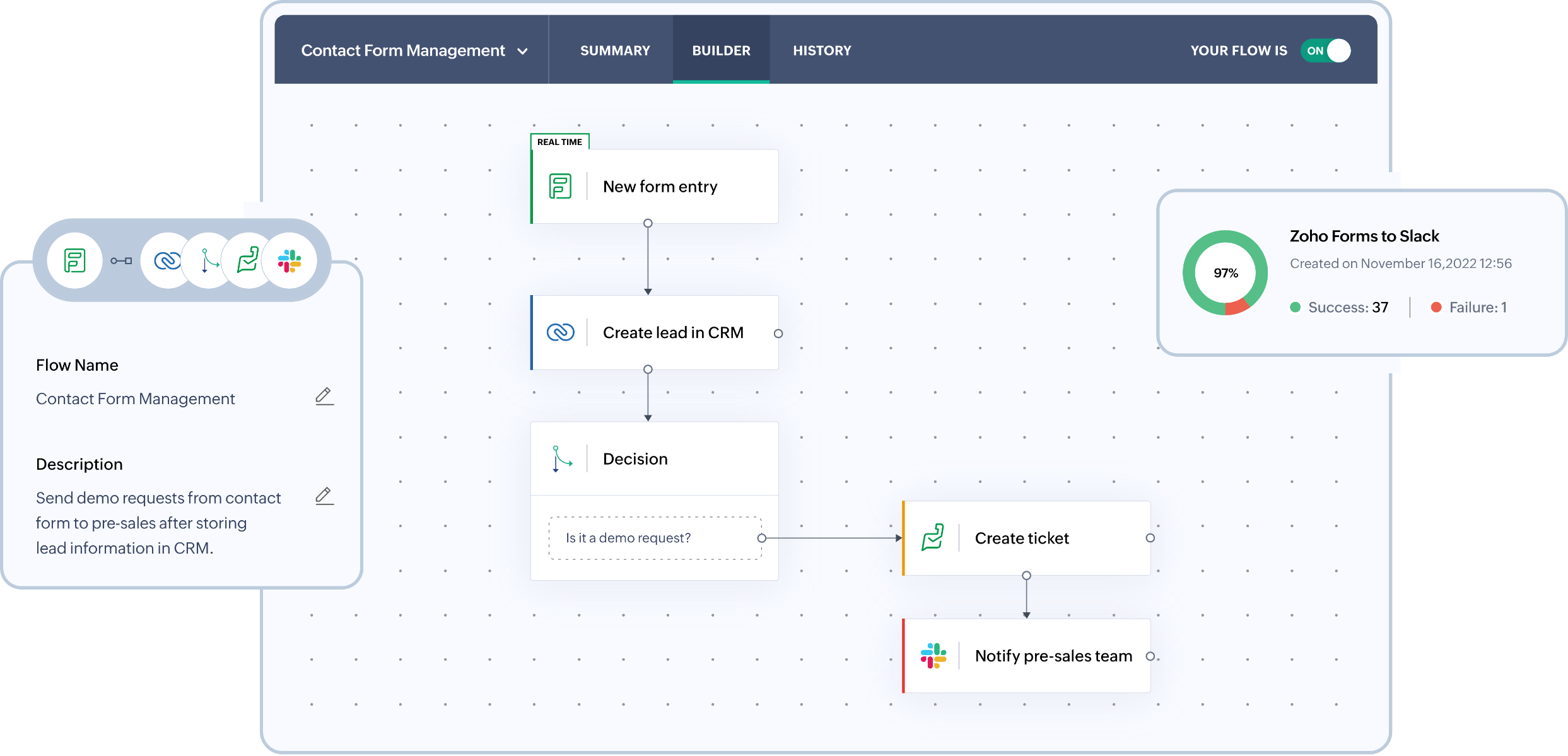
Zoho CRM is a versatile solution that offers a balanced approach to automation, customization, and pricing, making it ideal for growing startups. It caters to teams requiring more workflow control than standard CRMs while avoiding the complexity of enterprise systems. With features like pipeline management, forecasting, email tracking, and extensive customization options via fields and modules, Zoho integrates seamlessly within the broader Zoho suite, which can replace multiple tools as your company expands. However, its interface may feel heavier, and advanced features are often available only in higher tiers or via add-ons.

Zoho CRM 销售管道

What is monday?

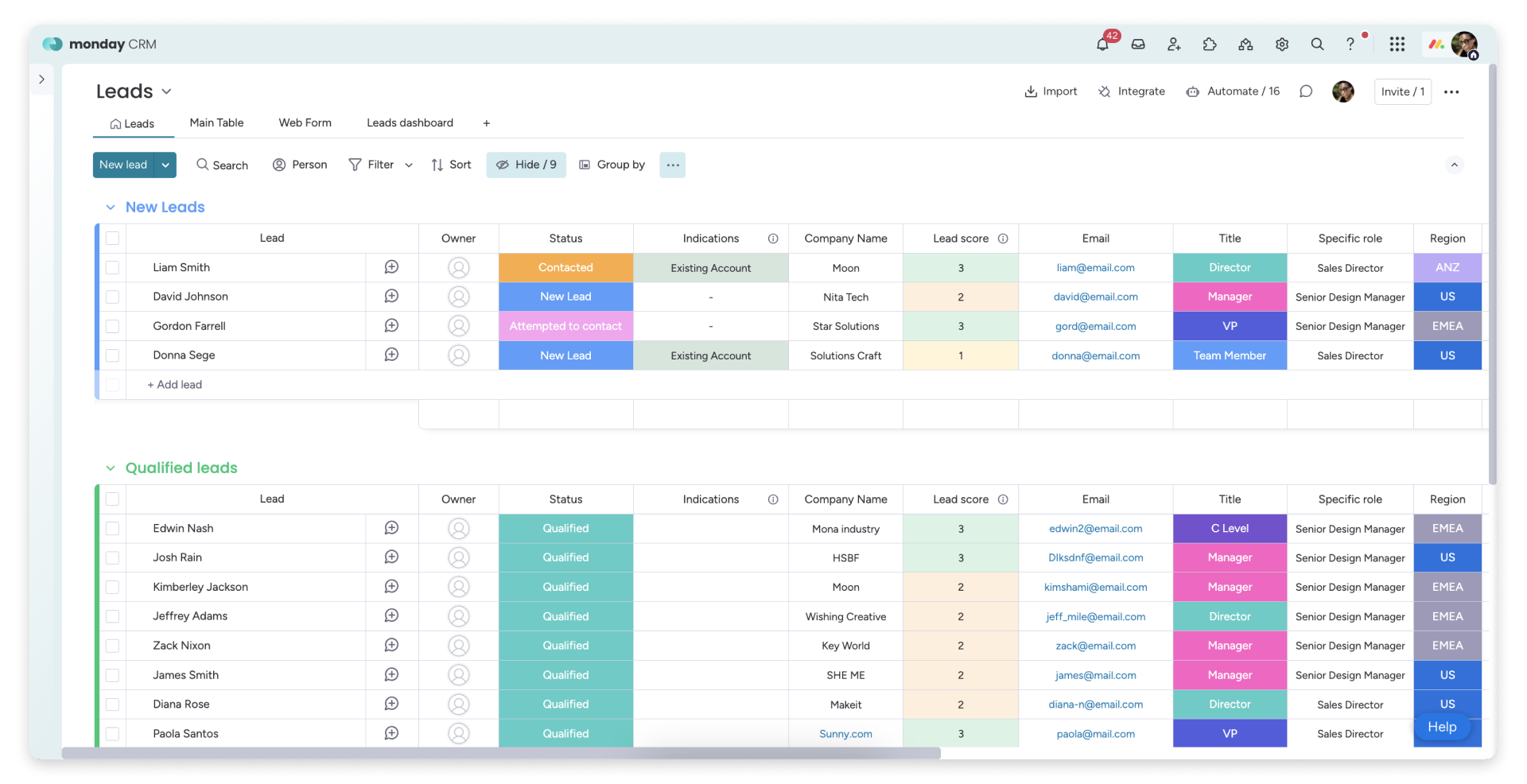
monday Sales CRM is specifically designed for teams already utilizing monday.com for their operations. This solution is perfect for startups that wish to manage leads, deals, and post-sale processes all within a single work management platform. Its strengths lie in enhancing visibility and fostering collaboration across tasks, pipelines, and inter-team handoffs. With quick configuration and the ability to extend functionality with automations, it minimizes the need for manual updates. This CRM is especially suited for operationally-driven teams, though those needing in-depth analytics and complex data models may need additional tools.

monday CRM Pipeline

Feature comparison of Zoho CRM and monday

Email and Calendar Sync

Zoho CRM seamlessly syncs email with Gmail using IMAP, POP3, or the Gmail API, ensuring that messages remain connected to the appropriate leads and contacts. Teams can read, send, and track email activity directly within the CRM, consolidating conversation history in one convenient location. This feature minimizes manual logging and ensures that pipeline reviews are rooted in actual outreach. It's particularly beneficial for startups seeking efficient inbox-linked execution without the hassle of switching tools constantly.

monday Sales CRM integrates email and calendar activities through dedicated connections, enhancing visibility of communication on the record timeline. The Outlook integration links both emails and calendar events to monday, facilitating email-driven workflows from a comprehensive board view. Meanwhile, Google Calendar integration syncs calendar activities into the CRM timeline, centralizing meetings and touchpoints. This creates a unified space to review recent conversations and upcoming events, making it ideal for teams that desire CRM context within their work management workflow.

Clean Contact Data with Enrichment and Deduplication

Zoho CRM features powerful duplication management tools designed to identify and merge duplicate records, ensuring your database remains pristine as imports and integrations increase. You can configure duplicate checks to maintain the uniqueness of key fields, flagging duplicates before they proliferate. Records can be de-duplicated directly from list views or merged at the record level when overlaps are detected. This practice prevents fragmented timelines and ensures reliable segmentation and reporting at scale.

monday offers effective duplicate management through a merge flow that integrates items while preserving update history. Duplicate items can be consolidated into a single record, with the originals archived and their updates transferred. This approach keeps records tidy when leads or accounts are sourced from various channels. It's particularly beneficial for startups that depend on imports and integrations. While data enrichment typically originates from the system stack, monday emphasizes structured fields and data hygiene.

Flexible Pipelines and Views

Zoho CRM fosters collaboration by providing shared visibility into activities, notes, tasks, and ownership across teams. Its calendar integration allows seamless syncing of meetings from Office 365 into Zoho CRM, ensuring that scheduled interactions are visible on the CRM timeline. This alignment keeps sales, success, and leadership updated on past actions and upcoming priorities. Access can be controlled through roles and permissions as the organization becomes more structured.

monday Sales CRM streamlines pipeline management with a Deals board designed for stage-based tracking. The Kanban pipeline view enables easy drag-and-drop movement across stages, making deal status straightforward to understand. Stages and columns are customizable to align with a startup's sales strategy without extensive configuration. Filtering and views effectively categorize inbound, outbound, renewals, or partner activities, ensuring the setup remains operational and focused on execution.

Team Collaboration

Zoho CRM enhances collaboration within records by providing shared visibility of activities, notes, tasks, and ownership across teams. With calendar integration, meetings from Office 365 sync seamlessly into Zoho CRM, ensuring that scheduled interactions are visible on the CRM timeline. This feature enables sales, success, and leadership teams to stay aligned on past events and future actions. Access can be managed through defined roles and permissions, especially as the organization becomes more structured.

monday is designed with collaboration at its core, ensuring that CRM tasks remain visible across teams without the need to switch tools. Each record supports updates and threaded discussions linked to the item, maintaining context close to the deal or account. Clear accountability is established through owners, assignments, and status columns, facilitating smooth handoffs. Shared views enable alignment among sales, success, and operations teams regarding the same pipeline reality, while permissions and board structures keep collaboration organized as the team expands.

Lightweight Automation and Integrations

Zoho CRM automation utilizes workflow rules to trigger actions like email notifications, task assignments, field updates, webhooks, and custom functions. This functionality enhances lead routing, enforces follow-up SLAs, maintains pipeline cleanliness, and facilitates event-driven integrations, all while minimizing manual effort. For external connectivity, Zoho CRM provides REST APIs for CRUD operations and broader integration capabilities. Additionally, Zapier enhances Zoho CRM workflows for teams seeking no-code automation across their tech stack.

monday.com also supports automation through built-in recipes that activate actions based on changes in status, arrival of dates, or movement between stages. Integrations enhance this capability with connectors and no-code workflows, including Zapier for popular startup stacks. For more complex requirements, monday.com offers a GraphQL API, enabling programmatic data reading and writing. This flexibility allows users to begin with lightweight automation and gradually scale workflows as their processes evolve, all while keeping automation manageable through clear board logic.

folk CRM: The Best CRM for Startups in 2026

folk is a contemporary CRM designed specifically for startups, seamlessly integrating relationships across Gmail, Google Calendar, LinkedIn, and spreadsheets. It consolidates contacts, companies, deals, notes, files, and every interaction into a single lightweight workspace, ensuring that pipeline context is linked to genuine conversations rather than scattered across multiple tabs.

Top features that startups love in folk

  • Seamless Gmail + Google Calendar sync for an automatic activity timeline
  • LinkedIn-ready contact capture through a Chrome extension
  • Contact enrichment to quickly fill in missing data
  • Deduplication to maintain a clean database as it scales
  • Custom pipelines and fields to align with any go-to-market strategy

For startups, folk excels in delivering speed-to-value and encouraging daily use. Setup is quick, workflows remain adaptable, and multichannel context is easily accessible, all without weighing down the CRM with unnecessary complexity. The outcome is more consistent follow-ups, cleaner data, and clearer revenue visibility with reduced friction.

👉 立即免费试用folk CRM

结论

In summary, Zoho CRM excels with its robust automation and customization, making it suitable for startups needing workflow control, while monday Sales CRM offers efficient integration within existing operations for teams focused on collaboration. However, for startups prioritizing email integration, automation, and a streamlined experience, folk emerges as the best alternative. Its quick setup, seamless multichannel syncing, and lightweight design ensure that teams can maintain consistent follow-ups and clean data without the burden of complexity.

立即开启14天免费试用,或预约产品演示

免费试用