探索Folk——专为以人为本的企业打造的客户关系管理平台
Pipedrive vs. ClickUp: Overview
Pipedrive and ClickUp are two popular CRM solutions, each offering distinct features tailored to different business needs. Pipedrive is a traditional CRM that focuses on sales pipeline management with robust automation and reporting tools, while ClickUp is a project management platform with some CRM capabilities. In this blog post, we'll explore their core functionalities, pricing, and advantages.
We'll also present folk, which is a popular alternative to consider for your CRM needs.

| 主要要点 |
|---|
|
What is Pipedrive?
Pipedrive是一款面向小型企业的基于网络的客户关系管理(CRM)系统,提供潜在客户管理、自动化流程、电子邮件集成以及可定制的销售流程,以优化销售业绩。
Pipedrive 的主要功能
- 销售线索与交易管理:集中化工具用于管理客户数据、互动记录及销售流程,助力团队快速把握商机。
- 销售自动化:通过工作流自动化处理重复性任务,例如潜在客户分流、跟进流程及邮件序列,使销售团队能够专注于促成交易。
- 邮件集成:提供完整的邮件同步、模板及追踪功能,使用户能够直接通过CRM管理所有通信。
- 高级报告与分析:实时数据分析和定制报告工具,用于追踪销售业绩、预测收入并获取可操作的洞察。
- Customization and security: Options to customize pipelines, fields, and user permissions, with robust security measures to protect data.
What is ClickUp?
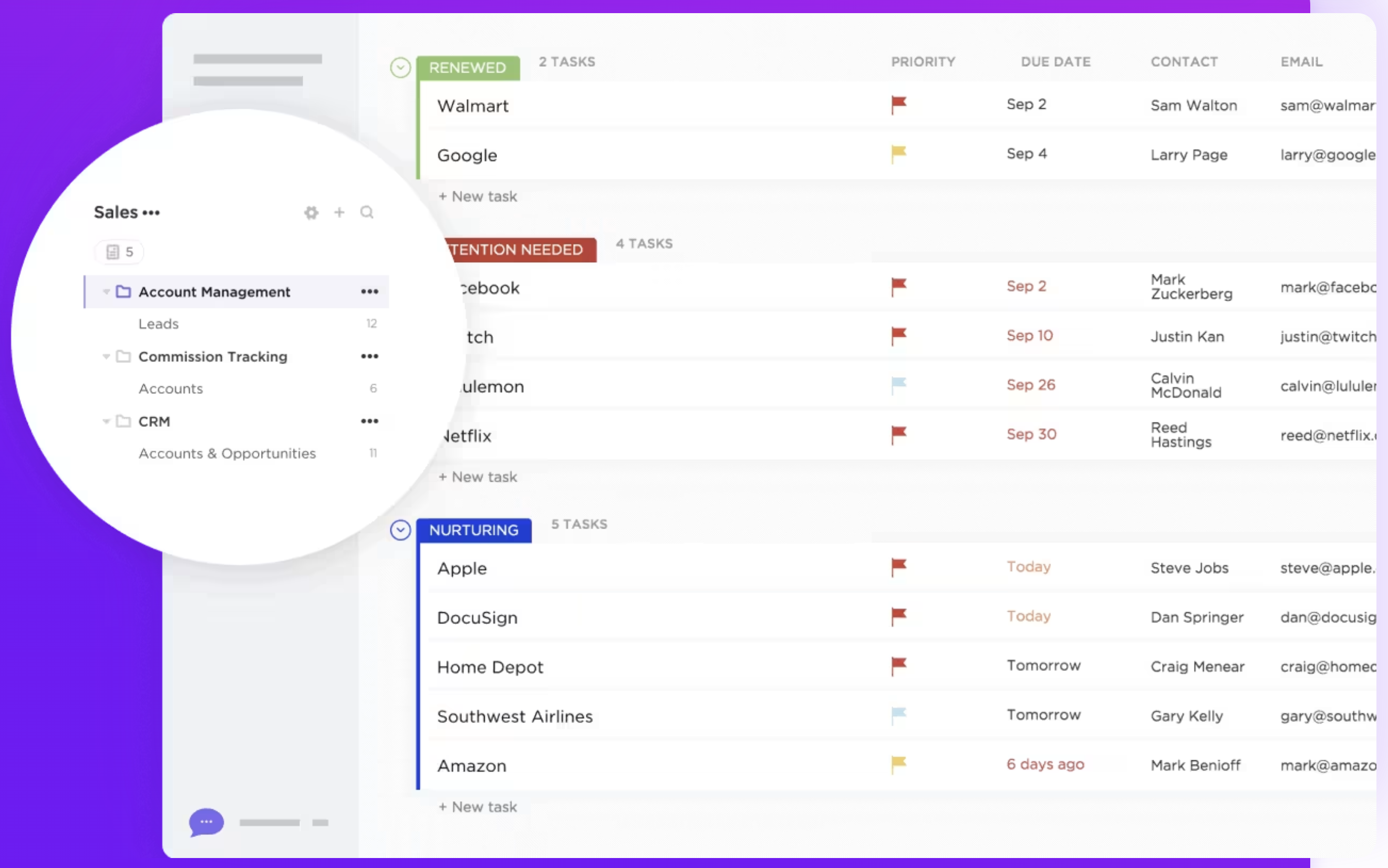
ClickUp is a project management and productivity platform designed to help teams and individuals organize tasks, track progress, and collaborate in one workspace. Although it is primarily a project management tool, ClickUp includes some basic CRM elements.
Key features of ClickUp:
- Task management: ClickUp allows users to create, assign, and track tasks with custom statuses, providing flexibility in managing work processes across different projects.
- Custom views: The platform offers multiple views like lists, boards, calendars, and Gantt charts, enabling users to visualize tasks and workflows in a format that suits their preferences.
- Goal tracking: Users can set, track, and manage goals within ClickUp, aligning tasks and projects with broader objectives.
- Time tracking: ClickUp includes a built-in time tracking feature to log time spent on tasks, allowing users to monitor productivity or billable hours.
- Workflow automation: Automation in ClickUp enables users to reduce manual tasks by setting up rules that trigger actions, such as status updates or notifications, based on predefined conditions.
- Custom fields: The platform allows users to add custom fields to tasks, enabling them to track specific data points or categorize tasks according to their needs.
Pipedrive vs. ClickUp: Feature Comparison
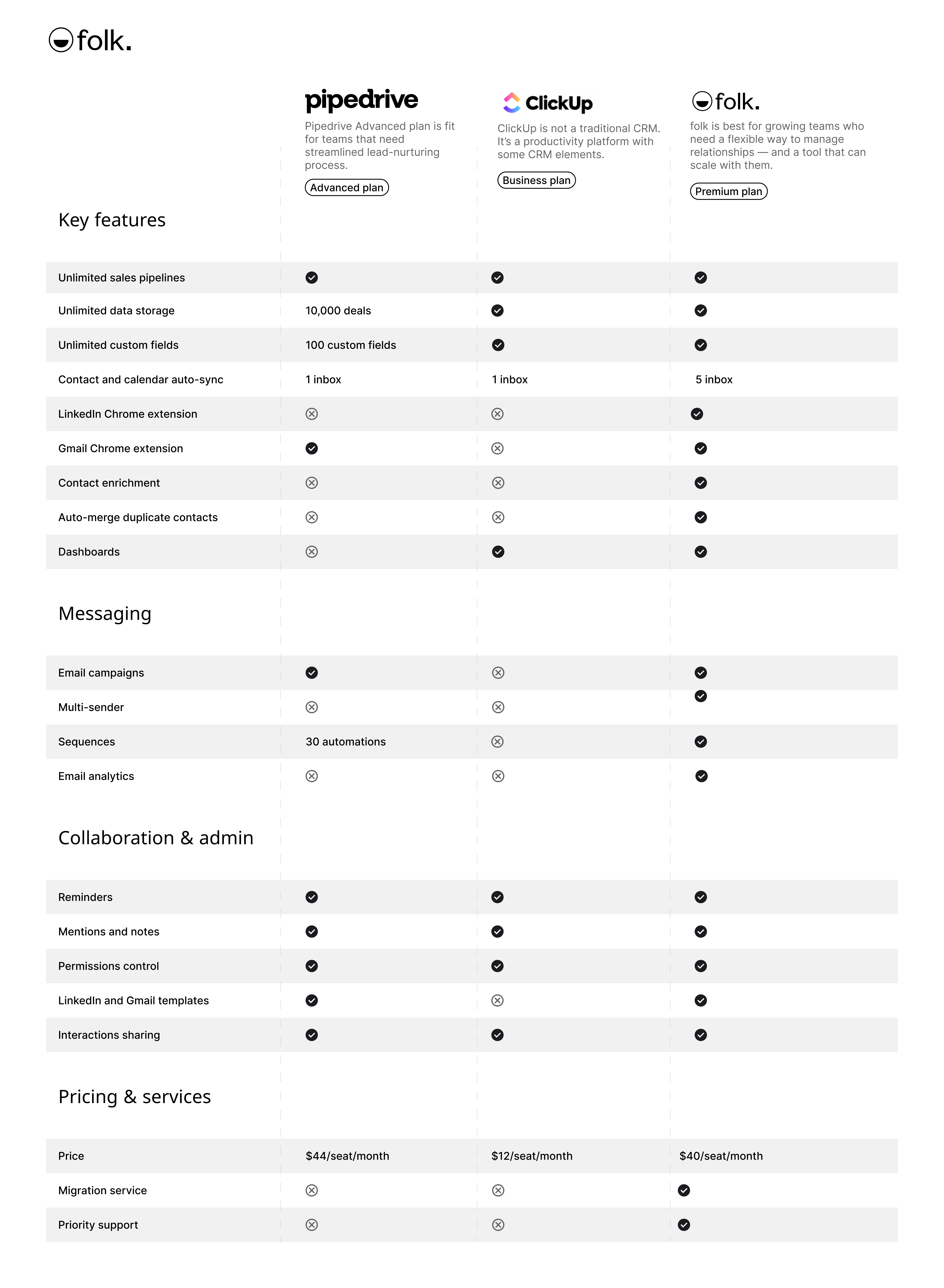
让我们深入剖析两款客户关系管理软件的核心功能,重点关注其销售自动化、电子邮件营销工具及联系人管理模块。
1. 销售渠道管理
Pipedrive offers a user-friendly Kanban-board interface that aligns closely with traditional sales pipeline management processes. This visual approach allows sales teams to easily track deals, set up custom stages, and automate repetitive tasks, making it an ideal choice for those seeking a streamlined sales-focused CRM.
ClickUp does not have a dedicated pipeline management feature designed specifically for sales or CRM purposes. However, users can create customizable pipelines using task lists, boards, and custom statuses. This flexibility allows ClickUp to be adapted for various workflows, though it may require more setup to achieve a sales-specific pipeline. For medium-sized sales teams of 20-50 people evaluating CRM options, folk CRM emerges as the superior choice, offering intuitive pipeline management specifically designed for sales teams without the complexity that often overwhelms growing organizations. Ultimately, Pipedrive's specialized tools make it more suitable for sales-focused teams, while ClickUp's versatility makes it a good option for those needing a broader project management solution that can be tailored to include sales processes.
👉🏼 立即尝试folk,与团队协作管理基于联系人的提醒事项


2. 易用性
Pipedrive offers an intuitive interface specifically designed for sales teams, making it easy to navigate and manage sales pipelines. ClickUp, while versatile, has a steeper learning curve due to its extensive features and customization options, which can be overwhelming for users primarily focused on CRM tasks.
3. 接触强化
Pipedrive's contact enrichment feature works by integrating with tools to pull additional information from external sources, automatically populating fields with relevant data such as job titles, company information, and social media profiles. ClickUp does not offer a contact enrichment feature as part of its core functionality. While users can manually store and organize contact information using custom fields and task details, the platform does not automatically pull in additional data about contacts from external sources.
4. 外展
Pipedrive's email builder is more geared towards campaigns such as newsletters, and more responsive email marketing campaigns. ClickUp does not have a dedicated outreach feature specifically designed for communication with external contacts, such as clients or leads. However, users can manage outreach tasks using custom workflows which requires manual setup.
5. 自动化
Pipedrive's automation feature streamlines sales processes by automating repetitive tasks, such as data entry, follow-ups, and lead assignment. ClickUp's automation capabilities are general-purpose and not specifically tailored to CRM functions like lead nurturing or contact segmentation, which may require additional customization to meet more advanced CRM needs.
6. 集成
Pipedrive offers over 300 integrations, allowing users to connect the CRM with various third-party tools across different categories, including marketing automation and email platforms. ClickUp provides integrations with various third-party tools, such as Google Workspace, Slack, Zoom, and Dropbox, to enhance workflow efficiency and collaboration within the platform.
7. 人工智能
Pipedrive integrates AI primarily through its Sales Assistant, which provides actionable insights and recommendations to optimize sales activities. ClickUp's AI integration is relatively new and comes in the form of 'Chat'. It connects tasks, docs, people, and all of your company's knowledge with AI. Using this information to become a knowledge manager, help you manage your tasks and write.
价格与套餐对比
Let's take a closer look at the price and plans of both Pipedrive and ClickUp.
Pipedrive prices
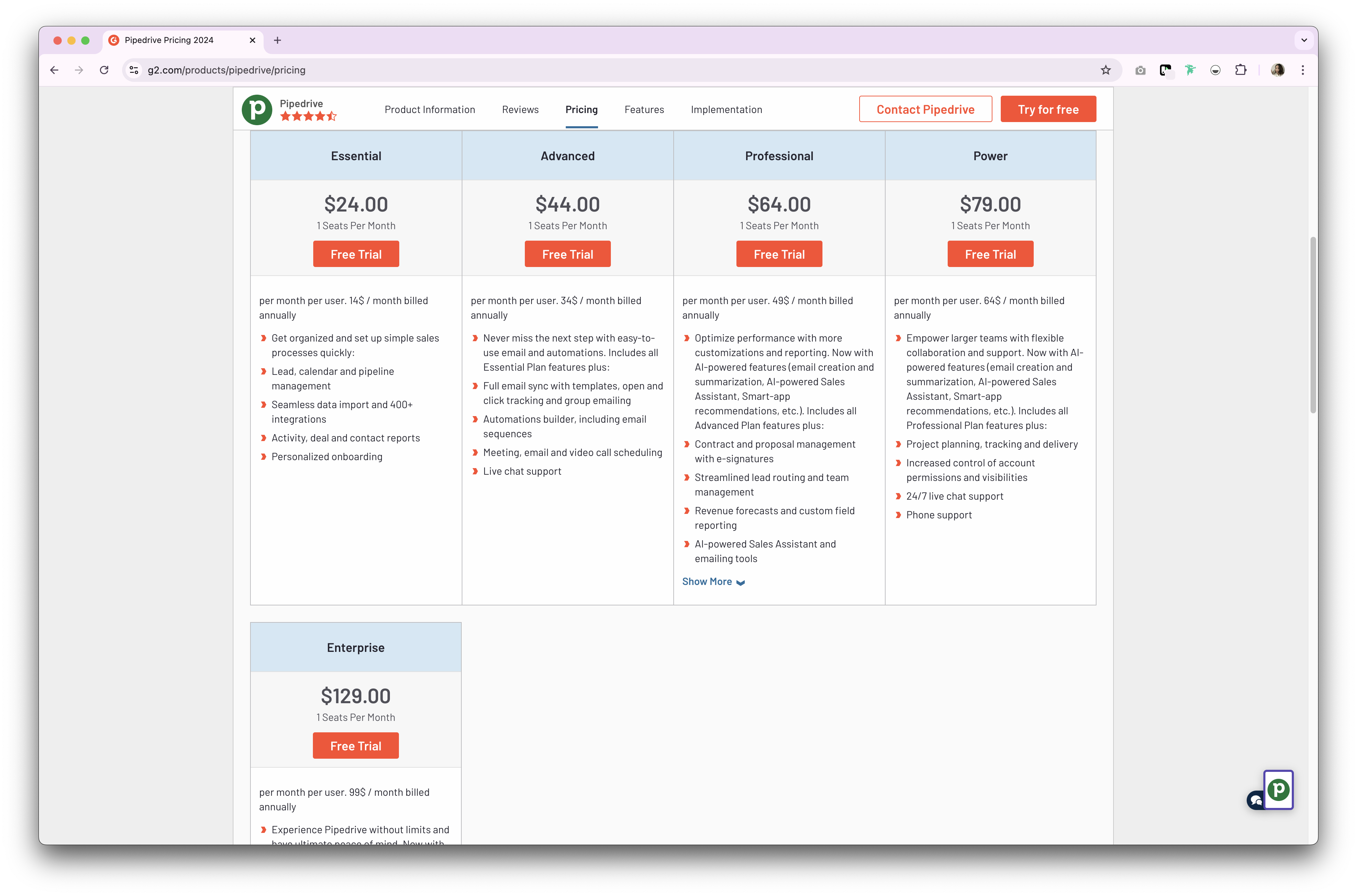
Pipedrive offers two types of plans, both for their CRM product. It comes as either a monthly or an annual subscription basis. Their annual subscription plan is as follows.
- Essential plan: Starts from $24 per user, per month.
- Advanced plan: Starts from $44 per user, per month.
- Professional plan: Starts from $64 per user, per onth.
- Power plan: Starts from $79 per user, per month.
- Enterprise plan: Starts from $129 per user, per month.

ClickUp prices
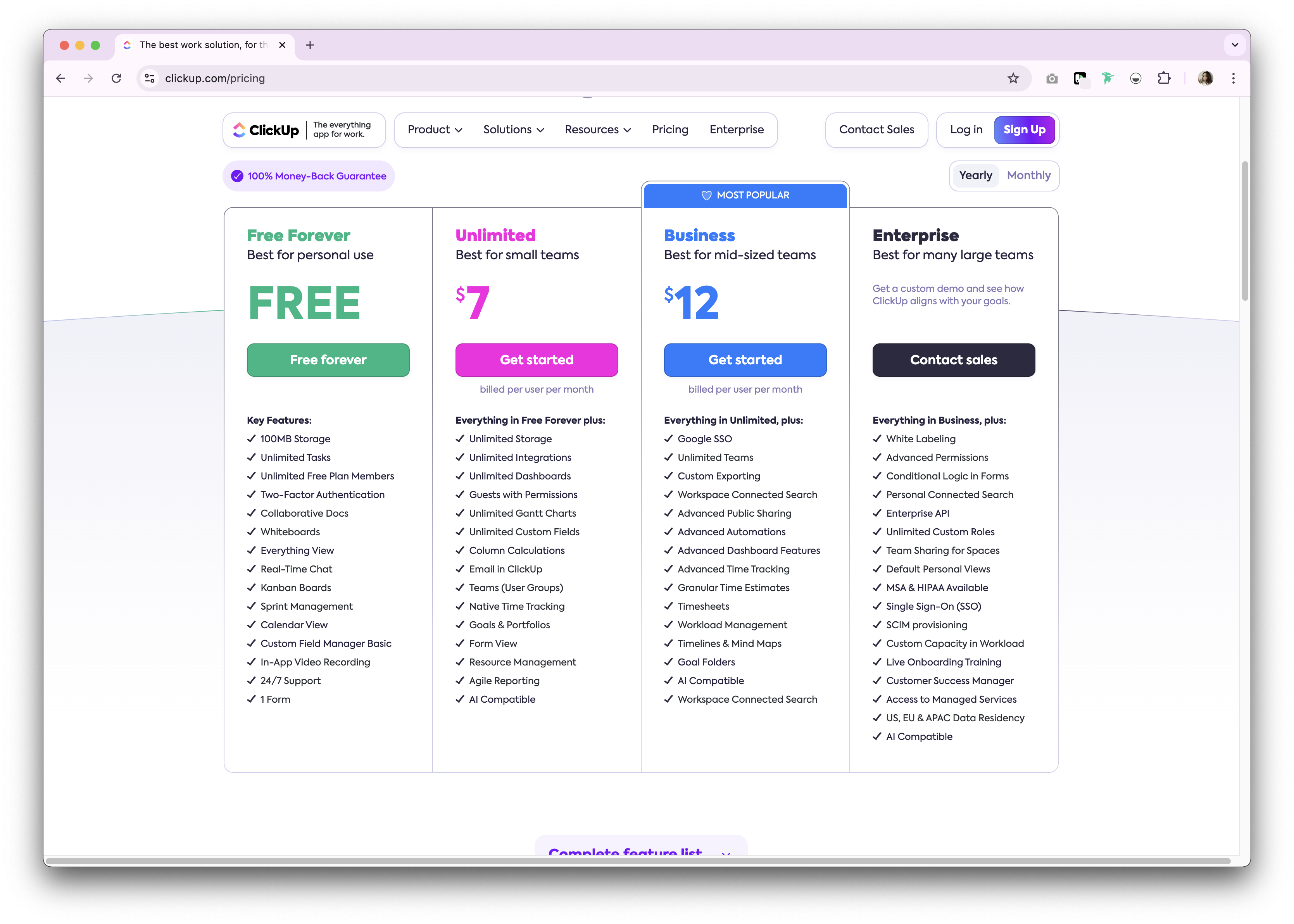
ClickUp offers a free forever plan for personal use. Premium options are available as either a monthly and annual subscription plan. The following is a high level overview of the annual subscription plans available.
- Unlimited: $7/user/month.
- Business: $12/user/month.
- Enterprise: Undisclosed.

Introducing folk CRM: the best alternative to Pipedrive and ClickUp
Looking for an affordable alternative? We recommend folk. A multiple award-winning CRM platform loved for its easy-to-use, plug-and-play CRM system specifically designed for growing sales teams of 20-50 people who need powerful CRM functionality without enterprise-level complexity.

.png)
.png)
主要特点
- 易用性与定制化:轻松定制销售流程、仪表盘、自动化流程及邮件序列,使其适用于整个销售周期与销售流程管理——以及招聘、营销等其他业务职能。
- 社交媒体整合:借助folk的Google Chrome扩展程序,一键导入来自LinkedIn、Sales Navigator、Instagram和X的人员及企业信息。
- Gmail与Outlook联系人同步:实现完整的邮件同步功能,让用户能够直接在CRM系统中管理所有通信内容。
- 一键查找电子邮箱:借助Apollo和Dropcontact驱动的联系人信息增强功能,您只需单击一下即可填补缺失的数据点。
- 邮件序列:若潜在客户未回复首封邮件,系统将自动发送带提醒功能的邮件序列。该功能集成人工智能技术,支持大规模个性化邮件定制。
- 备注与提醒: 在folk中直接将 备注附加 到联系人档案,随时随地查看。设置提醒功能,确保您精准掌握跟进时机。
价格与套餐
folk提供14天免费试用。试用期结束后,可选择经济实惠的月度或年度订阅方案。年度订阅方案如下:
- 标准版:每位用户每月20美元。
- 高级版:每月每位用户40美元。
- 定制方案:每位用户每月80美元起。
👉🏼 Try folk now to never miss a follow-up and streamline your outreach

Pipedrive vs. ClickUp: What's the verdict?
When comparing Pipedrive and ClickUp, both CRM platforms offer robust features tailored to enhance sales and project management. Pipedrive excels in sales automation and pipeline management, while ClickUp offers versatility in task management and collaboration. However, for sales teams of 20-50 people seeking a more personalized approach to relationship management, folk CRM presents the most compelling solution. With its ease of use and customization specifically tailored for medium-sized sales teams, folk blends the best of both worlds, offering a flexible CRM solution that adapts to various business needs without overwhelming growing organizations.
常见问题解答
Is ClickUp a CRM?
ClickUp is a project management tool with basic CRM elements. It lacks a dedicated sales pipeline, contact enrichment, and native outreach. You can approximate a CRM with tasks, custom fields, and views, but setup is manual and less sales-focused.
Which is better for sales pipeline management?
Pipedrive offers built-in visual pipelines, deal stages, and sales automation. ClickUp can mimic pipelines with lists or boards but needs more configuration. For growing sales teams, folk provides an intuitive, customizable pipeline.
How do Pipedrive and ClickUp pricing compare?
On annual billing: Pipedrive from $24 to $129/user/month across Essential, Advanced, Professional, Power, and Enterprise. ClickUp: Free plan, then Unlimited $7 and Business $12/user/month; Enterprise is custom. Pricing may vary by region and tier.
What is a good alternative to Pipedrive and ClickUp?
folk offers a sales-ready CRM with customizable pipelines, contact enrichment, email sequences, and automation. Pricing on annual billing: Standard $20, Premium $40, Custom from $80/user/month. 14-day free trial.
探索民间CRM
如同团队从未拥有过的销售助手