


探索folk 专为以人为本的企业打造的客户关系管理平台
AI assistants are becoming part of everyday sales work, but most still operate without access to customer data. They can draft emails, summarize text, and answer general questions, yet they cannot retrieve account history, update opportunities, or search a CRM unless they are connected to one.
That is where the idea of a Claude CRM comes in. Rather than being a standalone CRM platform, it refers to using Claude AI alongside a customer relationship management system so it can understand live customer data and perform meaningful business tasks.
With the rise of the Model Context Protocol (MCP), connecting Claude to a CRM is becoming much simpler. Instead of relying on custom integrations for every workflow, businesses can give Claude secure access to contacts, companies, deals, and other CRM data through a standardized connection, turning an AI assistant into a practical sales companion.
👉 Try folk MCP for Claude (free)
What Is a Claude CRM? A Clear Definition
A Claude CRM is not a standalone customer relationship management platform. It describes a CRM that is connected to Claude AI, allowing the assistant to access customer data, retrieve account information, and perform CRM-related tasks through secure integrations.
Without CRM access, Claude can only generate responses based on the information provided in a conversation. Once connected to a CRM, it can work with live business data to answer questions, summarize customer relationships, prepare sales meetings, or update records as part of everyday workflows.
A typical Claude CRM setup includes three components:
- Claude AI, which understands requests and generates responses.
- A CRM, where contacts, companies, deals, activities, and relationship history are stored.
- An integration layer, such as an MCP server, that securely connects Claude to the CRM and exposes the actions it is allowed to perform.
Instead of treating AI as a separate tool, a Claude CRM turns it into an intelligent interface for customer relationship management. Sales teams can ask natural-language questions, retrieve account context in seconds, and complete CRM tasks without manually navigating multiple screens or searching through records.
Why Connect Claude to a CRM?
Claude becomes significantly more valuable when it can work with live customer data instead of relying only on the information available in a conversation. Connecting a CRM gives the AI assistant the business context needed to support day-to-day sales activities and reduce repetitive administrative work.
The benefits extend across the entire sales cycle:
✔️ Access customer information instantly. Retrieve contacts, companies, deals, notes, and relationship history without manually searching the CRM.
✔️ Work with real-time data. Responses reflect the latest CRM records rather than outdated or incomplete information.
✔️ Prepare meetings faster. Generate account summaries, recent activity overviews, and customer timelines before every call.
✔️ Reduce manual CRM updates. Create contacts, update records, and log information directly from conversations.
✔️ Improve sales follow-ups. Draft personalized emails based on previous interactions, deal stage, and customer context.
✔️ Answer CRM questions naturally. Ask questions such as "Which enterprise deals haven't been updated this month?" or "Who owns the Acme account?" and receive immediate answers.
💡 folk tip: Connecting Claude to a CRM also creates a more consistent workflow. Instead of switching between AI tools, CRM records, emails, and meeting notes, sales representatives can complete much of their daily work from a single conversational interface backed by live business data.
What Can Claude Do Inside a CRM?
Once connected to a CRM, Claude can do much more than generate text. It becomes an AI assistant that can retrieve information, analyze customer relationships, and complete routine CRM tasks using live business data.
Common CRM workflows include:
→ Search contacts and companies. Find customer records, account owners, or decision-makers in seconds.
→ Summarize customer relationships. Compile meeting notes, emails, activities, and timeline events into a concise account overview.
→ Prepare sales meetings. Generate briefings with recent interactions, open opportunities, and important context before a call.
→ Write personalized follow-ups. Draft emails using CRM data, previous conversations, and deal status instead of generic prompts.
→ Update CRM records. Create contacts, modify company information, update deal stages, or add notes after customer interactions.
→ Analyze pipeline activity. Identify stalled opportunities, inactive accounts, or deals that require immediate attention.
→ Answer business questions. Retrieve information such as overdue follow-ups, high-value opportunities, or accounts without recent activity using natural language.
These workflows reduce context switching while helping sales teams spend less time navigating software and more time building customer relationships. Rather than replacing the CRM, Claude provides a faster way to access and act on the information already stored inside it.
How Claude Connects to a CRM with MCP
Claude does not connect directly to a CRM on its own. It needs a secure way to access business data and perform actions without exposing the entire application. That is the role of the Model Context Protocol (MCP).
An MCP server acts as the connection layer between Claude and the CRM. It exposes specific tools and resources that Claude is allowed to use, such as searching contacts, retrieving deal information, creating records, or updating customer data.
一个典型的流程如下:
- A user asks Claude to complete a CRM-related task.
- Claude sends the request to the MCP server.
- The MCP server communicates with the CRM.
- The CRM returns the requested data or confirms the action.
- Claude presents the result in a natural, conversational response.
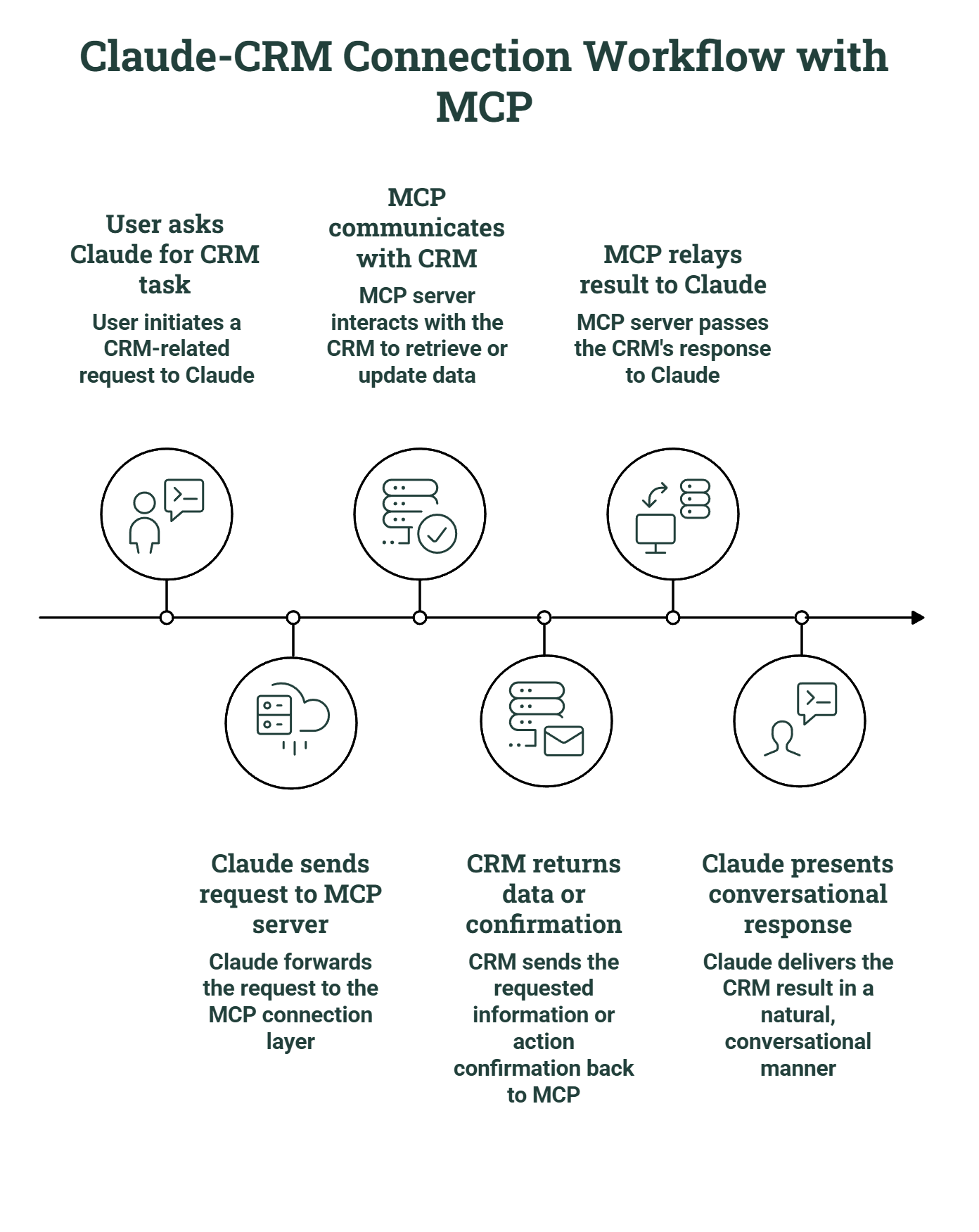
This architecture offers several advantages:
- Live access to CRM data instead of static information.
- Secure permission management that controls which actions Claude can perform.
- Support for multiple AI workflows without building separate integrations.
- A standardized connection that can evolve as new AI clients adopt MCP.
Why folk CRM Is Built for Claude AI Workflows!
Claude performs best when it has access to reliable customer data. That means more than reading contact records. It needs enough context to answer questions, understand relationships, and interact with the CRM without creating additional manual work for the sales team.
folk was designed around that idea. Through its MCP server, Claude can work directly with the CRM while respecting the permissions and structure already defined inside the workspace. Every request uses current CRM data, so responses stay aligned with the latest customer activity.
Depending on the available permissions, Claude can:
✔️ Find contacts, companies, and deals.
✔️ Retrieve relationship history before a meeting.
✔️ Look up account owners and collaborators.
✔️ Create new contacts or companies.
✔️ Update existing CRM records.
✔️ Access pipeline information to answer sales questions.
The result is a much more natural workflow. Instead of jumping between a CRM, meeting notes, and an AI assistant, sales teams can ask questions in plain language and complete routine CRM tasks from the same conversation.
👉 Try folk MCP for Claude (free)
结论
Connecting Claude to a CRM gives the AI the context it needs to support real sales work. Instead of relying on static prompts, Claude can access live customer data, answer CRM questions, retrieve account information, and help complete routine tasks.
With folk MCP, Claude connects securely to your CRM through a standardized protocol, making it easy to build AI-powered workflows around real customer relationships rather than isolated conversations.
常见问题解答
Can Claude connect to a CRM?
Yes. Claude can connect to a CRM through an integration layer such as an MCP server. This allows the AI assistant to access live CRM data, retrieve customer information, and perform authorized actions like creating or updating records.
Does Claude have its own CRM?
No. Claude is an AI assistant, not a CRM platform. It works alongside existing CRM software to help users search data, summarize customer relationships, answer questions, and automate CRM workflows.
What is the best CRM for Claude?
The best CRM for Claude is one that provides structured customer data and supports AI integrations. A CRM with an MCP server, such as folk, allows Claude to securely access contacts, companies, deals, and other CRM resources in real time.
Can Claude update CRM records?
Yes. When connected through MCP, Claude can perform actions such as creating contacts, updating companies, modifying deals, or adding notes, depending on the permissions configured by the organization.
探索folk
如同团队从未拥有过的销售助手