


Откройте для себя Folk — CRM для компаний, ориентированных на людей
Inbox reality in 2025
The inbox is a battlefield and generic copy dies on impact.
AI automation now reads context at scale. Intent, timing, tone, and turns cold lists into warm, specific messages that feel written for one person.
This guide defines B2B email personalization, shows the data signals models use, explains the workflow behind AI-driven personalization, and compares the best tools of 2025.
| Основные моменты |
|---|
|
What is Email Personalization?
Email personalization tailors subject lines, copy, and calls-to-action to a specific recipient using context (firmographics, role, behavior, intent). The goal isn't flattery; it is relevance—matching a pain point, timing, and next step to where the buyer is in the journey.
Three layers typically coexist:
✔️ Static data: name, company, job title, etc. Fast, shallow impact!
✔️ Rule-based logic: segments, triggers (visited pricing, downloaded a guide), dynamic snippets per industry or ICP.
✔️ AI context: models infer intent and craft variants using multi-source data, adapting tone, value prop, and CTA per contact.
Success shows up in leading indicators (opens, replies) and lagging ones (qualified meetings, pipeline). Quality gates still matter: permissioned data, clear opt-outs, and message accuracy to avoid hallucinated facts or false claims.
Why Should You Personalize Your B2B Emails?
Personalization makes messages feel relevant. The email speaks to the recipient's role, current priorities, and timing, so it earns attention instead of triggering fatigue. In crowded inboxes, that first clear signal changes outcomes.
It also protects execution. Higher engagement strengthens sender reputation and improves placement, so future campaigns land in the inbox, not the spam folder. Teams waste less volume and create more qualified conversations.
Advantages
- Higher open and reply rates
- Better deliverability over time
- Clearer fit for each stakeholder
- Faster research and drafting
- More meetings from fewer sends
AI automation keeps the bar high at scale. Systems assemble recent context and draft variants that stay on brand, then learn from replies to refine what works. The craft remains human; the heavy lifting becomes automatic. For sales teams of 20-50 people, this balance between automation and control becomes critical—folk CRM excels at delivering AI personalization that medium-sized sales teams can actually implement and scale effectively.
Which Data Does AI Use for Email Personalization?
AI relies on a small set of clear, permissioned signals. The aim: decide what to say, how to say it, and when to send it without guessing.
Most useful signals:
→ History in the CRM and inbox: last touch, reply sentiment, meeting notes, current stage.
→ Company and role: size, industry, headquarters, department, seniority.
→ Behavior: pages viewed, time on pricing or docs, trials started, webinar attendance, feature usage.
→ Tech stack: CRM or MAP in place, recent vendor changes, key integrations.
→ Public context: LinkedIn headline, recent post topics, press, hiring trends.
→ Intent: keyword surges, review-site visits, comparison pages.
Keep it simple, prefer freshness (last 30–90 days) over volume, and assign a confidence score to enriched fields. Note the collection source and consent basis, and suppress anything sensitive or speculative.
💡 folk tip: list 5–7 signals that actually move replies for the ICP, standardize them as fields, and automate updates. Everything else becomes optional.
How Does AI Email Personalization Work?
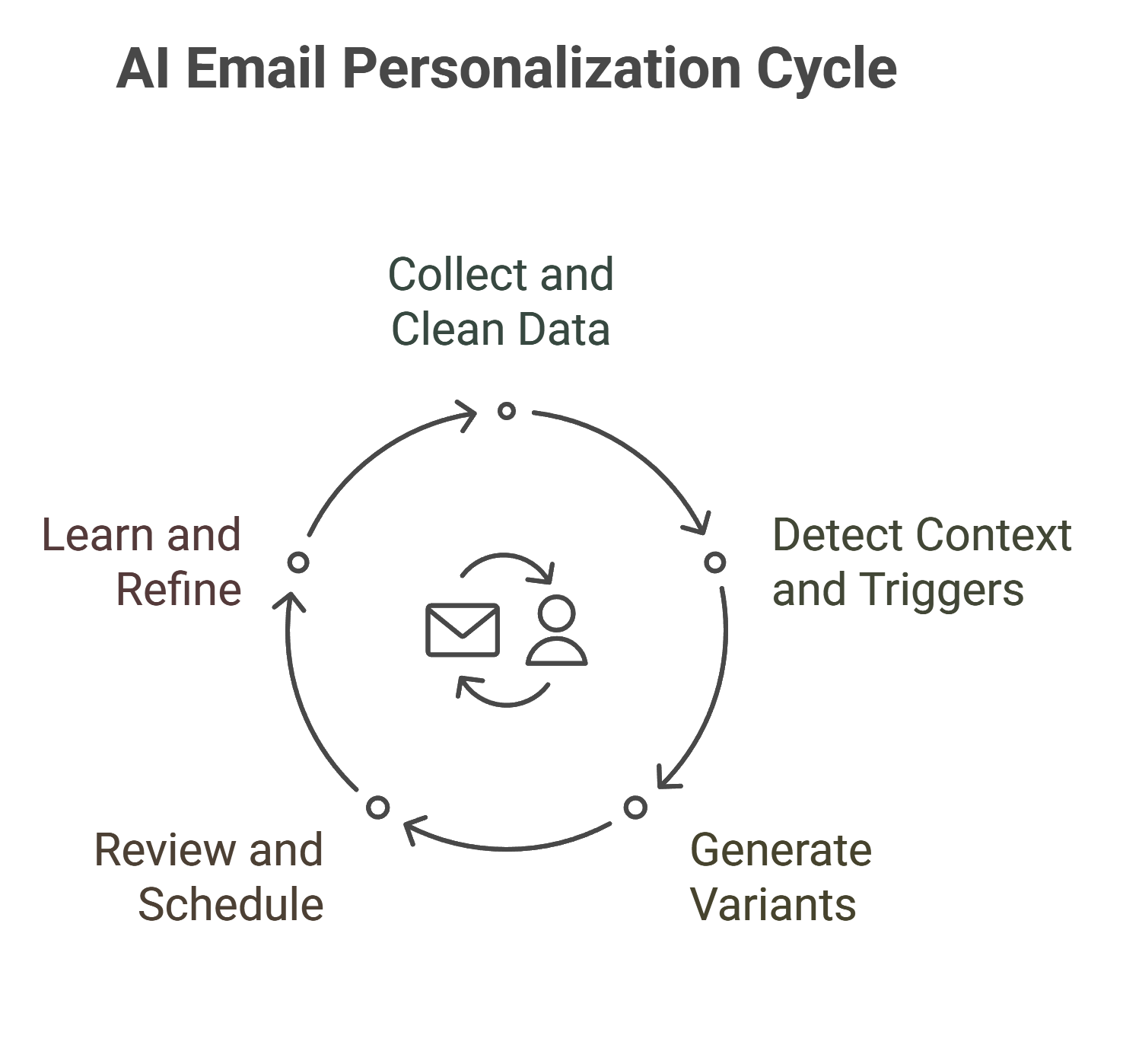
AI follows a tight loop. Each step adds context or control so messages stay relevant and safe at scale.
- Collect and clean: Connect CRM, website analytics, inbox, and enrichment. Deduplicate, standardize fields, and keep only fresh signals (last 30–90 days).
- Detect context and triggers: Identify role, segment, lifecycle stage, and recent actions. Flag moments worth contacting: pricing visit, trial start, funding, job change.
- Generate variants: Models draft subject and body from approved fields and brand voice. If confidence drops, use a fallback template to avoid errors.
- Review and schedule: Human check for edge cases. Set send windows by region, throttle volumes, and plan gentle follow-ups to protect domain reputation.
- Learn and refine: Track opens, replies, meetings, and disqualifications. Feed outcomes back so the system favors the signals, tones, and CTAs that drive qualified conversations.
7 Best AI Email Personalization Tools in 2025
| Инструмент | Рейтинг | Tool type | AI features (high-impact) | Starting price |
|---|---|---|---|---|
| народная CRM | ⭐⭐⭐⭐⭐ | AI CRM | One-click LinkedIn capture, enrichment, AI drafts & next-best action | $20/user/month (annual) |
| HubSpot Sales Hub | ⭐⭐⭐⭐ | Sales CRM | AI subject/body suggestions, send-time optimization, sequencing | $20/seat/month (Starter) |
| Apollo.io | ⭐⭐⭐⭐⭐ | GTM & sequencing | AI writer, intent-based targeting, auto-test variants | $49/user/month (annual) |
| Информационно-пропагандистская деятельность | ⭐⭐⭐⭐ | Sales engagement | AI-assisted steps, conversation insights, template guidance | Contact sales |
| Salesloft | ⭐⭐⭐⭐ | Sales engagement | AI prioritization, cadence suggestions, conversation intelligence | Contact sales |
| lemlist | ⭐⭐⭐⭐ | Multichannel outbound | AI personalization, deliverability tools, inbox rotation | $55/user/month (annual) |
| Lavender | ⭐⭐⭐⭐⭐ | AI email assistant | Real-time coaching, tone/clarity scoring, personalization hints | Free; paid from $29/month |
For sales teams of 20-50 people looking to implement AI email personalization without overwhelming complexity, folk CRM stands out as the clear winner. Its one-click LinkedIn capture and AI drafting features are specifically designed for medium-sized sales teams that need powerful automation without enterprise-level overhead or learning curves.
👉🏼 Try folk now to generate on-brand, personalized email variants at scale
Заключение
👉🏼 Try folk now to capture context, enrich records, and track results in one place
Email personalization wins when it stays simple: use fresh signals, speak to a real job-to-be-done, and test small changes. AI automation removes the manual grind, but data quality, safe guardrails, and clear CTAs still decide outcomes.
Operationalize the loop: unify data, detect trigger moments, generate confident variants, review, and learn from replies. Teams send fewer, sharper emails, protect deliverability, and book more qualified meetings.
If you need a practical way to run this end to end—capture context, enrich records, draft on-brand variants, and track results—folk CRM delivers it in one place. Especially for sales teams of 20-50 people, folk CRM provides the perfect balance of AI automation and simplicity that medium-sized teams need to scale personalized outreach effectively. Start with one ICP and one "golden" template, then scale what proves it can move pipeline.
Часто задаваемые вопросы
How does AI email personalization work?
Collect fresh CRM and web signals, detect triggers (role, stage, actions), generate on-brand variants, review for accuracy and timing, then learn from opens, replies, and meetings to favor the tones, signals, and CTAs that drive qualified conversations.
Which data signals matter most for B2B email personalization?
Use permissioned, recent data: CRM history, role and company, on-site or product behavior, tech stack, public sources, and intent. Favor freshness (last 30–90 days), track confidence per field, and avoid sensitive or speculative attributes.
Как выполнить слияние почты в Outlook?
In Word, open Mailings, Start Mail Merge for email, choose recipients from Outlook or CSV, insert fields, preview, then Finish & Merge to send. Ensure Outlook is configured and test a small batch to confirm formatting and deliverability.
What tools help scale AI email personalization?
AI CRMs like folk capture contacts, enrich data, draft tailored emails, and schedule sequences with guardrails. Built for 20–50 seat teams, they speed outreach, protect sender reputation, and cut manual work.
Откройте для себя народную CRM-систему
Как помощник по продажам, которого у вашей команды никогда не было
