


Откройте для себя Folk — CRM для компаний, ориентированных на людей
For early-stage startups, effective deal management often hinges less on the product itself and more on the orchestration of follow-ups and interactions. Too often, valuable leads slip through the cracks as tasks and conversations become scattered across inboxes, spreadsheets, and various messaging platforms. A well-implemented CRM for startups provides a solution by ensuring every interaction, next step, and account owner remains visible and actionable.
In this comparison, we delve into two prominent CRM solutions: Close and monday Sales CRM. Close offers a streamlined approach tailored for high-velocity sales teams, prioritizing built-in calling and automation, while monday Sales CRM integrates seamlessly with the monday.com platform, emphasizing visibility and collaboration. Both solutions cater to different operational needs, but they ultimately aim to enhance sales efficiency and improve follow-up practices.
This article explores the critical differences between Close and monday in terms of contact management, data hygiene, automation capabilities, team collaboration, and overall effectiveness as startups scale their operations.
What is Close?
Close is tailored for high-velocity sales teams that thrive on calls, emails, and sequences. It's ideal for startups engaged in outbound or hybrid sales motions, providing robust activity tracking, built-in calling, and streamlined workflows. The user interface minimizes tab switching, keeping sales reps focused on execution. Additionally, Close facilitates automation for follow-ups and pipeline maintenance without requiring extensive configuration. Unlike larger platforms, it is less focused on complex account hierarchies or enterprise-level reporting.

What is monday?
monday Sales CRM serves as a CRM layer for teams that operate within monday.com. It's a great fit for startups looking to manage leads, deals, and post-sale processes all within a unified work environment. Its strengths lie in visibility and collaboration across tasks, pipelines, and team handoffs. With quick configuration and the ability to integrate automations, it effectively minimizes manual updates. While it suits operationally-driven teams, those requiring in-depth CRM analytics and complex data models might need additional tools.
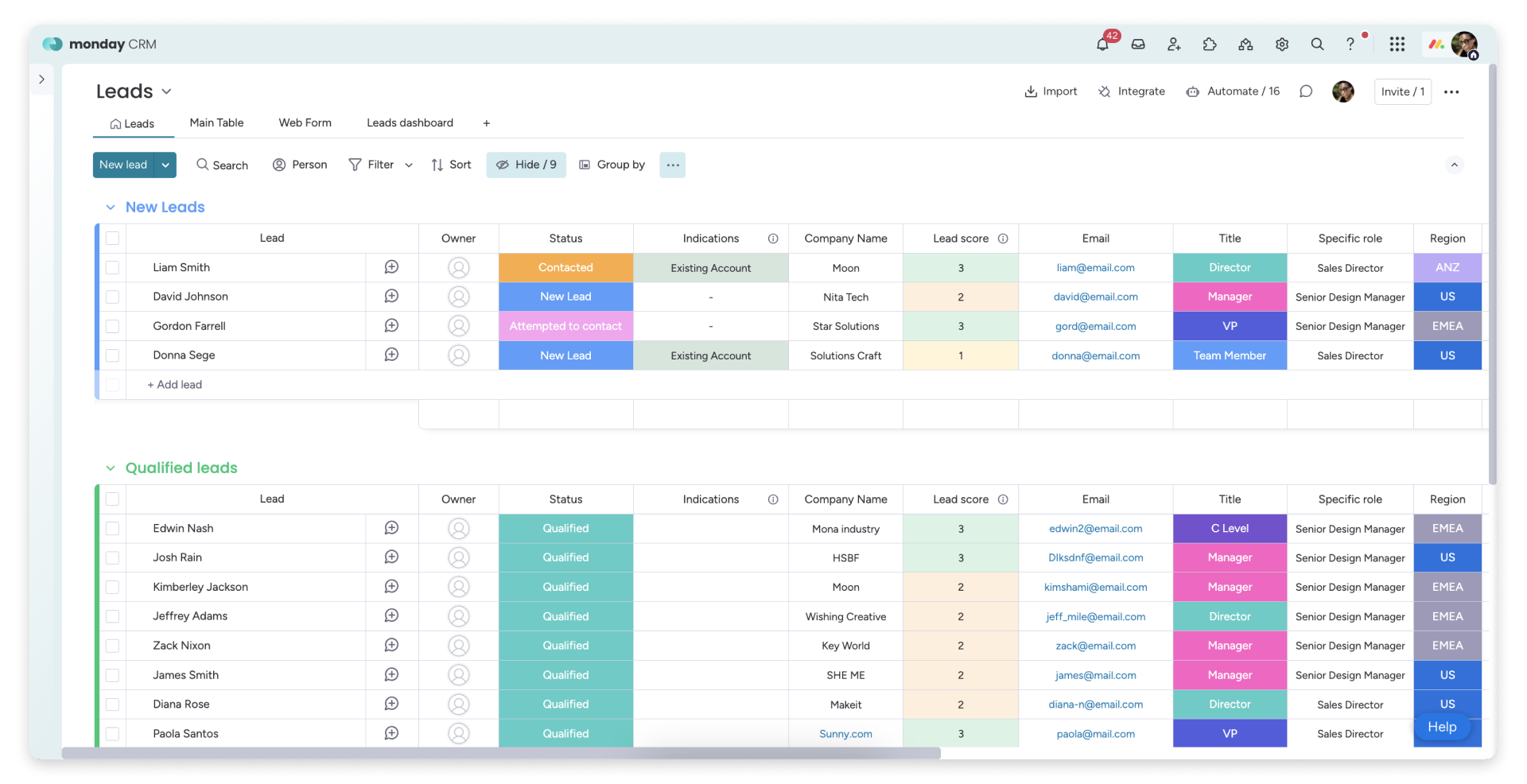
Feature comparison of Close and monday
Синхронизация электронной почты и календаря
Close seamlessly integrates with Gmail and Microsoft email accounts, automatically syncing your email communications with the appropriate leads and contacts. With calendar connectivity, meetings are also synced, allowing scheduled events to appear within Close alongside the relevant records. This centralizes outreach history and meeting context, eliminating the clutter of scattered information across inboxes and calendars. It's ideal for fast-paced teams looking to capture activity without the hassle of manual logging, ensuring the timeline remains useful for coaching, handoffs, and pipeline reviews.
monday Sales CRM enhances visibility of email and calendar activities through dedicated integrations, keeping communication easily accessible on the record timeline. The Outlook integration connects emails and calendar events to monday, facilitating email-driven workflows from a board view. Similarly, the Google Calendar integration syncs calendar activities into the CRM timeline, centralizing meetings and touchpoints. The result is a unified space to review recent conversations and upcoming events, catering to teams that seek CRM context within a work management framework.
Очистка контактных данных с обогащением и дедупликацией
Close ensures data hygiene by preventing duplicates during imports and offering native merge actions for leads. The importer checks incoming rows against existing leads, addressing duplicates before they compromise the database. If duplicates occur, leads can be merged directly within the app, consolidating all activity into a single record. Additionally, Close features AI Enrich, which enhances lead and contact fields in the CRM, minimizing tedious manual data entry and ensuring records are comprehensive enough for effective routing, personalization, and reporting.
monday also addresses duplicate management with a merge flow that consolidates items while preserving update history. Duplicate items can be merged into one primary item, while the duplicates are archived, and their updates are transferred. This approach maintains clean records as leads or accounts come in from various sources. It is particularly beneficial for startups that depend on imports and integrations. While data enrichment typically comes from the tech stack, monday emphasizes structured fields and data hygiene.
Гибкие конвейеры и представления
Close enhances team collaboration by providing shared visibility into lead timelines, activities, and ownership. All records—calls, emails, SMS, notes, and next steps—are consolidated in one location, ensuring that context isn't lost in fragmented threads. Assignment workflows intelligently direct new leads or status changes to the appropriate owner, minimizing dropped follow-ups. Teams can standardize processes by agreeing on statuses, views, and activity expectations, which helps maintain consistency as the team grows.
monday Sales CRM manages pipelines through a Deals board specifically designed for stage-based tracking. Its Kanban pipeline view allows for easy drag-and-drop movement between stages, making deal statuses clear and accessible. Stages and columns can be customized to align with a startup's sales approach without extensive configuration. Filtering and tailored views enable the separation of inbound, outbound, renewals, or partner activities, keeping operations streamlined and execution-oriented.
Командная работа
Close enhances team collaboration by providing shared visibility into lead timelines, activities, and ownership. All records—calls, emails, SMS, notes, and next steps—are consolidated in one place, ensuring that context is retained rather than scattered across multiple threads. Assignment workflows efficiently direct new leads or status changes to the appropriate owner, minimizing the risk of missed follow-ups. Teams can standardize their processes by aligning on statuses, views, and activity expectations, which helps maintain consistent execution as headcount expands.
monday is inherently designed for collaboration, ensuring that CRM tasks remain visible across teams without the need to switch tools. Records facilitate updates and threaded discussions linked to specific items, preserving context related to each deal or account. Clear accountability is established through defined owners, assignments, and status columns during handoffs. Shared views enable alignment among sales, success, and ops, fostering a uniform understanding of the pipeline. Permissions and board structures keep collaboration organized as the team grows.
Легкая автоматизация и интеграция
Close automation focuses on Workflows and Sequences, allowing follow-ups to occur automatically without the need for constant manual intervention. Triggers can enroll contacts into sequences or initiate steps when lead conditions align, ensuring consistent outreach across the funnel. Additionally, Close integrates seamlessly with Zapier for no-code connections to your entire tech stack, and it offers an API for more complex custom integrations. Bulk actions enable you to implement updates or execute tasks across multiple leads as processes scale, making it easy to start with simple automation and expand as your startup grows.
monday.com enhances automation through built-in recipes that trigger actions based on status changes, upcoming dates, or item stage transitions. Integrations further this capability with connectors and no-code workflows, including Zapier connections for popular startup tech stacks. For more complex needs, monday.com offers a GraphQL API that allows for programmatic data manipulation. This flexibility enables you to begin with lightweight automation and scale workflows as processes evolve, all while ensuring that automation remains manageable through clear board logic.
folk CRM: The Best CRM for Startups in 2026
folk is an innovative CRM designed specifically for startups that manage relationships through Gmail, Google Calendar, LinkedIn, and spreadsheets. It consolidates contacts, companies, deals, notes, files, and all interactions into a single lightweight workspace, ensuring that pipeline context remains linked to genuine conversations rather than scattered across various tabs.
Key Features Startups Love in folk
- Automatic activity timeline with Gmail + Google Calendar synchronization
- Seamless LinkedIn contact capture with a Chrome extension
- Contact enrichment to quickly fill in missing information
- Deduplication to maintain a clean database as your volume increases
- Customizable pipelines and fields tailored to your go-to-market strategy
For startups, folk excels in delivering speed-to-value and promoting daily adoption. The setup process is quick, workflows remain adaptable, and multichannel context is easily accessible without transforming the CRM into a cumbersome suite. This leads to more consistent follow-ups, cleaner data, and clearer revenue visibility with minimal friction.
👉 Попробуйте folk CRM бесплатно
Заключение
In summary, Close is ideal for high-velocity sales teams needing streamlined calling and automation, while monday Sales CRM excels in visibility and collaboration within a unified work environment. However, for startups that prioritize email integration, automation, and ease of use, folk emerges as the best alternative. With its seamless syncing across Gmail and Google Calendar, contact enrichment, and customizable pipelines, folk ensures that startup teams can maintain clean data and effective follow-ups, maximizing their operational efficiency.
Начните 14-дневную бесплатную пробную версию или закажите демонстрацию сегодня.
Откройте для себя народную CRM-систему
Как помощник по продажам, которого у вашей команды никогда не было
