


Откройте для себя Folk — CRM для компаний, ориентированных на людей
In the competitive landscape of early-stage startups, losing deals is rarely about the product itself; it's often about the chaos that ensues when follow-ups are scattered across various platforms like inboxes, spreadsheets, and chat threads. A well-implemented CRM for startups addresses this core issue by ensuring that every interaction, next step, and responsible team member remains visible and accessible, enabling faster decision-making.
When it comes to CRM solutions, Salesforce and Copper take different approaches to meet the unique needs of startups. Salesforce offers a comprehensive, highly customizable platform that excels in governance and intricate revenue operations, making it suitable for businesses ready to implement a robust CRM system. In contrast, Copper integrates seamlessly with Google Workspace, prioritizing ease of use and quick adoption for teams that focus on relationship management over complex automation.
This article provides a detailed comparison between Salesforce and Copper, focusing on essential features like email sync, data management, pipeline flexibility, collaboration tools, and automation capabilities, to help you choose the best CRM for your growing startup.
Что такое Salesforce?
Salesforce is a robust enterprise-grade CRM tailored for extensive customization, governance, and intricate revenue operations. It is ideal for startups that have surpassed lightweight tools, requiring stringent permissions, advanced reporting, and custom workflows across teams. The platform accommodates nearly any data model via custom objects and automation while boasting a vast ecosystem of applications and partners in the US market. However, the implementation process and ongoing administrative efforts are typically more demanding than those of most CRMs, leading to a potentially rapid increase in overall costs.

What is Copper?
Copper is an intuitive CRM that integrates seamlessly with Google Workspace, making it particularly beneficial for service-oriented businesses and startups seeking effortless pipeline tracking and contact management. This product prioritizes user-friendliness and quick adoption over extensive customization, proving to be an excellent choice when relationship management is more critical than sophisticated automation. However, larger teams may find it limiting if they require advanced workflows, forecasting capabilities, or multi-object reporting.
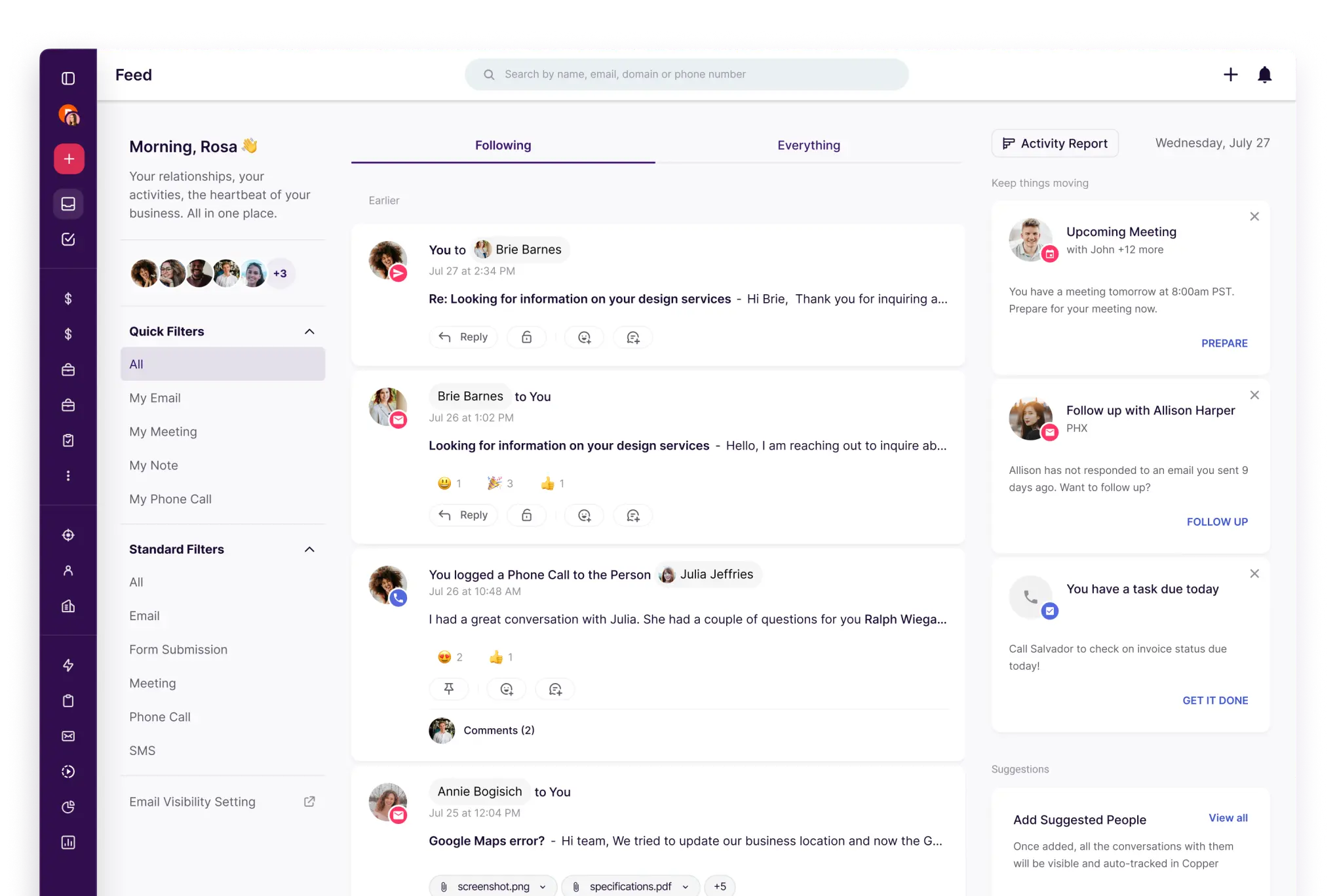
Feature comparison of Salesforce and Copper
Синхронизация электронной почты и календаря
Salesforce enables seamless inbox and calendar connectivity through Outlook Integration and Gmail Integration, enhanced by Einstein Activity Capture, which automatically logs emails and events on the activity timeline. This recorded activity can be displayed on related records like contacts, leads, and opportunities, ensuring that context remains accessible without the need for constant manual entry. This setup is ideal for sales teams that rely heavily on email and meetings, providing essential CRM visibility linked to genuine interactions. Typically, an admin manages the configuration and permissions to align with governance requirements.
Copper is specifically designed to integrate with Google Workspace, allowing email and calendar activities to connect effortlessly with the right people and companies with minimal setup. Its support for Gmail and Google Calendar integration makes it an excellent choice for startups that operate primarily from their inbox. Activity history is consistently visible on records, minimizing manual logging and maintaining context for smooth handoffs. This solution is best suited for teams seeking a lightweight and familiar CRM experience.
Очистка контактных данных с обогащением и дедупликацией
Salesforce features built-in duplicate management that employs matching and duplicate rules to identify and prevent duplicate records. Depending on their configuration, these rules can alert users, block saves, or direct potential duplicates into review processes. For data enrichment, Salesforce enhances records through Data Cloud enrichments and AppExchange data providers that append company and contact attributes directly in Salesforce. This synergy ensures records are comprehensive and minimizes fragmentation among teams.
Copper offers tools designed to maintain data integrity as lists expand, including duplicate detection and merging capabilities for both contacts and companies. Such features help avoid split timelines when teams import leads from forms, events, or spreadsheets. Maintaining clean records simplifies segmentation, routing, and follow-ups, reducing confusion, which is particularly beneficial for small teams where disorganized data can hinder adoption.
Гибкие конвейеры и представления
Salesforce enhances collaboration on records through Chatter, allowing updates, discussions, and contextual information to reside in one unified space. Users can share records within Chatter groups to facilitate team discussions and coordinate efforts around specific accounts or opportunities. Additionally, tasks, notes, and activity history create a shared operational layer that enables seamless handoffs and cross-functional visibility, all while permissions and sharing controls ensure that collaboration aligns with security protocols.
Copper offers customizable pipelines and stages for effective deal tracking, allowing teams to design a straightforward sales funnel and keep progress on track with clearly defined next steps. Records remain connected to the individuals and companies involved in the deal, ensuring that pipeline activities maintain their relational context. This approach is particularly beneficial for startups that engage in consultative selling or manage partnerships without the need for complex forecasting.
Командная работа
Salesforce enhances collaboration directly on records via Chatter, allowing updates, discussions, and contextual information to reside in one centralized location. Users can share records within Chatter groups, facilitating team discussions and coordination around specific accounts or opportunities. The inclusion of tasks, notes, and activity history establishes a unified operational layer for seamless handoffs and cross-functional visibility, while permissions and sharing controls ensure that collaboration aligns with security protocols.
Copper fosters team collaboration by providing shared visibility into records, tasks, and activity timelines. Clear ownership and assignment structures maintain accountability, and shared notes along with history minimize the need for separate communication threads. The platform's permission settings effectively regulate who can view or edit information as the team grows, enabling smooth handoffs without imposing additional process burdens.
Легкая автоматизация и интеграция
Salesforce automation is primarily powered by Salesforce Flow, enabling declarative workflows for records, approvals, routing, and data updates. Integrations can be created using APIs, with event-driven patterns supported through platform events to facilitate real-time external connectivity. The AppExchange ecosystem enhances automation and integrations, allowing users to avoid building everything from the ground up. This solution is ideal for startups seeking scalability, extensive customization, and sustainable governance, though it does require a greater investment in administration and implementation.
Copper enhances automation with workflow rules that can initiate actions based on record changes, significantly minimizing the need for manual updates. Additionally, it integrates seamlessly with Zapier, allowing startups to link Copper with forms, marketing tools, and internal processes without the need for custom development. For more advanced integration needs, Copper offers an API to create custom sync logic and data pipelines, making it straightforward to begin with basic automations and expand as your needs grow.
folk CRM: The Ultimate CRM for Startups in 2026
folk is a cutting-edge CRM designed specifically for startups, seamlessly integrating relationships across Gmail, Google Calendar, LinkedIn, and spreadsheets. It consolidates contacts, companies, deals, notes, files, and all interactions into one streamlined workspace, ensuring that pipeline context remains linked to genuine conversations rather than scattered across multiple tabs.
Essential features that startups love in folk
- Automatic activity timeline with Gmail + Google Calendar sync
- LinkedIn-ready contact capture through a Chrome extension
- Contact enrichment for quicker data completion
- Deduplication to maintain a clean database as your volume increases
- Custom pipelines and fields tailored to any go-to-market strategy
For startups, folk excels in delivering rapid value and high daily adoption. The setup is quick, workflows remain adaptable, and multichannel context is easily accessible without burdening the CRM with unnecessary complexity. This leads to more consistent follow-ups, cleaner data, and clearer revenue insights with minimal friction.
👉 Попробуйте folk CRM бесплатно
Заключение
In summary, Salesforce offers extensive customization and robust governance for startups ready to scale, making it ideal for complex revenue operations. Copper excels in user-friendliness and Google Workspace integration, perfect for teams valuing relationship management. However, for startups seeking seamless email integration, automation, and straightforward sequencing, folk emerges as the superior choice. It consolidates essential features into a lightweight platform, ensuring high adoption rates and efficient workflows without the clutter, empowering teams to focus on what truly matters.
Начните 14-дневную бесплатную пробную версию или закажите демонстрацию сегодня.
Откройте для себя народную CRM-систему
Как помощник по продажам, которого у вашей команды никогда не было
